12 Plugin Obsidian Must-Have Cho Dev Việt 2026

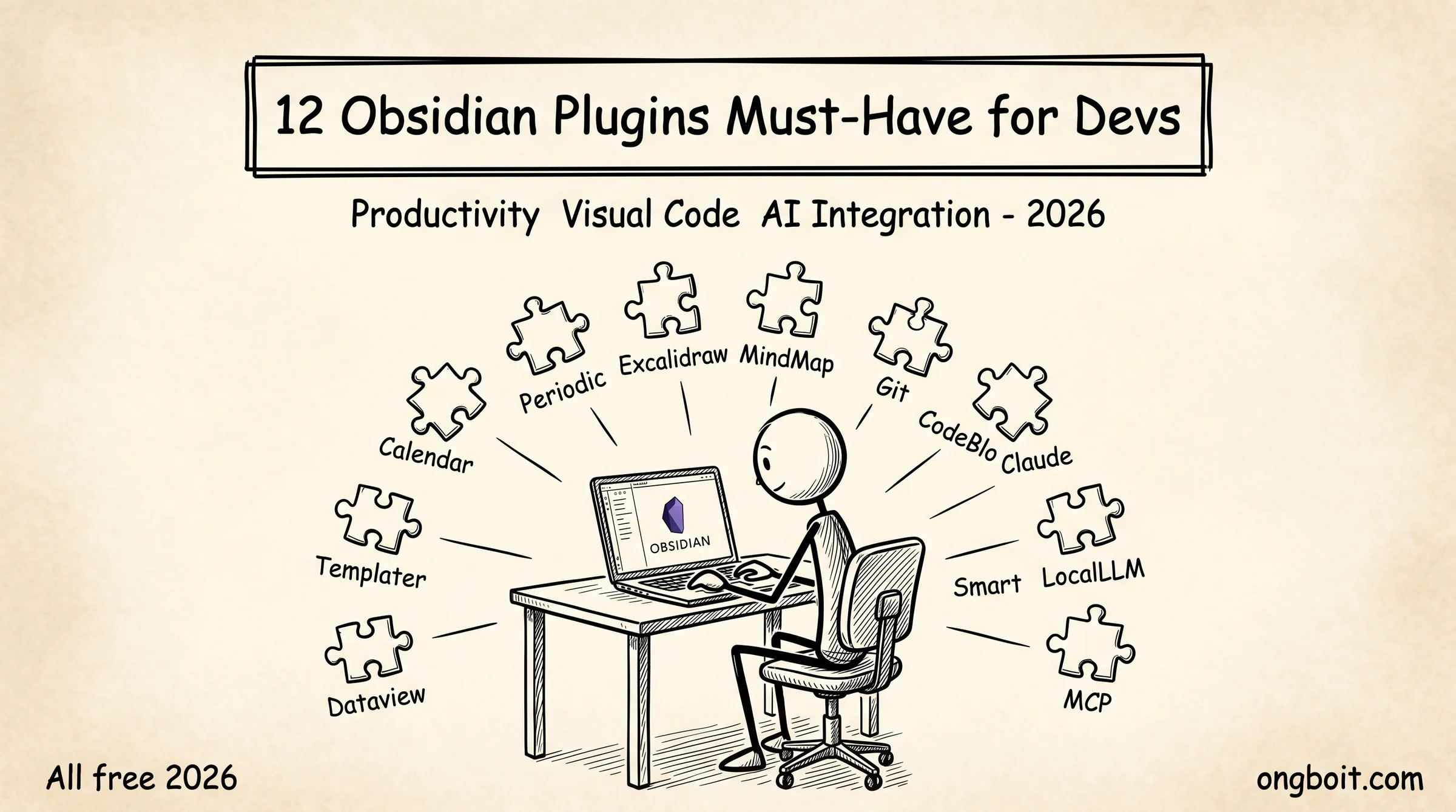
Plugin Obsidian must-have cho dev là 12 plugin extend Obsidian từ note-taking cơ bản thành productivity powerhouse. Trong 2,500+ community plugins (tính đến 4/2026, tổng 150 triệu downloads), 12 plugin dưới đây cover 90% use case của developer làm research, code, blog, daily journal. Mỗi plugin có setup 2-5 phút, miễn phí, tích hợp tốt với Claude Code workflow.
Bài này organize plugin theo 4 nhóm theo use case: Productivity Core (Dataview, Templater, Periodic Notes, Calendar), Visual & Sketch (Excalidraw, Mind Map), Code & Version Control (Obsidian Git, Advanced Code Block), AI Integration (Smart Connections, AgriciDaniel claude-obsidian, Local LLM Helper, MCP Tools). Nếu bạn mới cài Obsidian từ zero, bài này là next step để turn vault thành productivity tool thực sự.
TL;DR
- 12 plugin must-have chia 4 nhóm: Productivity (4), Visual (2), Code (2), AI (4). Cover 90% use case developer.
- Top 3 cài ngay: Dataview (database queries), Templater (template engine), Obsidian Git (version control). Setup tổng 10 phút.
- AI plugins 2026: AgriciDaniel claude-obsidian (11 skills), Smart Connections (RAG chat), MCP Tools (multi-agent). Pattern AI-ready cho developer.
- Tất cả miễn phí. Plugin community Obsidian không có nag screen, không IAP. Update tự động qua Settings → Community plugins → Check for updates.
Nhóm 1 Productivity Core Có 4 Plugin Nào Lập Trình Viên Cần Cài?
Productivity Core là 4 plugin nâng Obsidian từ note-taking cơ bản thành productivity workspace. Cài 4 plugin này trong tuần đầu là đủ cho 80% workflow daily.
1. Dataview turn frontmatter metadata thành database queryable. Cài Settings → Community plugins → Browse → “Dataview” (bởi blacksmithgu). Sau khi enable, viết query inline:
TABLE status, priority, deadline
FROM "10-projects"
WHERE status = "active"
SORT priority DESC
Output: bảng tự update mọi khi note thay đổi. Use case developer: track active projects, list note theo type, filter daily notes theo mood. Plugin requires frontmatter chuẩn (xem Obsidian markdown cú pháp). Github stars: 7.5K, last update tháng 4/2026.
2. Templater template engine với JavaScript embedding. Cài “Templater” by SilentVoid13. Settings → Templater → Template folder location: templates/. Tạo template với syntax <% tp.date.now() %> cho dynamic content:
---
title: <% tp.file.title %>
created: <% tp.date.now("YYYY-MM-DD") %>
type: <% await tp.system.suggester(["daily","weekly","project"], ["daily","weekly","project"]) %>
---
# <% tp.file.title %>
Use case: auto-generate daily note với date prefix, project note với placeholder fields, meeting note với attendees. Combo Templater + Periodic Notes powerful nhất cho daily workflow. GitHub stars: 3.2K.
3. Periodic Notes auto-create daily/weekly/monthly notes. Cài “Periodic Notes” by Liam Cain. Settings → Periodic Notes → enable Daily Notes (YYYY-MM-DD folder daily/), Weekly Notes (YYYY-Www folder weekly/), Monthly Notes (YYYY-MM folder monthly/). Mỗi khi mở Obsidian, plugin check nếu note hôm nay tồn tại, không tạo từ template.
Combo với Calendar plugin (next item) hoàn thiện UX: click date trên calendar widget → jump tới hoặc create periodic note tương ứng. Daily notes workflow cover combo này detail.
4. Calendar sidebar widget hiển thị calendar visualize. Cài “Calendar” by Liam Cain. Sau enable, sidebar phải có calendar widget. Click date jump tới daily note tương ứng. Color indicator: dots cho note đã tồn tại, hover preview content first paragraph.
Settings: start of week chọn Monday cho developer (default Sunday US). Show first day of week, show dots indicator. Setup 1 phút, immediate productivity boost.
Nhóm 2 Visual & Sketch Có 2 Plugin Nào Cho Lập Trình Viên?
Visual plugins biến Obsidian thành whiteboard kết hợp note-taking. Quan trọng cho dev research architecture, design system, mind mapping.
5. Excalidraw hand-drawn whiteboard sketch trong Obsidian. Cài “Excalidraw” by zsviczian. Cmd/Ctrl+P → “Excalidraw: Create new drawing” → file .excalidraw.md tạo ra. Tools: pen, rectangle, ellipse, arrow, text. Embed drawing vào note thông thường: ![[drawing.excalidraw]].
Use case developer. Architecture diagram thay vì draw.io online. Mind map khi research complex topic. Database schema visualize. Whiteboard meeting note với colleague (đặc biệt remote work). Drawing được lưu local, sync với vault qua Obsidian Sync, không cần cloud service riêng.
GitHub stars: 4.1K. Plugin được Obsidian community award “best plugin 2024”, vẫn maintain tích cực 2026.
6. Mind Map transform note với headings thành visual mind map. Cài “Enhanced Mindmap” hoặc “MarkMind”. Khác Excalidraw (manual draw), Mind Map auto-render từ markdown headings. Note structure:
# Central Topic
## Branch 1
### Sub-branch 1.1
### Sub-branch 1.2
## Branch 2
Plugin render structure trên thành mind map clickable. Edit headings, mind map auto-update. Use case: brainstorm session, outline content trước khi write, organize knowledge cluster.
Nhóm 3 Code & Version Control Có 2 Plugin Nào Quan Trọng?
Code plugins essential cho dev workflow combine code + notes trong vault.
7. Obsidian Git auto-commit vault lên GitHub repo. Cài “Obsidian Git” by Vinzent. Trước cài, init git trong vault: cd ~/vault && git init && git remote add origin [email protected]:user/vault.git. Settings → Obsidian Git → commit interval 10 phút, auto-push enable, commit message template vault: backup {{date}}.
Sau setup, plugin tự commit + push 10 phút một lần khi có change. Mobile cũng hoạt động qua Working Copy iOS hoặc MGit Android. Provide version control + automatic backup miễn phí qua GitHub. Bài sync mobile workflow cover Git workflow detail.
8. Advanced Code Block enhance code rendering. Default Obsidian render code block plain. Plugin add features: line numbers, code copy button, syntax highlight cho 100+ languages, line highlighting ({1,3-5}), filename header. Cài “Code Block Enhancer” hoặc “Code Block Customizer”.
Cú pháp ví dụ với line highlighting trong Python code block:
# This file demonstrates … import os
# These lines highlighted def main(): pass
Use case: documentation API, tutorial code, snippet library. Bài Obsidian-CLI hỗ trợ chạy code blocks trong vault như notebook (advanced workflow).
Nhóm 4: AI Integration (4 Plugin). Trend 2026
AI plugins là trend nóng nhất 2026 với Karpathy LLM Wiki pattern viral. 4 plugin dưới đây tích hợp AI vào vault Obsidian.
9. AgriciDaniel claude-obsidian. 11 skills cho Claude Code integration. Cài qua Obsidian Community Plugins search “claude-obsidian” hoặc clone repo github.com/AgriciDaniel/claude-obsidian. 11 commands: /wiki, /save, /wiki-ingest, /defuddle, /wiki-query, /autoresearch, /wiki-lint, /wiki-fold, /canvas, /obsidian-bases, /obsidian-markdown.
Plugin yêu cầu Claude Code CLI đã cài. Sau enable, chạy claude trong vault, slash commands xuất hiện. Bài 11 skills overview cover từng skill detail. Free, được Obsidian community recognize 2026.
10. Smart Connections. RAG chat với entire vault. Cài “Smart Connections” by Brian. Plugin embed mọi note bằng OpenAI hoặc local embedding model (free option), build vector index. Sau đó chat với vault: “Tóm tắt mọi research mình đã làm về MCP”, plugin pull related notes + context cho LLM trả lời.
Setup. API key OpenAI ($5 minimum credit) hoặc local model (Nomic Embed Text free qua Ollama). Index full vault 5-15 phút lần đầu (depends vault size). Sau index, chat instant. GitHub stars: 2.8K, very active.
11. Local LLM Helper. chạy LLM local (Ollama, LM Studio) integrate Obsidian. Cài “Local LLM Helper” hoặc “Smart Composer”. Setup Ollama trên máy (free), plugin connect localhost:11434. Chat với LLM local zero token cost.
Use case: developer API cost concerned, privacy strict (no cloud send), offline work. Quality lower hơn Claude/GPT-4 nhưng acceptable cho draft/brainstorm. Llama 3.3 70B local hơn Claude Haiku về quality, free vs $0.80/1M tokens.
12. MCP Tools. Model Context Protocol integrate với multi-agent system. Cài “obsidian-mcp-tools” by jacksteamdev. Expose vault qua MCP server, multi-agent (Claude Code + Cursor + Gemini) cùng access. Bài MCP server comparison cover detail 5 implementations.
Use case advanced: dev VN dùng nhiều AI agent khác nhau, muốn share vault context cross-agent. Setup phức tạp hơn 11 plugin trên (~30 phút lần đầu), nhưng power-user level.
Cách Chọn Plugin Phù Hợp Workflow
Quyết định plugin nào cài trước phụ thuộc workflow chính của bạn. Developer blog/research focus: cài top 4 nhóm 1 (Productivity Core) + Excalidraw + AgriciDaniel claude-obsidian. Developer code project: cài Obsidian Git + Advanced Code Block + AgriciDaniel claude-obsidian + Smart Connections. Developer minimal: chỉ 3 plugin cốt lõi (Dataview, Templater, Obsidian Git).
Quy tắc dùng plugin. Cài tối đa 15-20 plugin total. Trên 30 plugin Obsidian start lag launch time. Disable plugin không dùng 4 tuần, không phải uninstall (re-enable nhanh khi cần). Update plugin tuần một lần qua Settings → Community plugins → Check for updates.
Plugin compatibility check. Trước cài, check GitHub: stars (>100), last commit (< 6 tháng), issue tracker (responses). Plugin abandoned (last commit > 1 năm) tránh dùng vì có thể break với Obsidian update mới.
Pillar Obsidian + Claude Code cover 5 cách integration top-level. 3-layer architecture cover schema setup. Plugin trong bài này là layer extension thêm vào setup core đó.
Plugin Dev Cần Phải Cân Nhắc Gì Trước Khi Cài Hàng Loạt?
Phần này tổng hợp 3 yếu tố quan trọng mà mọi dev cần cân nhắc kỹ lưỡng trước khi cài nhiều plugin cho Obsidian vault của mình. Cài quá nhiều plugin một cách thiếu kế hoạch có thể gây ra nhiều vấn đề về performance và data conflict mà bạn không phát hiện ra cho đến khi đã quá muộn để khắc phục dễ dàng.
Yếu tố đầu tiên cần cân nhắc là khả năng tương thích của plugin với pattern vault đang áp dụng. Đối với bạn đã triển khai Karpathy LLM Wiki pattern, có một số plugin đặc biệt phù hợp với pattern này vì hỗ trợ tốt việc auto cross-link các note có nội dung tương đồng. Ngược lại có một số plugin thiết kế cho mục đích khác có thể conflict với cấu trúc wiki, gây tình trạng data không nhất quán giữa các layer. Pattern khôn ngoan là tham khảo kỹ docs tương thích của từng plugin trước khi cài, đặc biệt là các plugin có khả năng auto modify nội dung note trong vault.
Yếu tố thứ hai cần cân nhắc là tác động của plugin đối với khả năng sync multi-device. Một số plugin lưu trữ config data vào các file đặc biệt trong vault directory, các file này khi được sync giữa nhiều thiết bị có thể gây conflict không mong muốn. Pattern khôn ngoan là test trên môi trường staging với 2 thiết bị song song trước khi triển khai chính thức cho toàn bộ thiết bị làm việc hằng ngày. Đặc biệt quan trọng cho bạn đang dùng các giải pháp sync self-hosted như đã được mô tả trong bài hướng dẫn riêng về chủ đề này.
Yếu tố thứ ba cần cân nhắc là maintenance burden dài hạn cho danh sách plugin đã cài. Mỗi plugin đều cần được update định kỳ khi maintainer ra version mới, một số plugin bị abandon có thể trở nên không tương thích với version mới của Obsidian core sau vài tháng. Pattern khôn ngoan là chỉ cài các plugin thực sự cần dùng hằng ngày, có docs hỗ trợ hoặc community user đông đảo, và được maintainer cập nhật ít nhất 3 tháng một lần. Đầu tư 10 phút check commit history của plugin trên GitHub trước khi cài giúp tránh tình trạng plugin bị abandon gây hỏng vault về sau khi maintainer không còn maintain.
Lập Kế Hoạch Triển Khai Plugin Theo Roadmap Cho Team VN Như Thế Nào?
Phần này hướng dẫn cách lập roadmap triển khai các plugin hợp lý cho team product tại VN. Triển khai theo roadmap giúp team làm quen dần với các plugin mới mà không bị quá tải, đồng thời cho phép đánh giá tác động thực tế của từng plugin trước khi commit dài hạn.
Tuần đầu tiên là giai đoạn làm quen với các plugin cốt lõi cho personal productivity. Team nên cài 3-4 plugin cơ bản nhất bao gồm Templater để automation tạo note mới, Dataview để query linh hoạt vault content, Tasks để track todo. Trong tuần này, mỗi thành viên team nên dành ít nhất 20 phút mỗi ngày để khám phá tính năng của từng plugin, đọc docs, thử các use case cụ thể. Cuối tuần, tổ chức session chia sẻ ngắn 30 phút để các thành viên chia sẻ kinh nghiệm và đặt câu hỏi cho nhau.
Tuần 2-3 là giai đoạn mở rộng sang các plugin chuyên dụng cho dev. Team có thể cài thêm Excalidraw cho mindmap ngay trong vault, Git plugin để integration với git, Editor Syntax Highlighter cho code editing có syntax highlight. Trong giai đoạn này, team nên bắt đầu áp dụng các plugin vào công việc thực tế hằng ngày, ghi chép lại các use case hiệu quả và các vấn đề gặp phải. Session chia sẻ cuối 2 tuần này sẽ giúp team thống nhất convention sử dụng chung cho từng plugin.
Một bài học quan trọng nữa từ thực tế triển khai cho nhiều team tại VN là tầm quan trọng của việc xây dựng docs hướng dẫn nội bộ cho các plugin đã được approve. Mặc dù nhiều plugin đã có docs chính thức trên GitHub, nhưng cách áp dụng cụ thể vào workflow của doanh nghiệp thường có những điểm khác biệt riêng. Pattern khôn ngoan là dành 1-2 giờ viết docs hướng dẫn ngắn gọn bằng tiếng Việt cho mỗi plugin quan trọng, kèm theo các ví dụ cụ thể từ công việc hằng ngày của team. Docs này không chỉ giúp các thành viên hiện tại làm quen nhanh chóng mà còn là tài sản quý giá cho thành viên mới gia nhập team trong tương lai.
Tuần 4 trở đi là giai đoạn tích hợp với các plugin AI. Đây là giai đoạn quan trọng nhất vì các plugin AI có tiềm năng thay đổi cách làm việc của team một cách căn bản. Team nên cài từng plugin AI một cách thận trọng, đánh giá kỹ lưỡng trước khi mở rộng cho toàn bộ thành viên. Pattern khôn ngoan là chỉ cài tối đa 2 plugin AI mới mỗi tuần, đảm bảo team có đủ thời gian làm quen và đánh giá tác động thực tế. Sau khoảng 3 tháng triển khai theo roadmap này, team sẽ có một bộ plugin ổn định và phù hợp với workflow đặc thù của doanh nghiệp.
Câu Hỏi Thường Gặp
Plugin có làm vault chậm không?
Có thể. Mỗi plugin add load time 50-200ms khi launch Obsidian. 30 plugin = 1.5-6 giây launch slower. Plugin heavy như Smart Connections build vector index ban đầu mất 5-15 phút. Recommend giới hạn 15-20 plugin active, disable plugin không dùng.
Plugin có conflict với nhau không?
Hiếm nhưng có. Plugin cùng claim hotkey hoặc API method. Symptom: feature A break sau cài plugin B. Cách debug: disable plugin gần đây cài, restart Obsidian, test feature. Plugin community Obsidian thông thường well-isolated.
Cài plugin từ GitHub không qua marketplace được không?
Được nhưng cần BRAT plugin (Beta Reviewer’s Auto-update Tester). Cài BRAT, add GitHub repo URL, plugin install + update từ source. Hữu ích cho plugin chưa publish marketplace hoặc beta version.
Plugin có Vietnamese localization không?
Một số có. Obsidian core có Vietnamese translation chính thức. Plugin community phần lớn English-only. Một số plugin (Calendar, Periodic Notes) hỗ trợ Vietnamese qua user settings. Cộng đồng developer đôi khi fork plugin để Vietnamese, nhưng less maintained.
Smart Connections có tốn tiền không?
Có nếu dùng OpenAI embedding ($0.02/1M tokens, vault 1000 notes ~$0.50 lần đầu, sau đó incremental cheap). Free nếu dùng local model Nomic Embed Text qua Ollama (zero cost, slower index). Recommend local cho developer cost-conscious.
Plugin có sync giữa devices không?
Có nếu sync .obsidian/ folder. Obsidian Sync sync plugin config tự động. Syncthing/Git cần config include .obsidian/plugins/ và .obsidian/snippets/, exclude .obsidian/workspace.json (UI state). Bài sync mobile workflow cover detail.
Bạn Cài Plugin Nào Đầu Tiên?
Bắt đầu với Top 3: Dataview, Templater, Obsidian Git. Setup tổng 10 phút. Tuần thứ 2 thêm Periodic Notes + Calendar combo cho daily workflow. Tuần thứ 3 thêm Excalidraw nếu cần visual. Tuần thứ 4 explore AI plugins nếu interest.
Đừng cố cài hết 12 plugin từ đầu. Mỗi plugin có learning curve riêng, cài hết tuần đầu sẽ overwhelm. Add plugin từ từ khi gặp use case cụ thể, không phải proactive add cho “có thể cần sau”.
Cluster Obsidian + Claude Code của ongboit gồm các bài extension: Obsidian là gì, cài đặt từ zero, markdown cú pháp là foundation. Pillar setup, 3-layer architecture, CLAUDE.md templates, PARA folder structure là intermediate. 11 skills AgriciDaniel, MCP server, daily notes workflow là advanced. Plugin trong bài này (A-4) là layer thực dụng để bổ sung sức mạnh cho setup core.
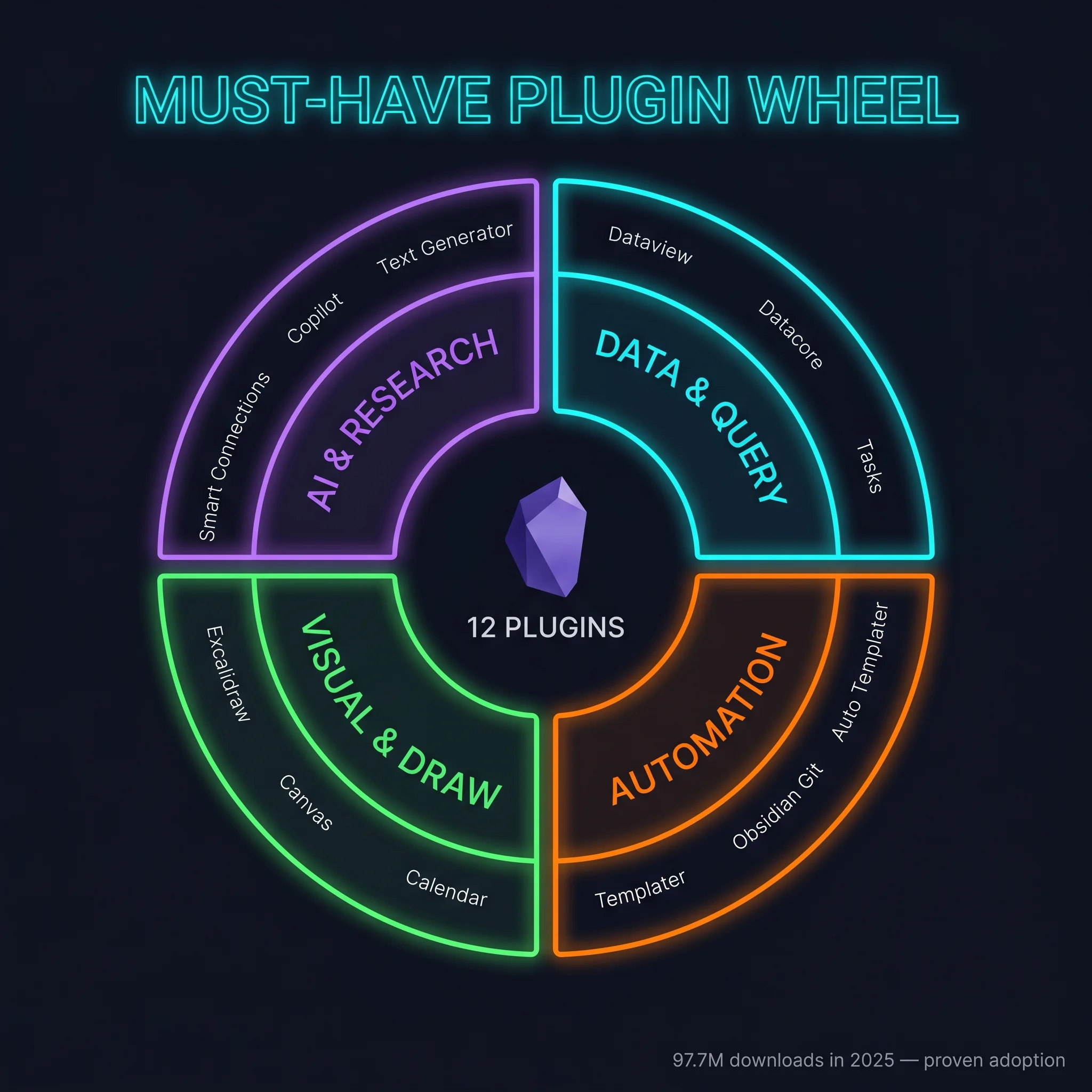
Số liệu adoption plugin 2025 (theo obsidianstats Wrapped 2025): tổng 97.7M downloads qua 2,750 plugin. Top tier individual: Excalidraw 1.78M, Templater 1.40M, Dataview 1.11M, Tasks 1.02M, Obsidian Git 700K, Copilot 587K, Datacore (Dataview successor) 184K. Pattern: plugin tốt 2025 thường có 500K+ downloads, plugin emerging có 100K+ trong năm đầu, đây là threshold chọn plugin reliable cho production vault.