Obsidian Markdown Cú Pháp: Reference Cho Dev Việt 2026

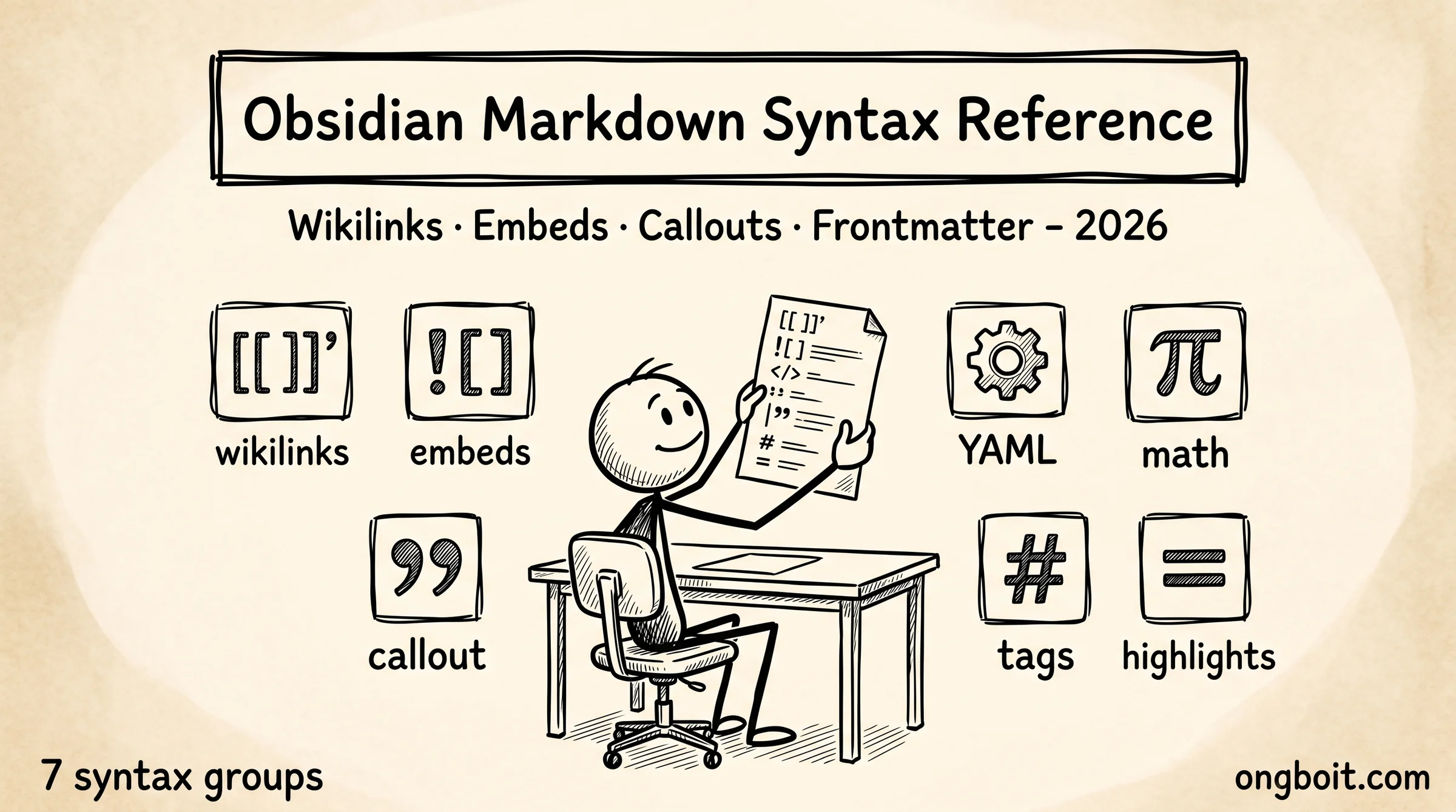
Obsidian markdown cú pháp mở rộng CommonMark chuẩn với 7 nhóm tính năng đặc thù: wikilinks [[]], embeds ![[]], callouts > [!note], frontmatter YAML, math $$, tags #tag, và highlights ==. Đây là Obsidian Flavored Markdown (OFM), reference đầy đủ cho developer làm việc với vault Obsidian + Claude Code. Bài này list từng cú pháp với ví dụ + use case + Claude Code interaction.
OFM khác markdown thông thường ở 3 điểm. Một, wikilinks [[note]] thay vì markdown links text. Hai, frontmatter YAML strict mode (no nested objects). Ba, callouts dùng blockquote prefix > [!type]. Bài 3-layer architecture cover frontmatter convention, pillar Obsidian + Claude Code cover wikilinks usage cơ bản. Bài này là reference comprehensive cho mọi cú pháp.
TL;DR
- Obsidian Flavored Markdown mở rộng CommonMark với 7 features: wikilinks, embeds, callouts, frontmatter YAML, math LaTeX, tags hierarchy, highlights.
- Wikilinks
[[note]]link nội bộ vault,[[note|alias]]dùng anchor text custom,[[note#heading]]link tới section,[[note^block-id]]link tới block cụ thể. - Frontmatter YAML phải FLAT (no nested), Obsidian Properties UI không support nested. Required fields chuẩn: title, tags, created, updated, type.
- Callouts 13 type built-in (note, abstract, info, todo, tip, success, question, warning, failure, danger, bug, example, quote). Foldable + customizable color.
Wikilinks Cú Pháp Liên Kết Nội Bộ Hoạt Động Ra Sao?
Wikilinks [[note-name]] là cú pháp đặc trưng nhất của Obsidian, link giữa các note trong cùng vault. Khác với markdown links chuẩn text, wikilinks ngắn gọn hơn và Obsidian’s graph view chỉ track wikilinks (không track markdown links).
5 dạng wikilinks phổ biến:
[[note-name]]                 # Link cơ bản, anchor = note name
[[note-name|Anchor Text]]     # Link với anchor text custom
[[note-name#Heading]]         # Link tới section cụ thể
[[note-name^block-id]]        # Link tới block (paragraph) cụ thể
[[#Heading In Same File]]     # Link nội bộ trong cùng file
Wikilinks resolve qua filename, không phải folder path. File wiki/concepts/karpathy.md link bằng [[karpathy]] (chỉ filename, không cần wiki/concepts/). Khi 2 file cùng tên ở 2 folder khác, dùng full path [[wiki/concepts/karpathy]] để disambiguate.
Block ID ^block-id dùng để link tới paragraph cụ thể. Tạo block ID bằng cách add ^block-id ở cuối paragraph: “Đây là một quote nổi bật. ^important-quote”. Sau đó link [[note#^important-quote]] jump đến đúng paragraph đó. Hữu ích khi reference quote từ paper, transcript.
Quy tắc minimum 2 wikilinks per note theo community convention. Đảm bảo dense linking, không có orphan page. Plugin /wiki-lint của AgriciDaniel claude-obsidian flag note có < 2 wikilinks là orphan candidate. Bài 11 skills overview cover plugin này.
Embeds Nhúng Note, Image, Video Có Cú Pháp Gì?
Embeds ![[file]] nhúng nội dung file khác vào note hiện tại. Khác wikilinks [[]] chỉ tạo link, embed render nội dung inline. Hữu ích cho image, video, PDF, hoặc transclusion note nội dung.
5 dạng embed:
![[image.png]]                # Embed image
![[image.png|400]]            # Embed image với width 400px
![[image.png|alt text]]       # Embed image với alt text
![[note]]                     # Embed full note nội dung
![[note#Heading]]             # Embed chỉ section của note
![[note^block-id]]            # Embed block cụ thể
![[video.mp4]]                # Embed video
![[document.pdf]]             # Embed PDF (preview)
Note transclusion (embed full note hoặc section) đặc biệt hữu ích cho re-use content. Ví dụ template daily note có header chuẩn ![[daily-note-header]], khi update header file một lần là update mọi daily note. Pattern DRY (Don’t Repeat Yourself) áp dụng cho note.
Image embed thay vì link để render inline. Khác image chỉ link, ![[image.png]] hiện preview ngay trong note. Width control qua pipe: ![[hero.png|800]] resize 800px wide. Alt text qua pipe: ![[hero.png|Alt description]].
Hạn chế. Embed lớn (note 5000 từ embed full) làm parent note slow. Recommend embed chỉ section nhỏ hoặc image. Embed nested (note A embed note B embed note A) tạo infinite loop, Obsidian detect và render fallback link.
Callouts Highlight Information Type Như Thế Nào?
Callouts là blockquote với type indicator, render thành colored box với icon. Cú pháp > [!type] ở đầu blockquote. 13 type built-in cover use case phổ biến.
13 type callouts:
> [!note]
> General note

> [!abstract]
> Summary or TL;DR

> [!info]
> Informational

> [!todo]
> Action items

> [!tip]
> Helpful tip

> [!success]
> Positive outcome

> [!question]
> Question or doubt

> [!warning]
> Warning to be cautious

> [!failure]
> Negative outcome

> [!danger]
> Critical danger

> [!bug]
> Known bug

> [!example]
> Example

> [!quote]
> Citation or quote
Foldable callouts. Add + hoặc - sau type để control fold state: > [!note]+ mặc định mở, > [!note]- mặc định fold. Hữu ích cho long callouts không muốn occupy space mặc định.
Custom title. Sau type bracket, viết title custom: > [!warning] Critical Warning About Migration. Title override default name của type. Useful cho callout có context cụ thể.
Multi-paragraph callouts. Mọi line bắt đầu với > đều thuộc cùng callout. Tách callout bằng line không có >:
> [!info]
> Paragraph 1 trong callout
>
> Paragraph 2 cùng callout
Use case developer. Note source documentation: dùng > [!info] cho overview, > [!warning] cho caveat, > [!example] cho code sample, > [!bug] cho known issue. Bài CLAUDE.md 5 templates cover khi nào dùng callouts trong schema.
Frontmatter YAML Quản Lý Metadata Cho Note Ra Sao?
Frontmatter YAML là metadata block ở đầu note, giữa hai dòng ---. Obsidian dùng frontmatter cho Properties UI, plugin Dataview query, và Claude Code parse metadata. Quy tắc cốt lõi: FLAT YAML, không nested objects.
Cấu trúc frontmatter chuẩn:
---
title: Tên Note Hiển Thị
tags:
  - category/subcategory
  - other-tag
created: 2026-05-04
updated: 2026-05-04
status: stable
type: concept
sources:
  - "[[source-1]]"
  - "[[source-2]]"
related:
  - "[[note-a]]"
priority: high
---
Field types Obsidian Properties UI support. Text (string đơn giản), Number, Date, Datetime, Checkbox, List (array), Tags (special list with autocomplete). Nested object KHÔNG support, sẽ break Properties UI. Nếu cần nested, lưu dạng JSON string trong field text.
Required fields convention developer:
titleluôn có (cho Properties UI display)tagsarray với hierarchy/createddate formatYYYY-MM-DDupdateddate update mỗi lần edittypecategorize note (entity, concept, source, project, daily, etc)
Optional fields tùy use case:
status(draft, stable, deprecated, archived)sourcesarray wikilinks tới raw sourcesrelatedarray wikilinks tới note relatedpriority(low, medium, high)aliasesarray tên alternative
Dataview queries dựa hoàn toàn trên frontmatter. Query WHERE type = "concept" AND status = "stable" pull mọi concept page stable. Power của Obsidian + Dataview phụ thuộc frontmatter consistency. Recommend Templater plugin auto-generate frontmatter chuẩn cho mọi note mới.
Math: LaTeX Inline Và Display
Math syntax theo MathJax/LaTeX, support inline $x = y$ và display $$\frac{a}{b}$$. Hữu ích cho dev research AI/ML, finance, engineering content.
Inline math:
Velocity là $v = d/t$, gia tốc $a = dv/dt$.
Display math (block):
$$
P(A|B) = \frac{P(B|A) \cdot P(A)}{P(B)}
$$
LaTeX commands hỗ trợ. Greek letters \alpha \beta \gamma. Operators \sum \int \prod. Subscript/superscript x_i^2. Fractions \frac{a}{b}. Square roots \sqrt{x}. Matrix \begin{matrix} a & b \\ c & d \end{matrix}. Most LaTeX standard commands work.
Use case developer. Notation paper AI/ML (transformer attention formula, loss function), thống kê research (Bayesian inference, p-value), finance modeling (Black-Scholes, NPV). Render đẹp như paper academic.
Hạn chế. Custom LaTeX packages (\usepackage) không support, chỉ MathJax built-in. Performance: note có 50+ math equations slow on mobile. Recommend tách math-heavy content vào separate note thay vì gộp.
Tags: Hierarchy Và Filtering
Tags #tag-name dùng filter và categorize note. Hierarchy với /: #concept/architecture/ai. Tags inline trong body hoặc trong frontmatter.
Cú pháp tags:
#tag                    # Inline tag
#concept/architecture   # Hierarchical tag
#research/2026/may      # Multi-level hierarchy
Frontmatter tags:
---
tags:
  - concept/architecture
  - dev/vietnamese
---
Naming convention. Lowercase, kebab-case, no space. #dev-vietnamese not #Dev Vietnamese. Hierarchy 2-3 levels max (#category/subcategory/specific), deeper hierarchy hard to manage.
Tags pane. Sidebar phải có tags pane list mọi tag với count. Click tag jump đến search filter chỉ note có tag đó. Hữu ích cho cross-cut filtering: tìm mọi note #concept/architecture regardless folder location.
Tags vs folders. Folders theo PARA hoặc topic, tags cross-cut concept. Một note có thể trong folder wiki/concepts/ và tag #dev-vietnamese, #2026/may. PARA folder structure cover folder strategy, tags là layer thêm orthogonal.
Highlights: Marking Important Content
Highlights ==text== đánh dấu phần quan trọng trong note, render với background màu vàng (default theme). Đơn giản nhưng hữu ích cho self-review.
Cú pháp:
This is normal text. ==This is highlighted== back to normal.
Use case. Reading research paper, highlight key claims để review sau. Drafting blog, highlight section cần fact-check. Daily note, highlight decision quan trọng trong ngày.
Khác bold text (semantic emphasis), highlights signal “review this later”. Khác inline code ` code ` (technical literal), highlights signal “important content”.
Plugin Highlights Compactor (community) collect mọi highlights trong vault thành 1 note tổng hợp. Power user dùng workflow: highlight throughout day, plugin generate weekly review note với mọi highlight + source link.
Obsidian Markdown Tích Hợp Claude Code Năm 2026 Như Thế Nào?
Đến năm 2026, kết hợp Obsidian vault với Claude Code qua MCP server đã trở thành pattern phổ biến cho dev VN xây dựng knowledge base cá nhân. Cú pháp Markdown của Obsidian (wikilinks, frontmatter, callouts) là input chuẩn cho AI Agent đọc, parse và update vault. Hiểu được cách AI tương tác với Obsidian Markdown giúp bạn thiết kế note ngay từ đầu để vault scale tốt với AI workflow, không phải refactor về sau.
Wikilinks là cross-reference signal cho AI Agent. Khi Claude Code đọc vault qua Obsidian MCP server, wikilinks [[note-name]] được parse thành graph relationship. AI có thể follow link để load related note vào context window, build cross-reference giữa các topic. Đây là khác biệt cốt lõi với Notion hay Apple Notes (link là URL trừu tượng) so với Obsidian (link là wikilinks với semantic meaning). Pattern khôn ngoan: viết wikilinks rõ ràng theo concept thay vì filename random, vault dễ navigate cho cả người và AI.
Frontmatter YAML là metadata layer cho AI Agent query. AI có thể filter note theo frontmatter (ví dụ: tags: [project-x], status: draft, review-date: 2026-06-01). MCP server có method search_by_frontmatter trả về danh sách note match query, nhanh hơn full-text search rất nhiều. Pattern điển hình: AI Agent chạy weekly review query mọi note có review-date trong tuần tới, đẩy reminder vào Slack. Đầu tư 5 phút standardize frontmatter schema cho vault tiết kiệm hàng giờ AI agent tìm kiếm về sau.
CLAUDE.md trong vault root chính là system prompt cho AI workflow. Cách hiệu quả nhất để định nghĩa rule cho Claude khi làm việc với vault là tạo CLAUDE.md trong vault Obsidian. File này được Claude Code load tự động khi mở vault, chứa rule về cách parse wikilinks, format frontmatter, naming convention, và bất kỳ pattern đặc thù nào của vault bạn. CLAUDE.md là markdown thuần túy, dùng cú pháp giống mọi note khác, không cần học format mới.
Callouts có thể được dùng như structured prompt cho AI. Pattern emerging trong cộng đồng: dùng custom callout type > [!ai-task] để mark phần note cần AI xử lý. AI Agent scan vault tìm callout này, execute task trong nội dung callout, ghi kết quả vào note. Ví dụ: > [!ai-summary] Tóm tắt 5 bullet sẽ trigger Claude summarize note đó thành 5 bullet, append vào cuối. Đây là cách elegant để embed AI workflow vào natural note-taking flow mà không cần switch tool.
Câu Hỏi Thường Gặp
Wikilinks và markdown links khác gì nhau?
Wikilinks [[note]] là Obsidian-specific, resolve qua filename. Markdown links text là CommonMark chuẩn, resolve qua relative path. Obsidian graph view chỉ track wikilinks. Recommend dùng wikilinks cho internal vault links, markdown links cho external URL.
Frontmatter required hay optional?
Optional cho Obsidian core, nhưng required nếu dùng Dataview queries hoặc plugin Properties UI. Recommend luôn có frontmatter với 4 field minimum: title, tags, created, type. Templater plugin tự generate khi tạo note mới.
Callouts có support trong markdown export không?
Một phần. Render trong Obsidian app + Obsidian Publish + một số markdown viewer. Khi export ra static site (Quartz, Hugo), callouts giữ nguyên syntax markdown nhưng render fallback (chỉ blockquote thông thường). Plugin Pandoc Reference List có thể convert callouts sang custom CSS.
Math LaTeX có sync sang mobile được không?
Có. Obsidian mobile render MathJax tương tự desktop. Performance hơi chậm hơn, note với 30+ equations có thể delay 1-2 giây. Inline math $x$ work tốt mobile, display math $$$$ cần mobile screen đủ rộng (iPad OK, iPhone đôi khi cắt).
Tags vs folders nào tốt hơn?
Cả hai dùng song song. Folders theo PARA actionability. Tags cross-cut concept. Một note daily journal trong folder daily/ + tags #mood/good #project/blog. Search vault với tag pull mọi note bất kể folder. Recommend không over-rely tags (max 3-5 per note) hoặc folders (max 4 levels deep).
Embed file lớn có lag không?
Có. Embed image > 5MB hoặc PDF > 20MB làm parent note lag khi mở. Recommend resize image trước embed (PIL hoặc TinyPNG), tách PDF ra separate note với link thay vì embed. Video > 50MB nên link YouTube thay vì embed file local.
Bạn Học Obsidian Markdown Cú Pháp Theo Thứ Tự Nào?
Bắt đầu với 3 cú pháp cơ bản: wikilinks [[]], frontmatter YAML, callouts > [!note]. 80% workflow daily chỉ dùng 3 cú pháp này. Tuần 1 thực hành tạo note với wikilinks dense linking. Tuần 2 add frontmatter chuẩn vào mọi note mới. Tuần 3 dùng callouts highlight info types.
Sau khi quen 3 cú pháp core, expand sang embeds (week 4) cho image/note transclusion, tags hierarchy (week 5) cho cross-cut filtering, math LaTeX (week 6) nếu research AI/ML/stats, highlights (week 7) cho review workflow.
Cluster Obsidian + Claude Code của ongboit cover các bài liên quan: pillar Obsidian + Claude Code overview integration, 3-layer architecture frontmatter convention, CLAUDE.md 5 templates wiki page templates dùng OFM, 12 plugin must-have extend OFM với Dataview queries dùng frontmatter. Recommend đọc kèm để có full context syntax + workflow.
Tài liệu tham khảo bên ngoài
- Obsidian Flavored Markdown (official), spec đầy đủ syntax.
- CommonMark, base spec markdown standard.