Canvas Obsidian Bases Visual: 2 Skill Visual Layer 2026

 AgriciDaniel claude-obsidian plugin:
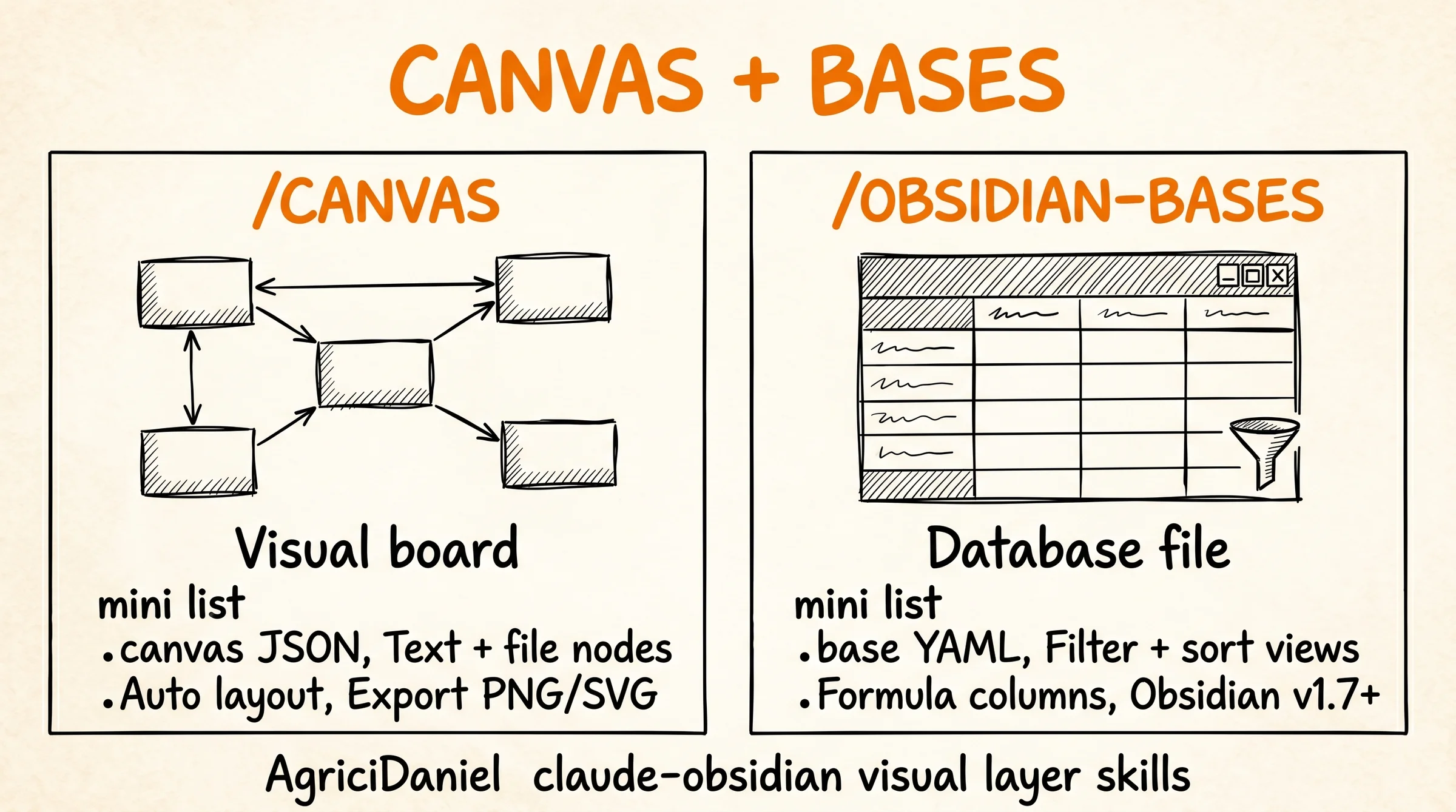
 /canvas tạo và edit Canvas board (visual graph), /obsidian-bases thao tác .base database file của Obsidian (Bases plugin native từ v1.7+). 2 skill này cho phép developer làm việc với data có structure phức tạp mà text-only không cover được.
Bài này deep-dive 2 skill, use case cho developer, integration với capture flow + query workflow. Bài 11 skills overview cover ở mức intro, bài này focus mechanics chi tiết.
TL;DR
/canvas: tạo/edit Obsidian Canvas (visual board) qua Claude Code, support node/edge/group, layout auto theo content structure./obsidian-bases: thao tác `.base` file (Obsidian Bases plugin), query database, filter view, formula computed columns.- Use case chính: project planning, system architecture diagram, content roadmap, knowledge graph visualization.
- Integration: skill consume content từ
/wiki+/wiki-ingest, output thành visual artifact mà text query không cover.
Vì Sao Cần Visual Layer Trong Vault Obsidian?
Text-only knowledge có limitation rõ ràng. Một, relationship phức tạp (3+ entities, multi-hop) khó visualize qua wikilinks tuyến tính. Hai, project planning với task dependencies cần graph view. Ba, system architecture diagram cần spatial layout không text capture được. Bốn, data tabular với filter/sort cần database thay vì markdown table.
Obsidian solve điều này native: Canvas (visual board từ v1.1+) và Bases (database file từ v1.7+, ra mắt cuối 2025). 2 feature này biến vault thành workspace toàn diện. Vấn đề: tạo và edit Canvas/Bases manual tốn thời gian. AgriciDaniel skill /canvas và /obsidian-bases automate tasks này qua Claude Code.
Cluster Obsidian + Claude Code có pillar overview, 3-layer architecture, /wiki bootstrap, capture trio, /wiki-query 3 modes, /wiki-lint + /wiki-fold maintenance cover phần text. Visual layer là phần complementary cho data có structure khác text linear.
/canvas Skill Hoạt Động Ra Sao?
/canvas là skill tạo và edit Obsidian Canvas qua Claude Code. Canvas là .canvas file JSON với 3 element type: text node (markdown content), file node (link tới .md page), group (container layout).
Workflow tạo canvas:
- User prompt: “Tạo canvas project plan cho bài blog Q2 2026”.
- Skill scan vault tìm relevant pages (notes, drafts, research).
- Generate Canvas JSON với nodes layout auto theo content structure.
- Save
Canvas/Project Plan Q2 2026.canvas. - Open trong Obsidian thấy visual board hoàn chỉnh.
Layout heuristic. Skill detect group theo topic clusters (frontmatter tag, folder), layout left-to-right cho timeline, top-to-bottom cho hierarchy, radial cho central concept với spokes. User có thể explicit specify layout: --layout timeline, --layout hierarchy.
Edge mặc định. Skill thêm edge giữa related nodes dựa trên wikilinks và frontmatter relations. Edge có label nếu relation type rõ ràng (“uses”, “part of”, “depends on”). Edge style consistent qua màu sắc (default → straight line).
Use case 1, project planning. Prompt “tạo canvas plan blog Q2 với 8 articles theo cluster Obsidian + Claude Code”. Skill pull existing draft, group theo cluster, layout horizontal timeline 3 tháng. Output canvas có timeline rõ + dependencies giữa articles.
Use case 2, system architecture. Prompt “vẽ architecture cho /wiki + /wiki-ingest + /wiki-query data flow”. Skill build canvas với 3 skill nodes, edge data flow từ ingest → wiki structure → query. Canvas này paste vào blog hoặc share team review.
Use case 3, knowledge graph. Prompt “canvas knowledge graph entities mention nhiều nhất tháng 4”. Skill scan log.md, identify top 10 entities, layout radial với cross-references. Visual giúp spot pattern không thấy qua text.
Edge case. Canvas quá nhiều node (>50) gây visual clutter. Solution: skill auto-detect và split thành multiple canvas theo topic. Hoặc explicit --max-nodes 20 để focus.
/obsidian-bases Skill Hoạt Động Ra Sao?
/obsidian-bases là skill thao tác .base file (database file của Obsidian Bases plugin). Bases plugin ra mắt cuối 2025 trong Obsidian v1.7, biến vault thành database với view filter/sort/group/formula.
Cấu trúc .base file. YAML format với 5 section. Source (folder/tag/dataview query). Properties (frontmatter fields show as columns). Views (filtered/sorted views, multiple per base). Filters (boolean conditions). Formulas (computed columns Excel-style).
Workflow tạo base:
- User prompt: “Tạo base track 50 articles ongboit Q1-Q2 2026”.
- Skill scan vault tìm articles match (folder articles/, frontmatter type=blog).
- Generate
.baseYAML với properties: title, status, published_date, word_count, cluster, score. - Auto-generate 4 view: All, Published, Draft, By Cluster.
- Add formula column “days_since_publish” computed from published_date.
Sample base file:
filters:
  and:
    - file.folder.startsWith("articles/ongboit.com")
properties:
  - file.title
  - status
  - cluster
  - published_date
  - word_count
  - score
views:
  - type: table
    name: "All Articles"
    sort:
      - property: published_date
        direction: DESC
  - type: table
    name: "Published"
    filters:
      and:
        - status == "published"
formulas:
  days_since_publish: |
    if(published_date != null,
       date.now().diff(published_date, "days"),
       null)
Use case 1, content tracking. Track 50+ articles với status (draft/review/published), word count, cluster, audit score. Filter view show only “score < 75" cần fix, "draft >7 days” cần priority.
Use case 2, research log. Track sources ingest qua /wiki-ingest. Properties: source_url, type (article/video/podcast), topic, ingestion_date, key_takeaway. Sort theo date, group by topic, find pattern qua month.
Use case 3, project task. Track task list với status, priority, due_date, owner. Multiple view: “Active”, “Blocked”, “This Week”, “Overdue”. Replace Notion/Trello cho team developer dùng vault chung.
Pattern hiệu quả. Properties consistency. Skill check tất cả pages match filter có cùng frontmatter fields. Missing field = null trong base. Run /wiki-lint trước /obsidian-bases để verify frontmatter clean. Bài /wiki-lint + /wiki-fold maintenance cover lint flow.
Limitation. Bases plugin Obsidian v1.7+ only. User vault cũ phải upgrade. Performance scale: vault <10K notes performance smooth, vault lớn 50K+ filter chậm. Workaround: split thành multiple base theo folder.
Workflow Tích Hợp Với Skill Khác Ra Sao?
Visual skill integrate với 3 skill khác trong AgriciDaniel ecosystem.
Với /wiki-ingest. Sau ingest research batch, /canvas tạo knowledge graph thấy pattern. /obsidian-bases tạo source tracker với filter “ingestion_date > last week” cho weekly review. Bài capture trio cover ingest flow.
Với /wiki-query. /wiki-query trả lời text-based query. /canvas + /obsidian-bases handle structural query (relationship graph, tabular filter) mà text response không cover. 3 skill complementary, không overlap.
Với /wiki bootstrap. /wiki tạo skeleton folders (sources, entities, concepts). /canvas thêm Canvas/ folder cho visual artifacts. /obsidian-bases thêm Bases/ folder cho database files. Full vault structure 5 layer: text + visual + database. Bài /wiki bootstrap vault cover skeleton ban đầu.
Pattern hiệu quả. Tạo base trước, canvas sau. Base là source-of-truth tabular, canvas visualize subset. Update base = update truth, regenerate canvas reflect change. Avoid maintain canvas manual lệch base.
Anti-pattern. Tạo canvas thay markdown note. Canvas là visual layer cho structured content, không thay note thường. Note text vẫn là format primary cho free-form knowledge.
Use Case Cụ Thể Nào Cho Developer?
Mình áp dụng /canvas + /obsidian-bases trong 4 workflow developer điển hình.
Workflow 1, blog content roadmap. /obsidian-bases track 60+ articles ongboit với 8 properties. /canvas visualize cluster Obsidian + Claude Code dependencies giữa pillar và 24 spoke. Update mỗi tuần khi ship article mới.
Workflow 2, code project tracking. /obsidian-bases track 15 personal projects với status, tech stack, last_commit. /canvas vẽ tech stack overlap để identify learning gaps.
Workflow 3, learning roadmap. /canvas vẽ skill graph với prerequisites (Python → ML → LLM → MCP). Each node link tới wiki page chi tiết. Visual giúp track progress và identify next priority.
Workflow 4, system documentation. /canvas vẽ architecture cho personal infrastructure (homelab, cloud setup). Each component link wiki page với config, troubleshooting note. Faster onboard khi quay lại sau 6 tháng.
KPI track. Canvas count (target 5-10 active canvas). Base count (target 3-5 base critical). Update frequency (canvas mỗi tuần, base mỗi ngày). Mình personal có 8 canvas + 4 base active sau 6 tháng dùng.
⚙️ Advanced Obsidian + Claude pattern mình áp dụng từ community này
Multi-vault setup, canvas visualization, wiki maintenance (lint/fold), và sub-agent pattern cho vault của ongboit + nextgrowth mình rút trực tiếp từ AI Marketing Hub Pro. Mình join cộng đồng với Daniel Agrici từ rất sớm và đây là chỗ mình active + contribute nhiều nhất.
Advanced pattern + maintenance skill ship liên tục, pro member access trước public. Nếu bạn vận hành Obsidian vault scale lớn với AI, đây là community nên đầu tư.
Bases Giờ Là Core Plugin: Thay Đổi Gì Cho Visual Layer?
Có một thay đổi lớn từ phía Obsidian mà mình nghĩ ai dùng visual layer đều nên nắm: Bases đã trở thành core plugin chính thức, tức tính năng biến note thành database giờ nằm sẵn trong app, không còn phải cài community plugin hay phụ thuộc Dataview. Theo bài phân tích trên Obsidian Observer (truy cập 2026-06-14), đây là cập nhật lớn nhất kể từ khi Obsidian ra mắt Properties, vì nó thay cách aggregate và hiển thị metadata bằng cơ chế native thay vì query plugin bên thứ ba.
Điều này ảnh hưởng trực tiếp tới cách mình dùng /obsidian-bases skill. Vì Bases giờ là tính năng lõi, output mà skill tạo ra chạy trên nền ổn định hơn, không lo plugin community ngừng cập nhật hay vỡ sau mỗi bản Obsidian mới. Nếu trước đây bạn ngại dựng database view vì sợ phụ thuộc Dataview, thì lý do đó gần như không còn nữa.
Phần mình thấy thú vị nhất cho visual layer là tiềm năng kết hợp Bases với Canvas. Theo thảo luận trên Obsidian Forum (truy cập 2026-06-14), cộng đồng đang muốn Canvas tự cập nhật khi có file mới khớp tiêu chí của một Base, tức là sơ đồ trực quan sẽ tự mọc thêm node thay vì phải kéo thả tay. Đây đúng là hướng mà mình kỳ vọng ở visual layer: dữ liệu định nghĩa bằng Bases, còn Canvas lo phần nhìn, hai lớp bổ trợ nhau thay vì làm trùng việc.
Câu Hỏi Thường Gặp
Cần Obsidian version nào?
Canvas yêu cầu Obsidian v1.1+ (ra 2023). Bases yêu cầu v1.7+ (ra cuối 2025). Update Obsidian latest version để dùng cả 2. Update qua Settings → About → Check for updates.
.canvas và .base file có sync qua Obsidian Sync không?
Có. Canvas (.canvas JSON) và Bases (.base YAML) là plain text file, sync qua Obsidian Sync hoặc Git như note thường. Conflict resolution giống markdown file. Bài Obsidian sync mobile multi-device cover sync setup.
Canvas có exportable không?
Có. Canvas export thành PNG, SVG, hoặc PDF qua Obsidian command “Export Canvas”. Phù hợp paste vào blog, slide, hoặc share team. Lưu ý: image export lose interactive (click node), export rendering tĩnh.
Bases có support relation giữa base không?
Có ở mức limited. Properties có thể link qua wikilink tới page hoặc property của base khác. Foreign key style relation native không có (chưa). Workaround: dùng wikilink + filter view.
/canvas có support layout custom?
Có ở mức flag. --layout timeline | hierarchy | radial | grid. Custom precise (drag node manual) không support qua skill, phải edit trong Obsidian sau. Skill generate layout reasonable, user fine-tune nếu cần.
Bases có thay thế Notion database không?
Một phần. Bases cover 70-80% Notion database use case (table, filter, sort, formula). Notion advance: relations multi-table, rollup aggregation, Kanban board built-in. Developer ưu tiên local-first + markdown native chọn Bases. Team cộng tác heavy chọn Notion. Bài Notion vs Obsidian comparison sẽ cover detail (coming soon).
Bạn Bắt Đầu Visual Layer Như Thế Nào?
Tuần đầu, /canvas tạo 1 board cho project current. Pick project nhỏ 5-10 nodes. Update canvas mỗi ngày khi work on project, observe value.
Tuần thứ hai, /obsidian-bases tạo 1 base track 1 entity type (articles, projects, sources). Setup 3 view (all, active, archived). Update mỗi ngày.
Tuần thứ ba, integrate canvas + base với /wiki-query. Query “show me X status” trả lời từ base. Query “diagram X relationship” generate canvas. 3 skill triplet powerful cho structured knowledge work.
Tham khảo cluster Obsidian + Claude Code: pillar setup, Karpathy LLM Wiki story, 3-layer architecture, /wiki bootstrap, capture trio, /wiki-query 3 modes, /wiki-lint + /wiki-fold maintenance, 11 skills overview. Bài này (D-7) cover visual layer, hoàn thiện cluster D 6 spoke chính.