Codex CLI Skills + Custom Slash Commands Pattern 2026

Codex CLI skills là gì? Đây là cơ chế user-extension chính thức của Codex CLI, cho phép bạn tạo “module” instructions tự custom (lưu trong file SKILL.md) để Codex tự động dùng khi gặp task phù hợp, hoặc invoke explicit qua cú pháp $skill-name. Skill sống trong folder .agents/skills/ (project), ~/.agents/skills/ (user-level global), hoặc /etc/codex/skills/ (admin).
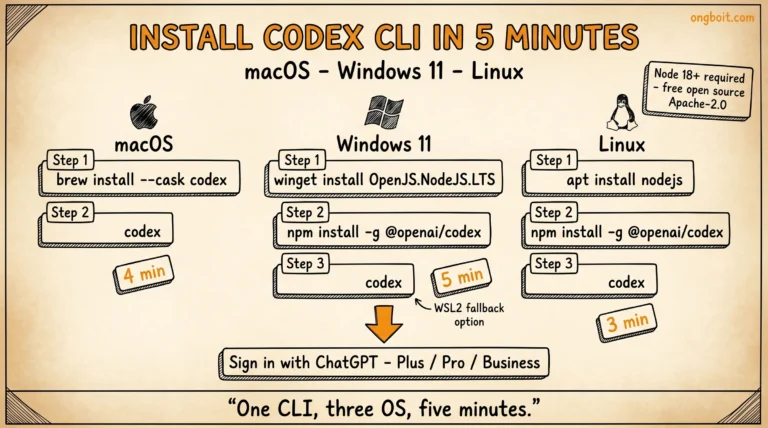
Lưu ý quan trọng: Codex CLI có 2 cơ chế custom extension: Custom Prompts (path ~/.codex/prompts/*.md invoke qua /prompts:name, đã deprecated nhưng vẫn chạy) và Skills (path .agents/skills/SKILL.md invoke qua $skill-name, recommended path 2026). Reader chưa cài Codex CLI? Xem hướng dẫn install Codex CLI 3 OS trước. Per official Custom Prompts docs + Skills docs truy cập 20/05/2026, OpenAI khuyến nghị migrate tất cả custom slash command sang Skills vì Skills support implicit auto-invoke + sharing qua marketplace. Bài này focus vào Skills, dùng Custom Prompts chỉ khi cần explicit slash command UX.
- Skill folder: 4 tier scan order
.agents/skills/>~/.agents/skills/>/etc/codex/skills/> OpenAI bundled. - Format: file
SKILL.mdvới YAML frontmatter (required:name+description) + markdown body chứa instructions. - Invocation: explicit qua
$skill-nametrong prompt, hoặc implicit khi Codex tự match description với task. - Progressive disclosure: Codex chỉ load name + description initially (cap 8K char), full body chỉ load khi skill được chọn.
- 2 cơ chế custom: Skills (recommended path 2026, implicit auto-invoke) hoặc Custom Prompts deprecated (
~/.codex/prompts/*.md→/prompts:name). Skills compatible với marketplace + multi-agent (Claude Code, Cursor, Gemini CLI). So sánh chi tiết feature Codex vs Claude Code trong vs-codex verdict 2026.
Codex CLI Skills + Slash Commands: Architecture Cơ Bản Ra Sao?
Skill architecture của Codex CLI dựa trên “open agent skills standard” (per official OpenAI Codex skills docs). Mỗi skill là một folder chứa ít nhất file SKILL.md, có thể kèm thêm scripts/ (executable), references/ (documentation), assets/ (template), agents/openai.yaml (metadata).
Codex scan skill từ 4 tier folder theo thứ tự ưu tiên: project-level .agents/skills/ (current working directory hoặc walk up parent folders/repo root), user-level $HOME/.agents/skills/, admin-level /etc/codex/skills/, system-level bundled với Codex binary. Skill cùng tên ở tier cao hơn (project) override tier thấp hơn.
Progressive disclosure là cơ chế quan trọng giảm token overhead: Codex chỉ load name, description, và file path của skill vào prompt context ban đầu (cap 8,000 char tổng cho tất cả skills). Full body SKILL.md chỉ load khi skill thực sự được chọn dùng. Pattern này khác Claude Code load full skill upfront, giúp Codex giữ token usage thấp khi có nhiều skill cài.
2 cách invoke skill: explicit qua $skill-name trong prompt (ví dụ $test-runner để gọi skill test-runner), hoặc implicit khi Codex auto-match description với task user gõ. Trong Codex còn có 3 built-in skill command đặc biệt: /skills list all loaded skills, $skill-creator generate skill mới, $skill-installer cài skill từ source ngoài.
SKILL.md Frontmatter Spec: 2 Field Bắt Buộc + 4 Optional
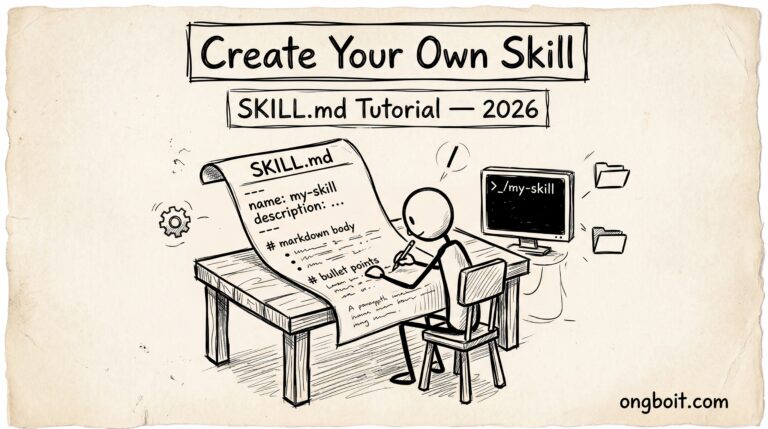
File SKILL.md có cấu trúc đơn giản: YAML frontmatter giữa 2 dấu ---, theo sau là markdown body. Theo SKILL.md open standard spec 2026, 2 field bắt buộc + 4 optional phổ biến:
---
# REQUIRED
name: deploy-staging                     # Phải match folder name exactly
description: Deploy ongboit staging branch via SSH + rebuild WordPress assets

# OPTIONAL (varies by agent)
when_to_use: "Triggered when user mentions 'deploy', 'staging', 'ship'"
allowed-tools: ["Bash", "Read", "Write"]
context: fork                            # fork = isolated context, default = inline
hooks:
  pre: scripts/check_branch.sh
  post: scripts/notify_slack.sh
---

# Skill body markdown - hướng dẫn cho AI khi skill được trigger
1. Verify nhánh hiện tại là staging-* không
2. Run npm run build trong client/
3. ...
Field description quan trọng nhất: quyết định khi nào AI agent auto-activate skill. Viết câu mô tả TASK hoặc CONTEXT trigger thay vì describe nội dung skill. Codex CLI thêm option openai.yaml trong skill folder cho UI metadata + MCP tool dependency declarations.
Codex Skills Khác Claude Code Skills Như Thế Nào?
Cả 2 tool dùng pattern SKILL.md tương tự nhưng có khác biệt key:
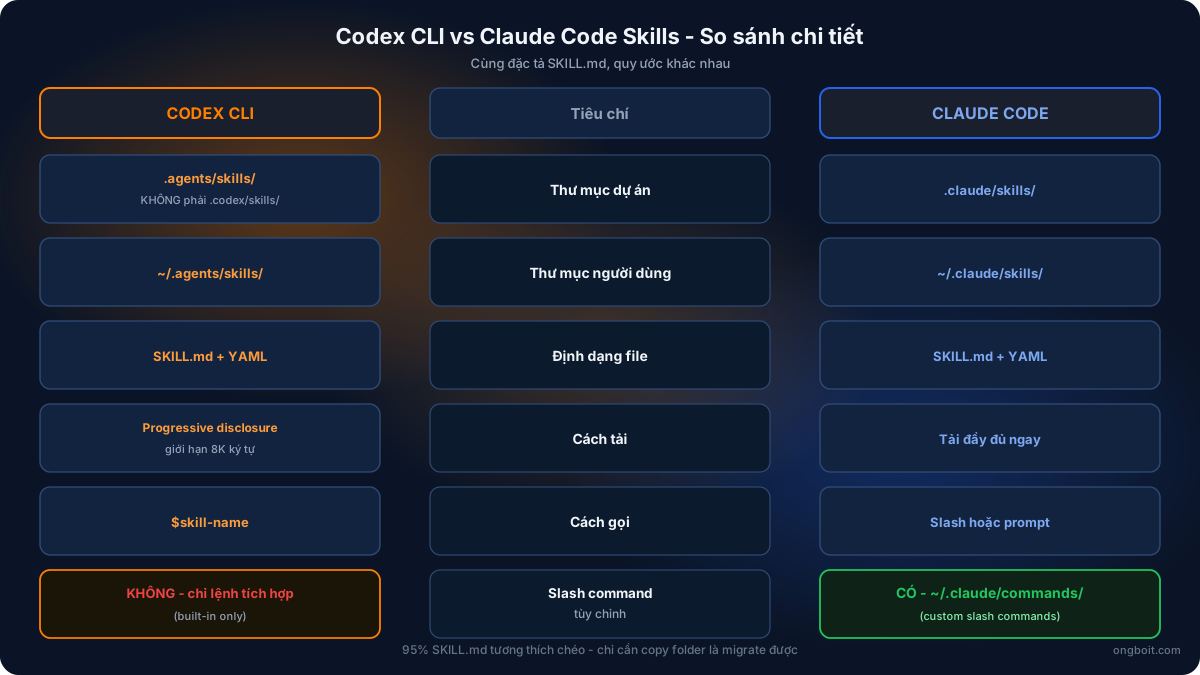
| Aspect | Claude Code Skills | Codex CLI Skills |
|---|---|---|
| Project folder | .claude/skills/ | .agents/skills/ (KHÔNG phải .codex/skills/) |
| User folder | ~/.claude/skills/ | ~/.agents/skills/ |
| File format | SKILL.md markdown + YAML frontmatter | SKILL.md markdown + YAML frontmatter (same spec) |
| YAML required fields | name, description | name, description (same) |
| Loading mechanism | Full load upfront | Progressive disclosure (8K char cap) |
| Explicit invocation | (slash hoặc prompt) | $skill-name |
| Custom slash command | Có (~/.claude/commands/) | Có via Custom Prompts (~/.codex/prompts/, deprecated) hoặc Skills (recommended) |
| Skill composition | Skill gọi skill qua reference | Skill gọi skill qua $skill-name trong instructions |
95% SKILL.md viết cho Claude Code chạy được trên Codex mà không cần sửa, chỉ cần copy từ .claude/skills/ sang .agents/skills/ là done. Detail migration pattern dual-tool có trong bài Claude Code và Codex CLI cùng project.
Tạo Skill Đầu Tiên (Hello World) Trong 5 Phút Như Thế Nào?
3 bước tạo skill đơn giản:
Bước 1: Tạo folder + file SKILL.md:
# Tại project root
mkdir -p .agents/skills/hello-world
nano .agents/skills/hello-world/SKILL.md
Bước 2: Paste content SKILL.md sau:
---
name: hello-world
description: Greet user with project context. Run when user says hello, hi, or asks about the project at start of session.
---

When invoked, do these things:

1. Read AGENTS.md or CLAUDE.md if exists at project root
2. List the top 3 most important files (entry point, config, README)
3. Greet user in Vietnamese: "Chào bạn! Project này là [summary từ AGENTS.md], có [N] file chính."
4. Ask: "Hôm nay mình giúp gì?"

Keep greeting concise, under 5 lines.
Bước 3: Restart Codex session để load skill mới, sau đó test:
# Mở session mới
codex

# Verify skill load
> /skills
# Output: list of loaded skills including "hello-world"

# Invoke explicit
> $hello-world

# Hoặc invoke implicit qua trigger
> hello, project này dùng gì?
# Codex tự match description "Greet user with project context" + run skill
Quy ước naming: tên folder phải match field name trong YAML frontmatter. description nên ngắn gọn 1-2 câu nêu rõ WHEN và WHY skill trigger, vì progressive disclosure chỉ inject description vào prompt context ban đầu. Description vague sẽ làm Codex implicit-select sai. Detail config skill folder ở Codex CLI config.toml deep dive.
5 Pattern Skill Production-Ready Cho Dev 2026 Là Gì?
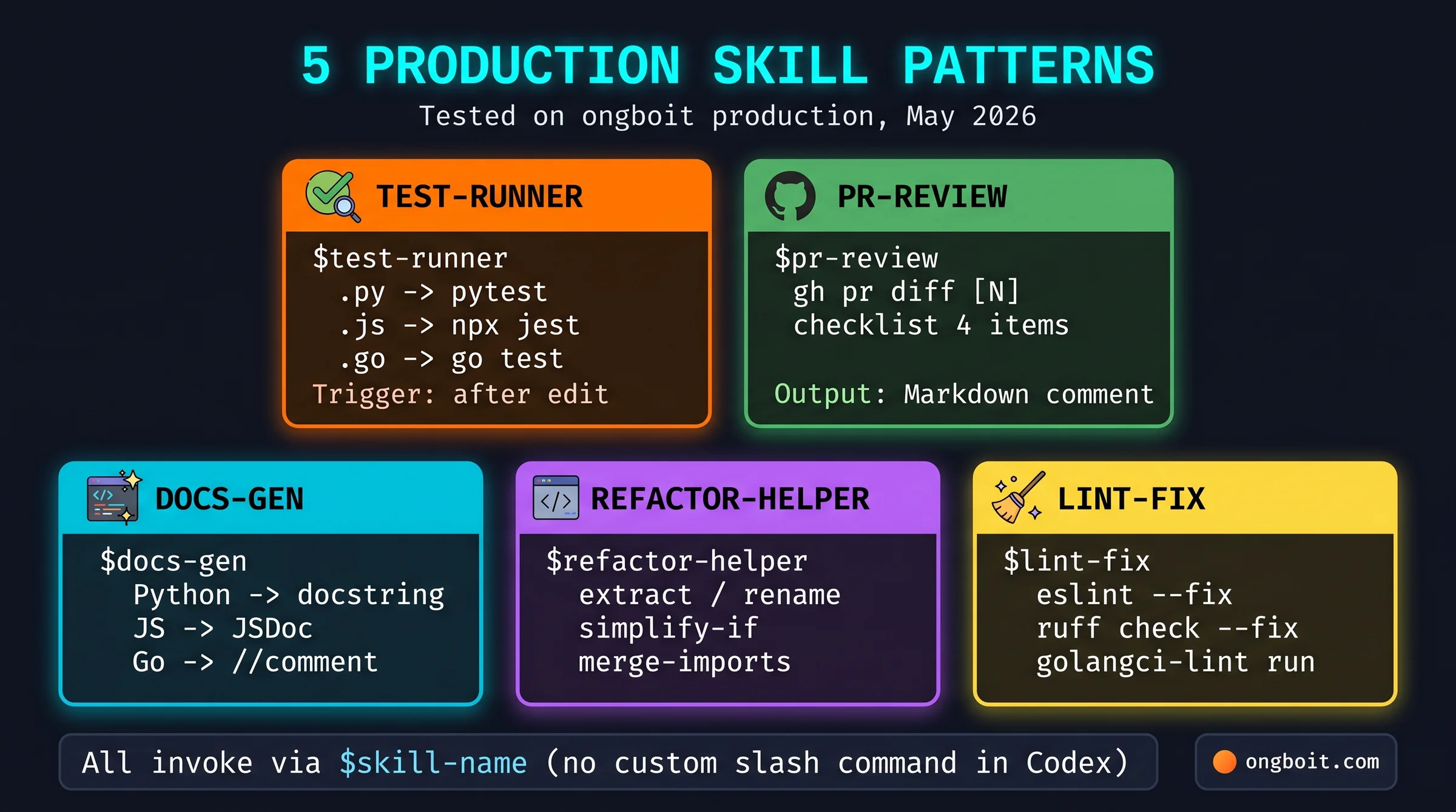
Sau 1 tháng test trên ongboit production, đây là 5 skill pattern ROI cao nhất:
Pattern 1: Test runner skill. Auto-run test suite phù hợp với file vừa sửa (Jest cho JS, pytest cho Python, go test cho Go):
---
name: test-runner
description: Run test suite matching the file extension just modified. Triggers after edit, refactor, or when user asks to test.
---

After Codex edits a file or user asks to verify:

1. Detect file extension of last edited file
2. Map to test runner:
   - .py -> pytest [file path]
   - .js/.ts -> npx jest [file path]
   - .go -> go test ./...
   - .rs -> cargo test
3. Run only the relevant test file, not full suite (faster)
4. If fail: paste error + suggest fix
5. If pass: confirm with "Test xanh"
Pattern 2: PR review skill. Review pull request theo checklist standard, output Markdown comment:
---
name: pr-review
description: Review a GitHub pull request against ongboit checklist. Use when user mentions PR number or PR URL.
---

When reviewing PR:

1. Fetch diff via `gh pr diff [number]` or MCP github tool
2. Check against ongboit PR checklist:
   - Tests added for new code
   - No console.log/print debug left
   - Function name follows snake_case (Python) or camelCase (JS)
   - No commented-out code blocks
3. Output Markdown comment with sections: "Looks good", "Need fix", "Nice to have"
4. Post to PR via `gh pr comment` if user approves
Pattern 3: Docs generation skill. Generate JSDoc/Python docstring cho function chưa có doc:
---
name: docs-gen
description: Generate docstring for functions missing documentation. Triggers when user asks to document, add comments, or improve doc.
---

For each function without docstring:

1. Read function signature + body
2. Infer purpose from name + implementation
3. Generate doc in style matching language:
   - Python: triple-quoted docstring with Args/Returns/Raises sections
   - JS/TS: JSDoc with @param + @returns + @throws
   - Go: comment above function starting with function name
4. Apply patch only after user confirms
Pattern 4: Refactor helper skill. Apply common refactor: extract function, rename variable, simplify nested if:
---
name: refactor-helper
description: Apply common refactors. Use when user says refactor, extract, rename, simplify, or clean up.
---

Common refactors supported:

- extract: pull selected lines into new function with auto-generated name
- rename: rename variable/function across current file
- simplify-if: convert nested if/else into early return or guard clause
- merge-imports: combine multiple imports from same module into one

Always show diff before applying. Run test-runner skill after refactor.
Pattern 5: Lint fix skill. Auto-fix lint warning theo style guide project:
---
name: lint-fix
description: Run linter + auto-fix issues. Triggers after edit or user asks to lint.
---

Detect linter from project config:

1. .eslintrc.* -> npx eslint --fix [file]
2. pyproject.toml ruff section -> ruff check --fix [file]
3. .golangci.yml -> golangci-lint run --fix
4. Show user list of fixed issues + remaining warnings
5. If still warnings: suggest manual fix or rule disable
Sau 1 tháng dùng 5 skill pattern trên ongboit production, 3 sharp edge load-bearing:
- Description quá ngắn làm implicit match sai. YAML
descriptionchỉ 1 dòng “Run tests” sẽ làm Codex trigger skill cho mọi mention từ “test” trong conversation, gồm cả “let’s test this idea” (không liên quan code test). Workaround: viết description với scope rõ + boundary explicit. Ví dụ “Run test suite matching the file extension just modified. Triggers after edit, refactor, or when user asks to test code”. Thêm “after edit” và “code” để narrow scope. - 8K char cap dễ vượt khi nhiều skill. Cài 15-20 skill, mỗi description 200-300 char, tổng vượt 8K cap, Codex sẽ truncate hoặc skip skill. Workaround: prune skill description xuống 100-150 char + dùng folder hierarchy để inactive skill không scan. Hoặc move skill ít dùng từ
.agents/skills/sang.agents/skills-archive/(Codex chỉ scan paths configured). - Skill conflict cross-tier không có warning rõ. Cài skill
test-runnerở cả project-level.agents/skills/và user-level~/.agents/skills/, Codex dùng project-level (correct precedence) nhưng KHÔNG báo override happened. Dễ debug nhầm khi expect user-level setting work. Workaround: chạy/skillscommand để xem skill nào active từ tier nào, hoặc rename skill tier với prefix (vdproject-test-runnervsuser-test-runner) để tránh collision.
Quy tắc chung: Skill description là contract giữa user và Codex implicit matcher. Đầu tư 5 phút viết description chính xác hơn dành 30 phút debug skill auto-trigger sai. Combo Skills + hooks lifecycle + MCP server tạo extension stack đủ mạnh cho production workflow. Custom Prompts dùng song song khi cần explicit slash command UX (/prompts:name).
Marketplace Skill 2026: Agensi + SkillsMP + Multi-Agent Compatibility
Thay vì viết skill từ đầu cho mọi task, ecosystem 2026 có 2 marketplace lớn cho phép browse + install skill có sẵn:
| Marketplace | Đặc điểm | Tools tương thích |
|---|---|---|
| Agensi | 1.2M+ skill indexed, security-scanned, install qua 1 lệnh curl, creator giữ 80% revenue | Claude Code, Codex CLI, Cursor, Gemini CLI |
| SkillsMP | Multi-platform aggregator, filter theo occupation + author + popularity | Claude Code, Codex CLI, ChatGPT |
SKILL.md là open standard 2026: cùng file SKILL.md chạy được trên Claude Code, Codex CLI, Cursor, Gemini CLI, GitHub Copilot, Cline, Windsurf, OpenCode. Khác biệt chỉ ở folder path (.claude/skills/ vs .agents/skills/) và optional metadata (openai.yaml cho UI Codex). Pattern share skill ongboit qua git submodule trong project root .agents/skills/ cho team đồng bộ.
Tự viết skill khi: (a) workflow ongboit-specific không match generic marketplace, (b) có data sensitive trong skill content không share được, (c) muốn learn cách auto-trigger pattern. Install từ marketplace khi: task generic (deploy, test gen, PR review), security đã scan, không có business logic riêng. Cost: skill chạy trên ChatGPT subscription bình thường (Plus / Pro / Business), không charge thêm per-skill. Detail tier pricing trong Codex CLI pricing + 6 mẹo tối ưu cost.
Skill Composition: Gọi Skill Từ Skill Khác Hoạt Động Ra Sao?
Skill có thể tham chiếu skill khác bằng cách mention $skill-name trong instructions body. Pattern phổ biến: skill orchestrator gọi skill chuyên trách. Ví dụ skill full-review gọi tuần tự $lint-fix → $test-runner → $pr-review:
---
name: full-review
description: Complete pre-merge review for current branch. Runs lint, test, and PR review in sequence.
---

When invoked, execute these skills in order:

1. $lint-fix  - auto-fix lint warnings on changed files
2. $test-runner  - run tests for changed file paths
3. $pr-review  - generate PR comment if all pass

If any step fails, stop and report. Don't continue to next step.

Output summary at end with pass/fail per step.
Codex follow instruction body, encounter $lint-fix reference, switch context sang skill đó, execute, return result, tiếp tục $test-runner. Cách này tạo composable skill ecosystem mà không cần code Python wrapper. Tuy nhiên mỗi level composition tăng token cost ~20% vì mỗi sub-skill load full body khi invoke. Tránh nested > 3 level.
Migrate Claude Code Skill Sang Codex Skill Như Thế Nào?
Format SKILL.md gần như identical giữa 2 tool. 95% skill chạy được không cần sửa. Pattern migration:
Theo GitHub issue #15939 (May 2026), sau khi update lên codex-cli v0.117.0 một số user báo Custom Slash Commands biến mất + local skill trong ~/.codex/skills/ không show trong /skill list. Workaround: check version codex --version, downgrade về v0.116.x hoặc upgrade lên v0.131.0+ (đã fix). Verify skill load qua codex --print-config + /skill command sau migrate.
# Pattern 1: Copy thẳng (95% case)
cp -r ~/.claude/skills/test-runner ~/.agents/skills/test-runner

# Pattern 2: Symlink (share giữa 2 tool)
ln -s ~/.claude/skills/test-runner ~/.agents/skills/test-runner

# Pattern 3: Project-shared
mkdir -p .agents/skills
cp -r .claude/skills/* .agents/skills/

# Verify trong Codex session
codex
> /skills
# Confirm test-runner xuất hiện trong list
5% case cần sửa: nếu skill Claude Code mention Claude-specific feature (xem repo openai/codex để so sánh API), edit YAML description hoặc body để Codex hiểu. Ví dụ replace “use Claude memory tool” → “use $memory skill” (nếu cài MCP Memory server, xem 7 MCP server cho Codex). Migrate config + agents khác (file CLAUDE.md → AGENTS.md) có pattern riêng trong bài Claude Code và Codex CLI cùng project.
Codex CLI /goal Command + Ralph Loop: Auto-Iterate 2026 – Đã viết được Skills? Bước tiếp theo: combo Skills + /goal Ralph Loop cho long-running task auto-iterate (14h autonomous run case study).
Quay lại pillar tổng quan: Codex CLI là gì – hướng dẫn toàn diện.
Câu Hỏi Thường Gặp
Codex CLI có support custom slash command như Claude Code không?
Có, qua 2 cơ chế. Custom Prompts (path ~/.codex/prompts/*.md) invoke như /prompts:deploy-dev, đã được OpenAI đánh dấu deprecated nhưng vẫn chạy. Skills (path .agents/skills/SKILL.md) invoke qua $skill-name + auto-trigger theo description, là recommended path từ tháng 4/2026. Skills mạnh hơn vì support implicit auto-invoke, share qua marketplace (Agensi 1.2M+ skill), và portable cross-agent (Claude, Cursor, Gemini CLI). Nếu cần UX /my-command kiểu Claude, dùng Custom Prompts; còn lại migrate sang Skills.
Skill có thể có multiple file không hay chỉ SKILL.md?
Có. Folder skill có thể chứa nhiều file ngoài SKILL.md (bắt buộc): scripts/ chứa executable Python/Bash mà skill gọi qua tool call, references/ chứa documentation Codex đọc khi cần context, assets/ chứa template file (Markdown boilerplate, JSON sample), agents/openai.yaml chứa metadata extended cho admin. Pattern phổ biến: SKILL.md chứa instructions ngắn, reference detail trong file con để giảm token load upfront.
Skill cache có ảnh hưởng token cost không?
Có và tích cực. Progressive disclosure mặc định chỉ load name + description (~50-200 char per skill) vào prompt initial context. Full SKILL.md body chỉ load khi skill được chọn execute. So với Claude Code load full skill upfront (~1,000-3,000 char per skill), Codex tiết kiệm 80-90% token cho session ít skill được invoke. Token cost mỗi skill chỉ phát sinh khi thực sự dùng, không phải khi cài.
Skill conflict khi tên trùng giữa các tier folder?
Tier cao hơn override tier thấp hơn. Thứ tự ưu tiên: .agents/skills/ (project) > ~/.agents/skills/ (user) > /etc/codex/skills/ (admin) > OpenAI bundled. Cùng tên test-runner ở project + user, project version thắng. Codex KHÔNG báo warning khi override (sharp edge debug). Workaround: chạy /skills command để xem skill active từ tier nào, hoặc set unique naming pattern (project-test-runner, user-test-runner) tránh collision.
Skill có chạy được khi offline không?
SKILL.md instructions load từ disk local, không cần internet. Nhưng Codex CLI core vẫn cần kết nối api.openai.com để authenticate + inference (skill chỉ là context instructions, Codex vẫn cần gọi model). Air-gapped environment không phù hợp với Codex CLI hiện tại. Nếu cần workflow offline, dùng tool local model như Ollama + Aider thay vì Codex.