Claude Code Cho Product Manager: PRD → Tickets Tự Động (2026)

Bạn là Product Manager đang quản 3 squad tại startup VN Series A. Thứ Hai mở Linear, Jira, Notion, Slack, PostHog, Amplitude, Figma song song – 6 tab browser, 4 password manager prompt, 30 phút context switching trước khi viết câu PRD đầu tiên. Đến chiều thứ Sáu, bạn xong 1 PRD cho feature mới, tạo 8 ticket Linear manual, copy paste từ PRD vào Notion publishing, paste link Linear vào Slack stand-up – 4 giờ làm việc gần như mechanical. Tuần sau lặp lại. Claude Code với MCP server integration giải bài này khác từ kiến trúc: PRD viết một lần, Claude auto-generate Linear ticket có description + label + estimate đầy đủ, query PostHog conversion metric, post stakeholder update lên Slack – tất cả trong 1 session terminal, không context switch.
Bài này guide PM tại VN setup Claude Code workflow đúng cho daily PM work: 6 MCP integration (Linear, Jira, Notion, Slack, PostHog, Amplitude), workflow PRD-to-ticket trong 1 session, user research synthesis từ interview transcript, và 5 mistake thường gặp khi PM mới bắt đầu dùng Claude Code (paste PRD vào chat thay vì save markdown file, không setup CLAUDE.md, etc.).
Claude Code cho Product Manager là AI agent terminal-based connect 6 PM tool qua MCP: Linear, Jira, Notion, Slack, PostHog, Amplitude. Workflow chính: PRD trong markdown → Claude auto-generate ticket với description + label + estimate → pull metric từ PostHog/Amplitude → post update lên Slack. Atlassian remote MCP GA tháng 2/2026 với Claude làm first partner. PM không cần biết code: workflow markdown-first, terminal command đơn giản. Tiết kiệm 30-55% time trên task lặp lại (writing, doc, ticket) theo benchmark productivity AI tools 2025.
📊 Stats Cốt Lõi 2026
🟢 Bài này dành cho ai?
- Product Manager (Junior – Senior) tại startup/scale-up VN, quản 1-3 squad, viết 2-4 PRD/tuần, tạo 20-50 Linear/Jira ticket/tuần.
- Founder làm dual role PM + CTO seed/Series A, không có dedicated PM, cần automate ticket creation + status report.
- Solo PM tại agency / consulting juggle 3-5 client account, cần workflow consistent + multi-workspace switching.
- Product Lead chuyển từ traditional PM (ClickUp/Trello) sang modern stack (Linear/Notion/PostHog), muốn ramp up AI workflow từ đầu.
⚠️ Sự thật ít ai nói về AI cho PM 2026
Đa số “AI for PM” tutorial trên YouTube đang dạy bạn dùng ChatGPT vanilla: paste PRD vào chat, copy ticket description sang Linear manual, paste metric từ PostHog screenshot vào doc. Đây vẫn là context switching đắt nhất trong PM workflow – chỉ thay vì 6 tab thì còn 5 tab + ChatGPT. ChatGPT không integrate với Linear/Jira/Notion/PostHog deep.
Claude Code với MCP server giải quyết khác: PRD viết một lần trong markdown, Claude tự đọc PRD, gọi Linear API tạo ticket, query PostHog metric, post Slack update – không có context switch nào. Theo AI Business Weekly 2026, Anthropic enterprise revenue đã vượt OpenAI từ giữa năm 2025 – case study từ PM team enterprise là driver chính.
Tại Sao PM Cần Claude Code Thay Vì ChatGPT?
3 vấn đề ChatGPT vanilla không giải được cho PM workflow:
- Context switching cost: ChatGPT là tab thứ 7 bên cạnh Linear/Jira/Notion/Slack/PostHog/Figma. PM mở ChatGPT, paste PRD, copy ticket description, switch sang Linear, paste, fill estimate manual, switch sang Notion, paste doc… 30-45 phút/PRD chỉ cho transcription.
- Không state persistence: ChatGPT chat history scattered, không có project context. Mỗi PRD bắt đầu từ đầu, không nhớ feature trước đó, không nhớ team decision tuần trước. PM phải copy paste context vào mỗi conversation.
- Không tool execution: ChatGPT trả về JSON ticket format đẹp, nhưng bạn vẫn phải copy paste vào Linear manual. Không gọi được Linear API trực tiếp. Đây là gap fundamental – ChatGPT là chat tool, Claude Code là agent tool.
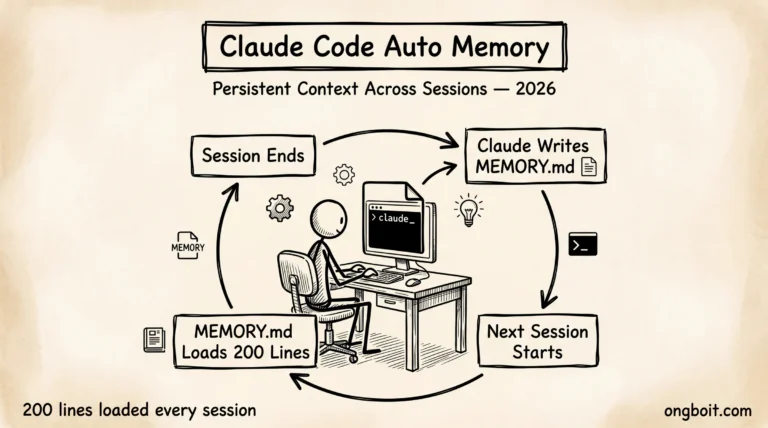
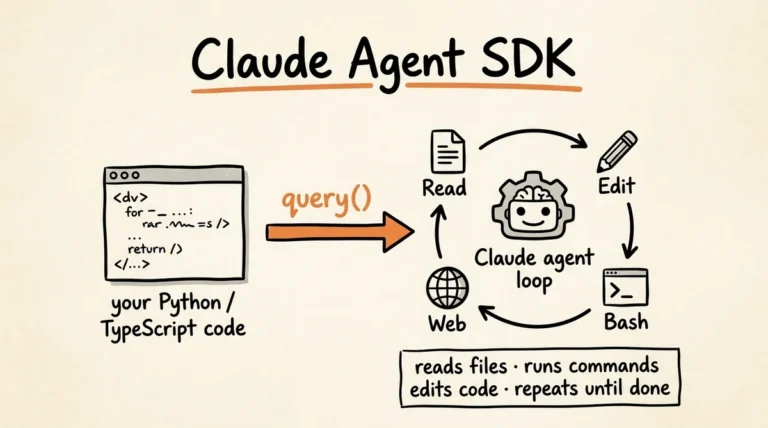
Claude Code khác: terminal-based, đọc CLAUDE.md declare project context (squad, roadmap, current sprint), nhớ cross-session. Với MCP server, Claude gọi Linear/Jira/Notion API trực tiếp – tạo ticket, update status, query data – không copy paste. Đây là agent workflow, không phải chat workflow.
PM Workflow Cốt Lõi Với Claude Code Là Gì?
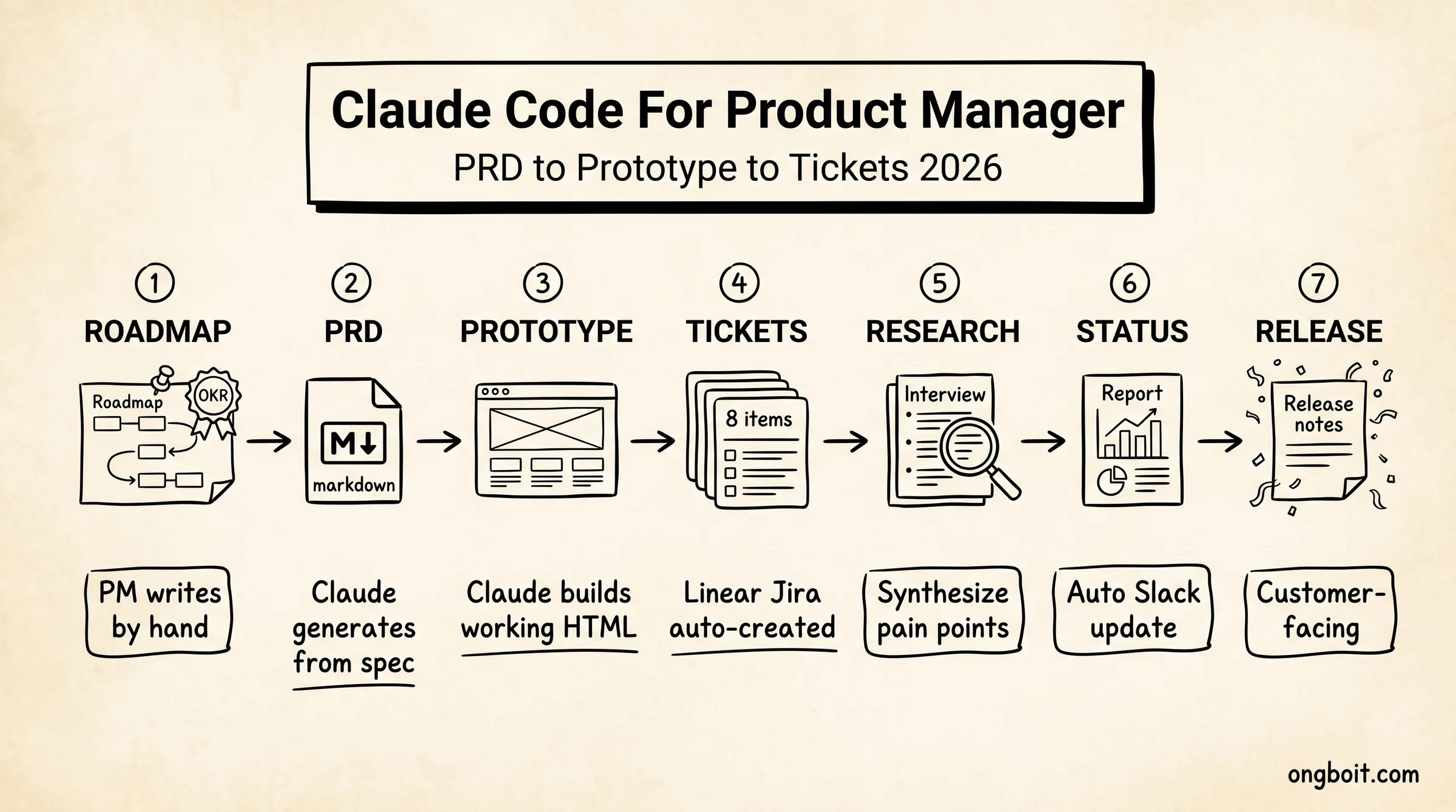
Anthropic + community PM 2026 đã refine workflow chuẩn: roadmap = doc duy nhất PM viết tay. Tất cả còn lại – PRD, ticket, status update – Claude generate từ roadmap + voice spec.
PM viết chỉ stage #1 (Roadmap), Claude làm stage #2-#7. Tổng time saving: 60-70% so với workflow manual all-7-stage.
MCP Integration: 6 PM Tool Hoạt Động Thế Nào?
Model Context Protocol (MCP) là chuẩn open của Anthropic cho phép Claude gọi external API. Mỗi tool có MCP server riêng:
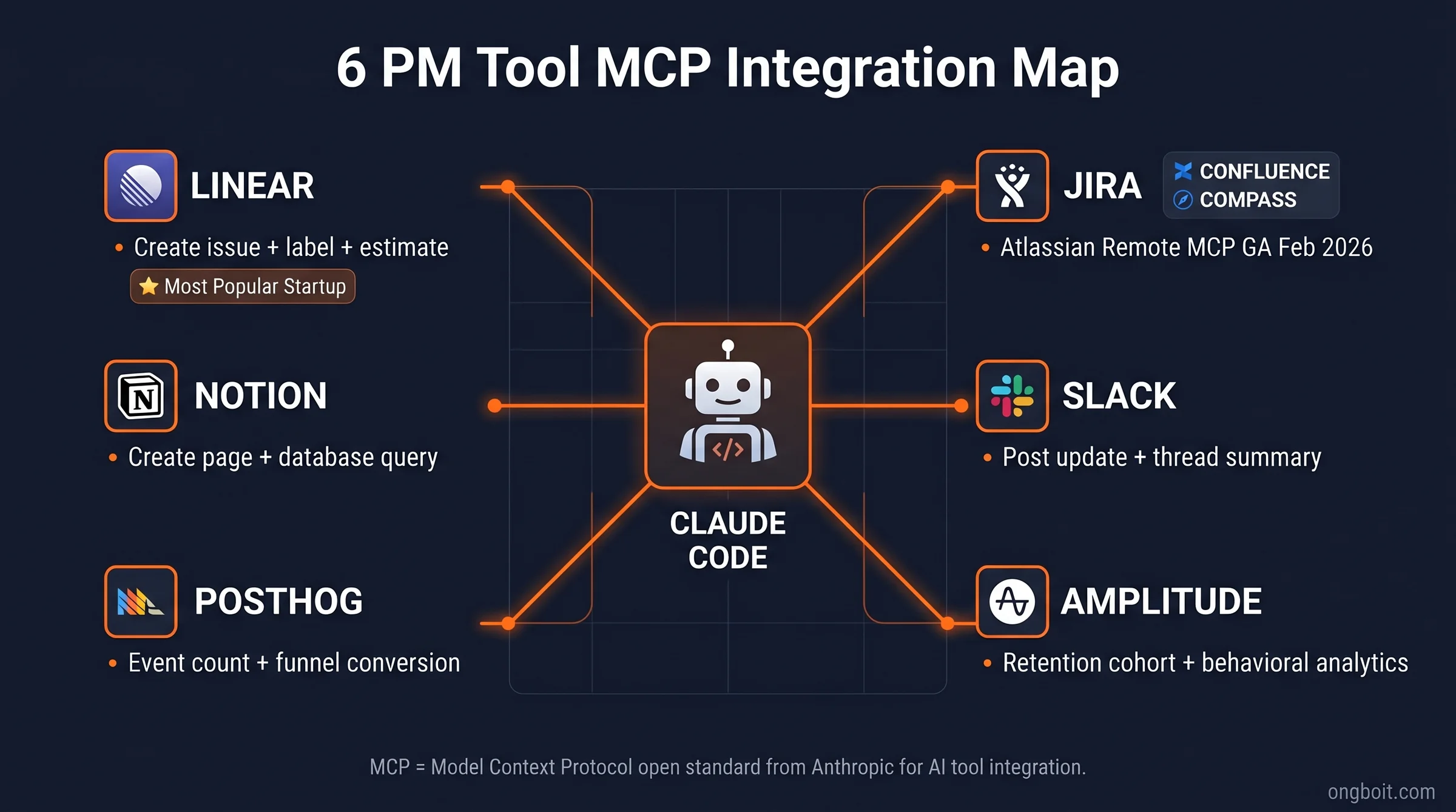
Linear MCP Server
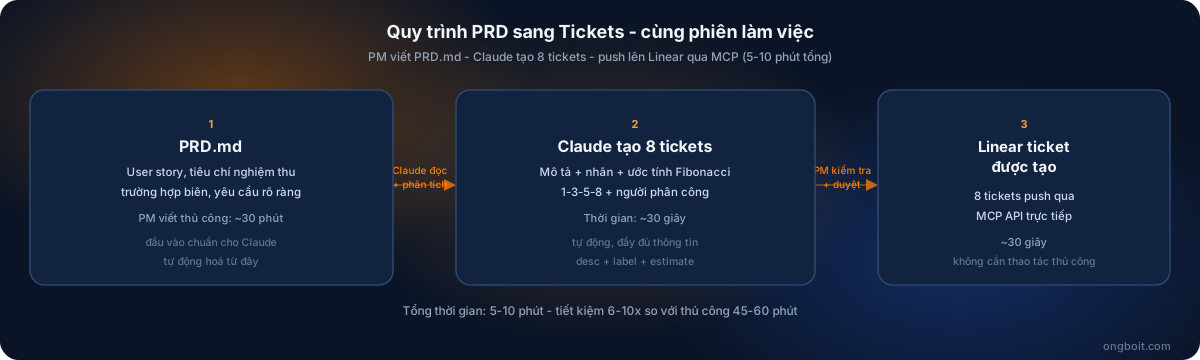
Most common cho startup VN. Capability: create issue (với desc, label, estimate, project, assignee), update status, query issue, comment on issue. Setup qua claude mcp add linear, OAuth via linear.app. Workflow killer: “Claude, đọc PRD này và tạo 8 ticket Linear cho squad Mobile, mỗi ticket có estimate theo Fibonacci 1-3-5-8, assign cho team-mobile, label feature-launch-q3”. Claude generate full 8 ticket trong 30 giây.
Jira MCP Server (Atlassian Remote MCP)
Cho enterprise VN dùng Jira. Atlassian Remote MCP server đã GA tháng 2/2026 với Claude làm first partner. Setup qua https://mcp.atlassian.com/v1/mcp endpoint (deprecating /sse sau 30/6/2026). Capability tương tự Linear + thêm Confluence (doc create/update) và Compass (catalog).
Notion MCP Server
Doc creation + page hierarchy. Workflow: Claude đọc PRD markdown, tạo Notion page với structured content (heading hierarchy + database properties + linked databases). Capability: tạo page, update page, query database, comment.
Slack MCP Server
Post stakeholder update, query channel messages, summarize thread. Workflow killer: cuối tuần Claude tự đọc Linear sprint progress, query PostHog conversion metric, post update vào #weekly-product Slack channel – PM không cần làm gì.
PostHog + Amplitude MCP Server
Analytics data direct access. Capability: query event count, funnel conversion, retention cohort. Workflow: “Claude, pull conversion rate của signup funnel tuần qua so với tuần trước, format thành chart-ready data”. Claude trả markdown table + chart spec.
GitHub MCP Server (optional)
Cho PM technical: query PR status, comment review, link ticket ↔ commit. Bridge gap giữa product roadmap và engineering execution.
Cách Setup Claude Code Cho PM Trong 30 Phút?
Bước 1: Install Claude Code + Pro/Team Subscription
Cài Claude Code qua npm: npm install -g @anthropic-ai/claude-code. Cần Pro $20/mo (cá nhân) hoặc Team Standard $20/seat (tham khảo Team plan guide nếu team có 5+ PM/dev). Free tier không đủ usage cho daily PM work.
Bước 2: Tạo CLAUDE.md cho mỗi project
Mỗi product/squad có file CLAUDE.md riêng, declare:
# Project: SquadMobile - Onboarding Revamp Q3 2026

## Roadmap context
- OKR: Tăng onboarding completion từ 32% lên 50% Q3
- Squad: 4 mobile dev + 1 designer + 1 PM (mình)
- Tech stack: React Native + Firebase

## Working style
- PRD format: ai/prd-template.md
- Ticket assign: team-mobile
- Estimate scale: Fibonacci 1-3-5-8
- Label convention: feature-{name}-q{n}

## Tools connected (MCP)
- Linear: squad-mobile workspace
- PostHog: prod project ID 1
- Slack: #squad-mobile channel
Claude đọc CLAUDE.md mỗi session – không cần restate context. Đây là single biggest productivity gain so với ChatGPT.
Bước 3: Connect 3-6 MCP Server
Start với core 3: Linear (hoặc Jira), Notion, Slack. Sau 1-2 tuần quen workflow, add PostHog/Amplitude. Setup từng tool:
claude mcp add linear
# Browser opens linear.app OAuth → authorize
# Claude trả về "Linear MCP connected"

claude mcp add notion
# Browser → notion.so OAuth → select workspace

claude mcp add slack
# Browser → slack.com OAuth → select team
Bước 4: Test First PRD-to-Ticket Workflow
Viết PRD markdown đơn giản trong prds/feature-onboarding-v2.md. Mở Claude Code, gõ:
Đọc prds/feature-onboarding-v2.md
Tạo 8 ticket Linear cho squad-mobile theo CLAUDE.md convention
Đầu tiên show cho mình review trước khi push
Claude generate 8 ticket draft với desc + label + estimate, hiện trên terminal. PM review, edit, OK. Claude push lên Linear qua MCP. Total 5-10 phút từ PRD-done đến all-tickets-created. Manual workflow cũ: 45-60 phút.
PRD → Working Prototype Same Session: Workflow Thực Tế?
Killer feature differentiate Claude Code vs ChatGPT vanilla: PRD viết xong, ép Claude build working prototype luôn trong cùng session. PM không cần biết code, không cần wait cho dev sprint planning.
Workflow concrete:
- Viết PRD đầy đủ trong
prds/feature-X.md: problem statement, user story, acceptance criteria, edge case. - Ask Claude prototype: “Đọc prds/feature-X.md, build working HTML prototype với Tailwind CSS, simulate 3 user flow chính. Save vào prototypes/feature-X/.”
- Claude generate file HTML + CSS + JS có thật, prototype interactive. Mở browser
file:///prototypes/feature-X/index.html, click qua test luôn. - Iterate prototype: “Thay button color sang brand orange #FF7F00, add error state cho form validation”. Claude edit file, refresh browser, test ngay.
- Share prototype qua Slack hoặc deploy lên Vercel (Claude Code có thể auto-deploy). Stakeholder click vào URL, không cần Figma access.
Giá trị thực tế: stakeholder thấy được working flow thật trong 2-3 tiếng từ lúc viết PRD, không cần wait 1-2 tuần dev sprint. Discovery + alignment cycle giảm từ 2 tuần xuống 1 ngày. Đây là biggest unlock cho PM workflow 2026.
💜 Quick Decision Guide
Dùng Claude Code khi: PM quản 2+ squad, viết 2+ PRD/tuần, dùng Linear/Jira/Notion stack, cần auto-generate ticket, comfortable với terminal (hoặc willing học 2-3 ngày).
Dùng ChatGPT Plus $20/mo thay thế khi: PM 1 squad, viết 0-1 PRD/tuần, dùng ClickUp/Trello (chưa có MCP), không terminal-comfortable, chỉ cần writing assist + brainstorm.
Dùng dedicated PM tool (Notion AI, Linear Asks) khi: embed-in-app workflow là priority, không muốn rời tool chính, OK với feature limited vs general AI agent.
User Research Synthesis: Phân Tích Interview Transcript Ra Sao?
PM workflow đau nhất ngoài ticket creation: đọc 10-20 interview transcript, extract top pain point + verbatim quote, kết hợp với PostHog data. Manual takes 4-6 giờ. Claude Code làm trong 15-30 phút.
Workflow concrete:
- Save tất cả transcript vào folder
research/interviews-q3-2026/. Format: 1 file markdown / 1 interview. Header có metadata (date, persona, recruited source). - Ask Claude synthesize: “Đọc tất cả file trong research/interviews-q3-2026/, extract top 5 pain point xếp theo frequency. Mỗi pain point kèm 2-3 verbatim quote từ interview, attribute đầy đủ persona + date.”
- Claude generate markdown synthesis với structure: pain point title, frequency count, verbatim quotes, suggested PRD framing.
- Cross-reference với PostHog: “Pain point #1 là ‘app crash khi upload ảnh’ – query PostHog event ‘upload_failed’ trong 30 ngày qua, group by device type, trả breakdown.” Claude pull data từ PostHog MCP, kết hợp với verbatim quote thành insight đa nguồn.
- Output thành Notion page: “Tạo Notion page ‘Q3 Research Insights’ trong workspace, content là synthesis trên.” Claude push lên Notion qua MCP.
Output cuối: Notion page có insight, verbatim, data, recommendation – sẵn sàng share stakeholder. Manual cycle 4-6 giờ → AI cycle 20-30 phút = 10x speedup cho task lặp lại nhất của senior PM.
Status Report + Release Notes Tự Động Hóa Như Thế Nào?
Weekly status report cho stakeholder + sprint release notes là 2 task PM ghét nhất. Claude Code giải:
Weekly Status Report
Workflow: setup recurring command. Mỗi sáng thứ Sáu, PM mở terminal, gõ:
Tạo status report cho stakeholder tuần này. Bao gồm:
- Linear: progress squad-mobile sprint hiện tại (% complete, blocker)
- PostHog: top 3 metric change tuần này vs tuần trước (signup conversion, retention D7, NPS)
- Notable PR merged tuần này (từ GitHub MCP)
Format: markdown, ngắn gọn, executive-friendly. Save vào reports/2026-W21.md
Claude execute trong 2-3 phút: query Linear, PostHog, GitHub parallel, synthesize. Output 800-1200 từ executive update. PM review, edit, post Slack. Total 10 phút cuối tuần thay 1-2 giờ manual.
Release Notes Cuối Sprint
Workflow: sprint kết thúc, gõ:
Pull tất cả Linear issue closed trong sprint Q3-W3 cho squad-mobile.
Group theo theme (bug fix, feature, performance, security).
Viết customer-facing release notes, tone friendly + benefit-driven.
Save vào release-notes/2026-q3-w3.md
Claude generate professional release notes có structure thân thiện customer, không phải dump ticket list. Có thể auto-publish qua Notion MCP vào public changelog page.
5 Mistake Thường Gặp Khi PM Mới Bắt Đầu Claude Code Là Gì?
Mistake 1: Paste PRD vào chat thay vì save markdown file
Sai. ChatGPT habit là paste mọi thứ vào chat. Claude Code đọc file trực tiếp – save PRD vào prds/feature-X.md, Claude đọc file path. Lợi ích: PRD version control trong Git, search-able, không lost trong chat history scattered.
Mistake 2: Không setup CLAUDE.md cho project
Sai phổ biến. Không có CLAUDE.md, PM phải restate context (squad, OKR, convention) mỗi session. Setup 1 lần CLAUDE.md = save 5-10 phút/session = 1-2 giờ/tuần. ROI tốt nhất trong PM workflow.
Mistake 3: Connect MCP server nhưng không test trước
Linear MCP có thể fail OAuth nếu workspace setting strict. PM connect xong, ask Claude tạo ticket → fail silently → fall back manual. Test workflow đầu tiên với “Claude, list 5 ticket gần nhất trong Linear” trước khi production use.
Mistake 4: Trust Claude blindly cho ticket creation
Claude có thể hallucinate label, estimate, assignee nếu CLAUDE.md không clear. Always ask “show me draft 8 ticket TRƯỚC khi push lên Linear”. Review estimate + assignment 30 giây trước khi commit. Tránh embarrassment cho team.
Mistake 5: Không version control PRD + CLAUDE.md
PRD + CLAUDE.md sống trong personal folder = lost khi đổi máy. Setup Git repo cho PM workspace, commit PRD + CLAUDE.md daily. Bonus: review PRD evolution qua git log, learning artifact cho PM career.
🛠️ Engineer’s Perspective: ROI Math Cho PM
- Time saving thực tế: PM tiêu tốn 8-12h/tuần cho task PRD writing + ticket creation + status report. Claude Code workflow giảm 60-70%, save 5-8h/tuần. Tương đương 250-400 giờ/năm/PM.
- Cost: Pro $20/mo cá nhân = $240/năm. So với time saving 250-400h ở rate PM $30-50/h = $7,500-$20,000 saving/year. ROI 30-80x.
- Hidden cost: learning curve 2-4 tuần để comfortable terminal + CLAUDE.md + MCP. PM không tech-comfortable có thể tốn 1-2 tháng. Pair với 1 dev senior để onboard nhanh.
- Bottleneck thực sự: không phải tool mà là workflow discipline. PM stuck với habit ChatGPT vanilla (paste mọi thứ) hoặc Linear UI-first không tận dụng được Claude Code. Đầu tư 2 tuần học workflow markdown-first là biggest unlock.
Honest Limitations: Claude Code Cho PM KHÔNG Làm Được Gì?
Sau 3 tháng dùng Claude Code cho PM mentor + ongboit content workflow, đây là 5 limitation thực tế:
- Không thay được stakeholder communication. Claude generate status report tốt, nhưng PM vẫn cần đứng meeting present, đọc tone executive, push back khi stakeholder yêu cầu không khả thi. AI không có political capital, PM có.
- MCP integration không cover hết PM stack. Tools chính supported: Linear, Jira, Notion, Slack, PostHog, Amplitude, GitHub. Tools chưa có MCP: Figma (read-only), Mixpanel, Heap, ClickUp, Trello, Asana, Monday. Workaround: manual copy paste cho tool ngoài MCP.
- Hallucinate khi data context thiếu. Claude có thể fabricate Linear ticket ID hoặc Notion page URL nếu không có MCP query trước. Always verify by querying actual data trước khi reference. PM cẩu thả paste output thẳng = embarrassment.
- Vietnamese language nuance còn kém. Claude train chủ yếu English corpus. Generate Vietnamese PRD ổn, nhưng cultural nuance (e.g., onboarding tone cho user VN gen Z vs gen X) thì missing. PM cần manual edit tone trước khi publish customer-facing.
- Privacy concern cho regulated industry. PM tại banking/healthcare VN không nên paste customer PII vào Claude (kể cả Enterprise plan). Anonymize transcript trước khi research synthesis. Compliance API enterprise giúp audit, nhưng vẫn cần workflow discipline.
Bottom line: Claude Code là productivity multiplier cho mechanical task, không thay được judgement + stakeholder relationship của senior PM. 70% PM work là task lặp lại (ticket, doc, report) – automate đây để dành thời gian cho 30% còn lại (strategy, stakeholder, user empathy).
Câu Hỏi Thường Gặp
PM không biết code có dùng được Claude Code không?
Có. PM workflow không yêu cầu viết code, chỉ cần comfort với terminal command đơn giản (claude, cd, ls). Learning curve 2-4 tuần để habit shift từ Notion UI sang markdown. Tham khảo guide cho non-coder.
MCP server có miễn phí không?
MCP server là free, open standard từ Anthropic. Mỗi tool (Linear, Jira, Notion) có MCP server riêng – đa số free (Linear, Notion, GitHub), một số tính usage (PostHog có rate limit free tier). Cost chính là Claude Pro subscription $20/mo.
Có bao nhiêu MCP server đáng cài cho PM stack?
Start 3: Linear/Jira + Notion + Slack. Đây là 3 tool PM dùng daily. Add PostHog/Amplitude khi ramp up data workflow (tuần 3-4). Add GitHub khi technical PM cần track engineering execution. Tránh install tất cả 10+ MCP cùng lúc – context window pollution + Claude pick wrong tool.
Claude Code có thể tự push code lên production không?
Có nhưng KHÔNG NÊN. Claude Code có thể commit + push code, nhưng PM không nên enable workflow này. Stick với prototype + draft – dev senior review trước khi merge. Production deploy là engineering decision, không phải PM decision.
Khác biệt giữa Claude Code và Linear Asks?
Linear Asks là embedded AI trong Linear UI, focus auto-fill ticket + suggestion. Workflow stay-in-Linear. Claude Code là agent terminal, generate ticket from PRD external + multi-tool integration. PM dùng Linear Asks cho quick fix trong Linear, Claude Code cho complex multi-tool workflow (PRD-to-prototype-to-ticket end-to-end).
Có template PRD nào tốt để bắt đầu?
Recommend template: Shape Up (Basecamp), Amazon PR/FAQ, hoặc RICE framework. Save template vào templates/prd-template.md, reference trong CLAUDE.md. Claude tự follow template khi generate PRD mới. Tham khảo Builder.io PM guide cho concrete template.
Atlassian Remote MCP hoạt động khác Linear MCP thế nào?
Atlassian Remote MCP server (GA tháng 2/2026) cover cả Jira + Confluence + Compass trong 1 OAuth. Linear MCP chỉ Linear. Nếu enterprise dùng Atlassian stack, Remote MCP tiện hơn 3 MCP riêng. Endpoint: https://mcp.atlassian.com/v1/mcp (legacy /sse deprecating 30/6/2026).
Kết Luận: PM Bắt Đầu Claude Code Từ Đâu?
Path đề xuất cho PM VN bắt đầu Claude Code:
- Tuần 1: Install Claude Code + Pro subscription. Tạo CLAUDE.md cho 1 squad, write 1 test PRD trong markdown.
- Tuần 2: Connect Linear + Notion + Slack MCP. Test workflow PRD-to-ticket cho 1 small feature.
- Tuần 3-4: Add PostHog/Amplitude MCP. Build first user research synthesis từ 5-10 interview transcript.
- Tháng 2: Stabilize weekly status report + sprint release notes automation. Train team junior PM theo workflow này.
- Tháng 3+: Advanced: PRD-to-prototype same session, multi-squad orchestration, custom slash command cho company-specific workflow.
Total commitment: 2-4 giờ/tuần đầu tiên cho learning + setup, sau đó save 5-8 giờ/tuần permanent. ROI break-even sau 2-3 tuần, compound từ tháng 2 trở đi. Đây là biggest productivity unlock cho PM 2026 – không có tool nào khác đạt được integration depth + agent workflow ngang Claude Code với MCP.
Bạn đang dùng PM stack nào? Linear + Notion hay Jira + Confluence? Share trong comment để mình write deep-dive bài tiếp theo về MCP setup chi tiết cho stack cụ thể.