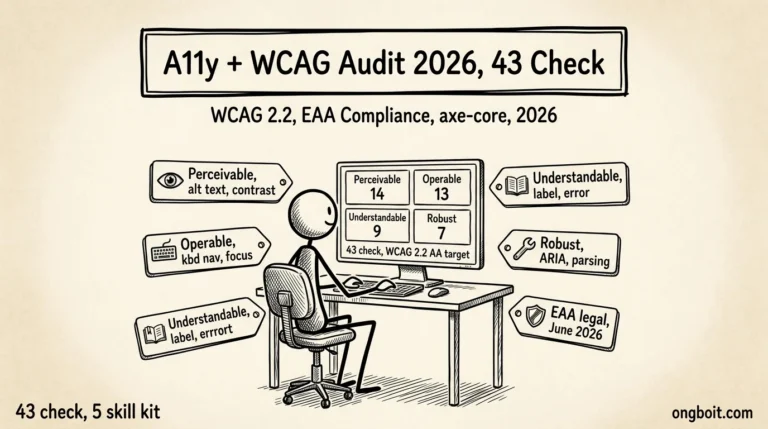
Cách Mình Dùng Claude Code Audit Technical SEO 2026

Site bạn rank trên Google nhưng GSC báo “Discovered, not indexed” cho 20-30% bài? Bài bạn không bao giờ xuất hiện khi user hỏi ChatGPT/Claude/Perplexity dù content tốt cách mấy? Tool audit báo “Site Health 80/100” nhưng không cho biết nên fix gì trước? Đa số trường hợp vấn đề nằm ở Technical SEO layer, không phải content. Site bạn có thể đang âm thầm chặn AI bot trong robots.txt, schema markup thiếu cho AI parsing, hoặc llms.txt vắng mặt mà không hề biết.
Bài này list đầy đủ 69 check Technical SEO 2026 chia 5 sub-section: robots + sitemap + canonical, indexability + crawl errors, schema markup, hreflang + i18n, AI crawler + llms.txt + server health. Mỗi check mình giải thích tại sao quan trọng + pass criteria cụ thể (không vague “good”, mà “HTTP 200 + content-type text/plain”). Kèm theo 3 cách thực sự làm audit (manual, paid tool, Claude Code skill) so sánh dựa trên data thực tế + bảng skill coverage chỉ rõ check nào tự động được, check nào cần human judgment.
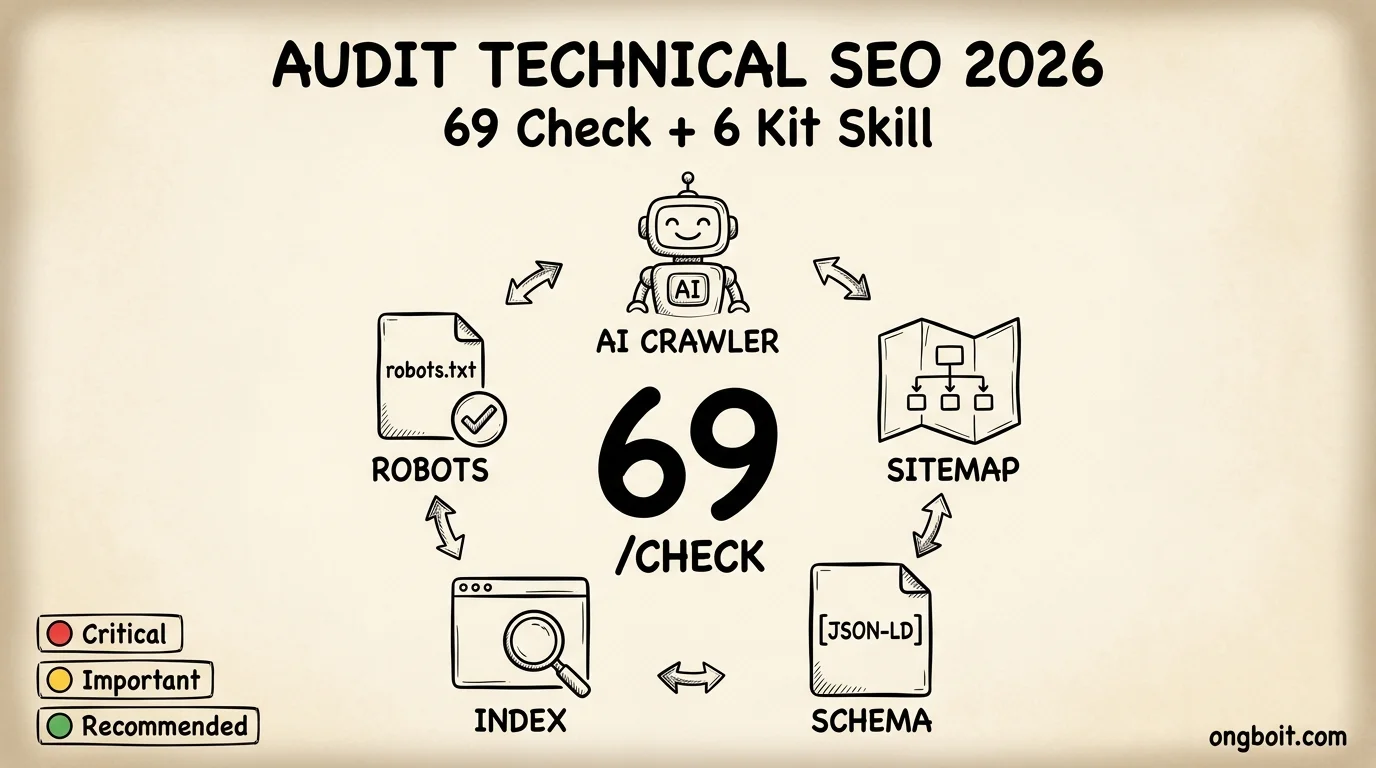
TL;DR
- Technical SEO là tất cả setup giúp Google + AI engine (ChatGPT, Claude, Perplexity) có thể tìm, đọc, và cite nội dung site bạn. Không có Technical SEO tốt, content tốt cũng vô ích.
- 69 check chia 5 nhóm: file cấu hình bot crawler, tình trạng Google index, metadata mô tả nội dung (schema), site đa ngôn ngữ, và cấu hình cho AI search engine 2026.
- 3 mức ưu tiên: Critical (fix ngay), Important (30-90 ngày), Recommended (backlog). Site nhỏ chỉ cần pass Critical 10 là đủ baseline.
- 3 cách audit: manual CLI tools (3-5 giờ, $0), paid audit tool ($59-259/tháng, miss AI search 2026), hoặc kit
claude-growth(15-30 phút, output code sẵn paste thẳng vào site).
Bài liên quan: audit content portfolio cho refresh queue ROI (audit content portfolio 100-500 bài qua kit power-user pipeline).
📌 Nếu bạn là PM, founder, CEO non-tech: bài này dùng nhiều thuật ngữ technical (crawlability, indexability, Schema.org, AI crawler, hreflang). 2 câu summary cho non-dev:
- Audit này làm gì: 1 lệnh check Google bot + AI bot có crawl/index site bạn được không (robots.txt, sitemap, canonical, schema, mobile-first).
- Bạn nhận lợi ích gì: Google index đúng = traffic không bị lost từ technical bug. AI bot access đúng = ChatGPT/Perplexity cite được bài bạn.
Technical SEO là gì và business impact 2026 ra sao?
Technical SEO là tầng nền tảng, bao gồm tất cả setup giúp Google bot và AI bot (như ChatGPT, Claude, Perplexity) có thể tìm thấy, đọc, hiểu, và đánh chỉ mục nội dung site bạn. Đơn giản: nếu Technical SEO fail thì dù content tốt cách mấy, Google + AI engine cũng không cite được site bạn. Technical SEO chỉ là một mảng trong một SEO audit hoàn chỉnh, bên cạnh content và off-page.
Khác với 2 nhánh SEO còn lại:
- Content SEO là chất lượng nội dung bạn viết (có giúp user solve task không?)
- Off-page SEO là backlinks (site khác link tới site bạn để vote credibility)
- Technical SEO là chuẩn kỹ thuật pass hay fail, không có “creative”
Tại sao 2026 Technical SEO quan trọng hơn 2024?
- Google May 2026 Core Update đang rollout (May 21 → ~June 4). Sites có authority + content chất lượng đang hold/gain. Site thin content + technical issue losing visibility nhanh.
- AI Overviews kéo CTR position #1 giảm mạnh. Ahrefs (2025, phân tích 300k keyword) đo CTR position #1 giảm -34.5% khi query có AI Overviews. Counter-intuitive: branded query CTR tăng +18% dưới AIO (Amsive 2026 research). Implication: Technical SEO + brand authority quan trọng hơn ranking position đơn thuần.
- Schema markup là metadata mô tả nội dung cho search engine + AI. Site có schema = Google + AI hiểu rõ nội dung là gì (Article? Product? FAQ?). Phần lớn site rank trang 1 Google đều dùng schema markup để giúp Google + AI engine hiểu nội dung. FAQPage schema 2026-05-07 không còn show snippet trên Google SERP (Google Search Central docs cập nhật), nhưng vẫn cực kỳ giá trị cho ChatGPT + Perplexity + Google AI Mode đọc để pull answer (Google statement explicit: vẫn dùng FAQ schema để hiểu page).
- AI search engine mới đòi hỏi setup mới: file
llms.txt(giốngrobots.txtnhưng cho AI bot, format Markdown đề xuất 2024), 10 AI bot trong robots.txt phân thành 2 nhóm training vs retrieval (GPTBot grew +55% from 2024 to 2025, Claudebot ~2x), WebMCP standard (Google Feb 2026 preview, cho phép site declare actions cho AI agent).
- Schema.org v30 stable 2026-03-19. Spec mới nhất add SignificantLink property (đánh dấu URL quan trọng cho AI agent navigate efficiently) + speakable + sameAs improvements.
- Mobile-first index mandatory. Google chỉ crawl mobile version site bạn từ 2021. Mobile cần serve cùng content như desktop.
Business impact concrete khi Technical SEO fail (giải thích plain language):
| Vấn đề kỹ thuật | Tác động kinh doanh |
|---|---|
robots.txt block AI bot (file ở root site chỉ định bot nào được truy cập) |
0 citation từ ChatGPT/Perplexity/Google AI Overviews → mất traffic từ AI search 2026 |
| Schema markup missing (metadata mô tả nội dung) | Mất rich result trên Google SERP + mất eligibility cho AI cite, CTR thấp hơn 5-15% |
sitemap.xml không cập nhật (file liệt kê toàn bộ URL trong site cho bot biết) |
Google crawl chậm + miss content mới, time-to-rank chậm hơn 2-4 tuần |
| Canonical tag sai (tag chỉ định URL chính nếu có duplicate version) | Google chia authority giữa nhiều URL → không URL nào rank top 10 |
| INP > 200ms (chỉ số đo độ trễ khi user click) | Fail Core Web Vitals → giảm ranking sau Google Core Update |
llms.txt missing (file 2024 đề xuất cho AI bot biết structure site) |
AI crawler tốn budget crawl → AI engine skip site bạn cho query phức tạp |
Mỗi cái fail = mất organic traffic cụ thể. Technical SEO không sexy nhưng là foundation cho mọi tối ưu khác. Skip Technical = mọi tối ưu khác đều waste.
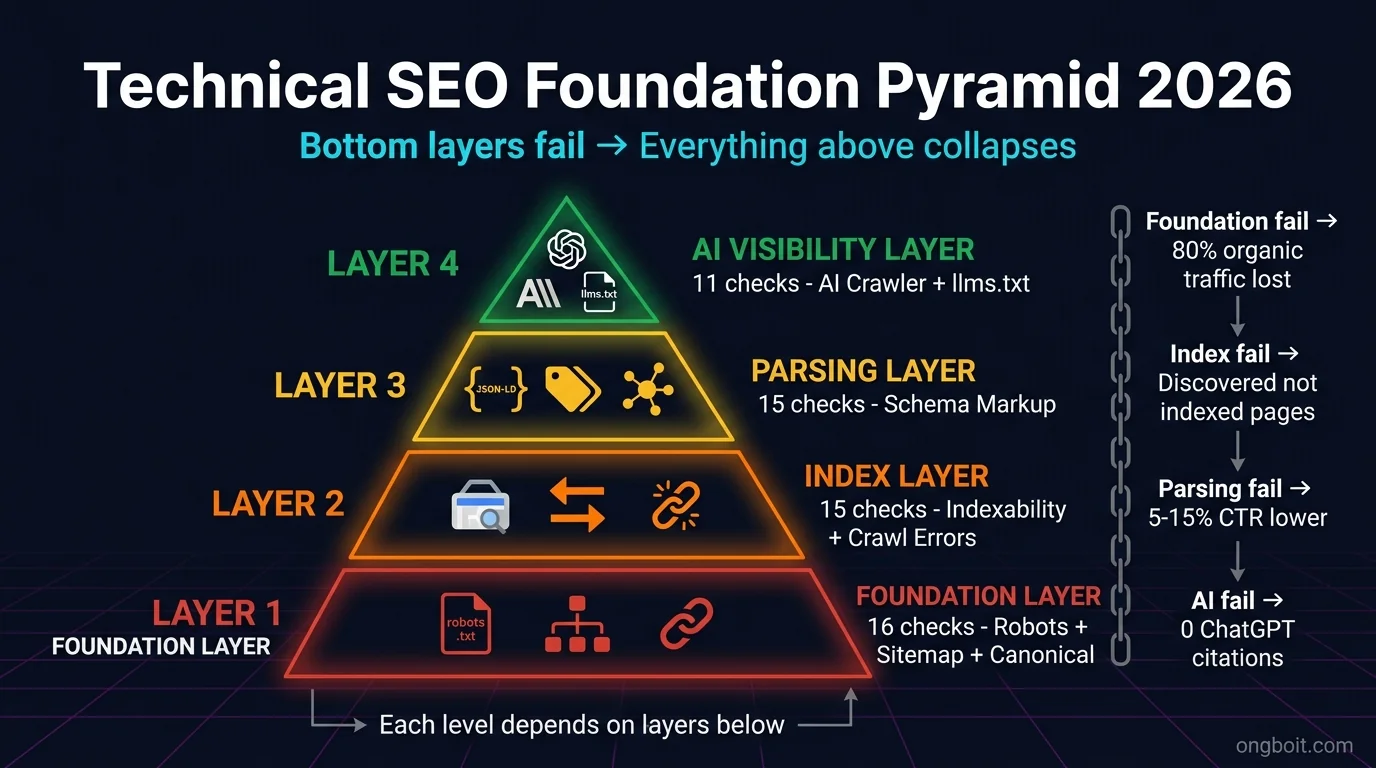
Technical SEO 2026: 5 nhóm check cần cover
ℹ️ Lưu ý quan trọng: 13 trong 69 check yêu cầu 👤 human judgment (không tool nào tự động được, vì là business policy / UX choice / legal review). Mỗi check manual đều có badge 👤 Manual inline để bạn dễ nhận. Chi tiết breakdown 13 check ở section Skill coverage cuối bài.
Tier: 🔴 Critical · 🟡 Important · 🟢 Recommended | Mode: 🤖 Auto (qua skill kit) · 👤 Manual (cần human judgment)
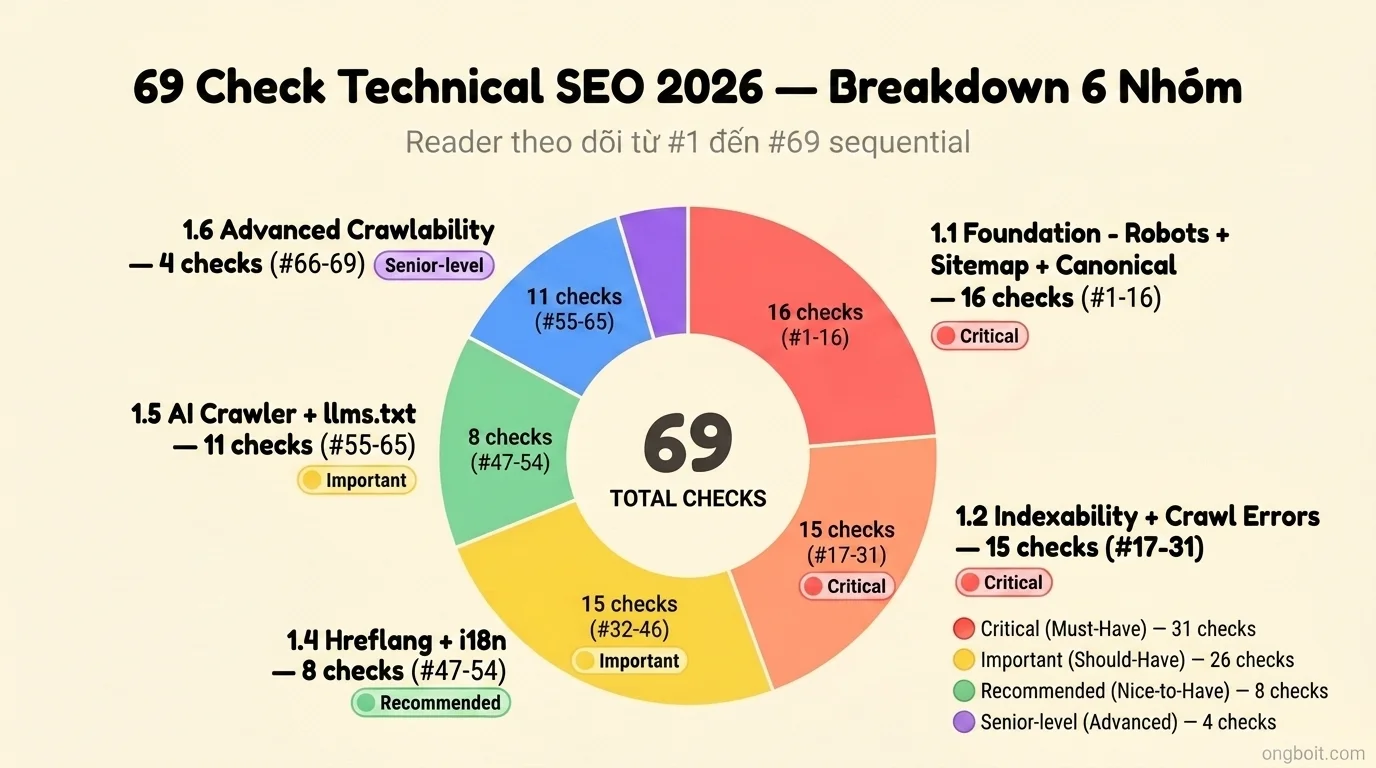
Sau khi tổng hợp Complete Website Audit Guide + Digital Excellence Blueprint + spec mới nhất 2026, mình chia Technical SEO ra 5 sub-section, tổng 69 check items:
| Sub-section | Range (số check) | Tier |
|---|---|---|
| 1.1 Foundation: Robots + Sitemap + Canonical | #1-16 (16 check) | 🔴 Critical |
| 1.2 Indexability + Crawl errors | #17-31 (15 check) | 🔴 Critical |
| 1.3 Schema Markup | #32-46 (15 check) | 🟡 Important |
| 1.4 Internationalization + Hreflang | #47-54 (8 check) | 🟢 Recommended |
| 1.5 AI Crawlers + llms.txt + Server health | #55-65 (11 check) | 🟡 Important |
| 1.6 Advanced crawlability #66-69 (4 check) | ⚙️ Senior-level |
Tier classification theo Website Health Audit Pyramid:
- Critical (Must-Have): fix ngay, expose risk hoặc legal liability
- Important (Should-Have): high-impact, fix trong 30-90 ngày
- Recommended (Nice-to-Have): optimization, fix khi có thời gian
Body bài liệt đầy đủ 69 check numbered theo format [1.1.1], [1.1.2]… với tier badge (🔴 Critical / 🟡 Important / 🟢 Recommended), why-it-matters 1 dòng, và pass criteria cụ thể. PDF cuối bài chỉ là bản tải về tiện in + tick khi audit. Phần “làm sao actually audit” (manual / paid tool / Claude Code) mình bàn ở cuối bài.
Robots, sitemap, canonical: 16 check Foundation để site không bị Google bot block?
📌 Section này bao gồm check #1 đến #16 trong tổng 69 check Technical SEO.
Đây là 3 file/tag cơ bản nhất. Sai 1 cái = toàn bộ Technical SEO collapse.
Robots.txt (/robots.txt ở root site):
- [1] Site có file robots.txt không? 🔴 Critical
- 💡 Tại sao: robots.txt cho phép/cấm bot crawl từng folder. Không có file = Google + AI bot crawl bừa, miss page quan trọng hoặc tốn budget vào page rác.
- ✅ Cách check: Mở
yoursite.com/robots.txttrên browser → phải hiển thị text content. Hoặc terminal:curl -sI yoursite.com/robots.txt→ HTTP 200.
- [2] robots.txt có lỗi cú pháp không? 🔴 Critical
- 💡 Tại sao: Cú pháp sai = bot ignore toàn file, default allow mọi thứ → tệ nhất là leak admin page.
- ✅ Cách check: Paste content file vào Google robots.txt tester → 0 errors.
- [3] Có khai báo rule rõ ràng cho 6 bot quan trọng không? 🔴 Critical
- 💡 Tại sao: Default
User-agent: *rules áp dụng cho cả AI bot 2026. Khai báo rõ Googlebot, Bingbot, GPTBot, ClaudeBot, PerplexityBot, CCBot mới control được training vs retrieval bot. - ✅ Cách check: Mở file robots.txt, dùng Ctrl+F tìm tên từng bot → có rule
User-agent: GPTBotetc.
- 💡 Tại sao: Default
- [4] File CSS/JS có bị block trong robots.txt không? 🔴 Critical
- 💡 Tại sao: Google cần render page như browser. Block CSS/JS = Google thấy page broken → giảm rank.
- ✅ Cách check: Mở robots.txt, không được có
Disallow: /wp-content/themes/,Disallow: .css,Disallow: .js.
Sitemap.xml:
- [5] sitemap.xml có được khai báo trong robots.txt không? 🔴 Critical
- 💡 Tại sao: Google tìm sitemap qua dòng
Sitemap:trong robots.txt. Không khai báo = Google chậm discover URL mới. - ✅ Cách check: Mở robots.txt → tìm dòng
Sitemap: https://yoursite.com/sitemap.xml.
- 💡 Tại sao: Google tìm sitemap qua dòng
- [6] sitemap.xml có truy cập được không? 🔴 Critical
- 💡 Tại sao: URL khai báo trong robots.txt phải reachable. Sitemap 404 = Google không có map crawl site.
- ✅ Cách check: Mở
yoursite.com/sitemap.xmltrên browser → phải hiển thị XML content. Không 404, không redirect.
- [7] sitemap.xml có hợp lệ XML schema không? 🔴 Critical
- 💡 Tại sao: Sitemap broken XML = Google parse fail → bỏ qua mọi URL trong sitemap.
- ✅ Cách check: Paste URL sitemap vào xml-sitemaps validator → 0 errors.
- [8] Mỗi URL trong sitemap có
<lastmod>không? 🟡 Important- 💡 Tại sao:
<lastmod>cho Google biết khi nào page update, ưu tiên re-crawl content mới. - ✅ Cách check: Mở sitemap.xml, scroll xuống vài URL → mỗi
<url>block có<lastmod>2026-05-30</lastmod>style.
- 💡 Tại sao:
- [9] Sitemap có ít hơn 50,000 URL không? 🟡 Important
- 💡 Tại sao: Google chỉ accept sitemap ≤ 50k URL hoặc 50MB. Quá thì phải tách thành sitemap index.
- ✅ Cách check: Mở sitemap.xml, Ctrl+End scroll xuống cuối, đếm số
<url>block (Ctrl+F “” count).
- [10] Site lớn (>50k URL) có dùng sitemap index không? 🟡 Important
- 💡 Tại sao: Sitemap index = file
<sitemapindex>link tới nhiều sitemap nhỏ. Cần thiết cho site e-commerce, news, programmatic SEO. - ✅ Cách check: Nếu site bạn >50k URL, mở sitemap → top-level element phải là
<sitemapindex>không phải<urlset>.
- 💡 Tại sao: Sitemap index = file
Canonical tag + Pagination:
- [11] Mọi page có canonical tag không? 🔴 Critical
- 💡 Tại sao: Canonical bảo Google “đây là URL chính của content này”, tránh duplicate authority bị split.
- ✅ Cách check: Mở bất kỳ page nào, View Source (Ctrl+U), Ctrl+F tìm
canonical→ phải có<link rel="canonical" href="...">trong<head>.
- [12] Canonical có tự trỏ về URL hiện tại không? 🔴 Critical
- 💡 Tại sao: Self-referencing canonical = signal mạnh cho Google. Canonical trỏ sai URL = Google index URL khác.
- ✅ Cách check: Mở page, View Source, tìm canonical →
hrefvalue phải match URL hiện tại trên browser (hoặc preferred version nếu page là duplicate).
- [13] Page có meta robots tag không? 🟡 Important
- 💡 Tại sao: Default Google index mọi page found. Meta robots cho phép control granular per page (vd: page tag archive nên
noindex). - ✅ Cách check: View Source page → có
<meta name="robots" content="index,follow">hoặc absent (= default index,follow OK).
- 💡 Tại sao: Default Google index mọi page found. Meta robots cho phép control granular per page (vd: page tag archive nên
- [14] X-Robots-Tag HTTP header có conflict với meta robots không? 🟡 Important
- 💡 Tại sao: Server có thể set X-Robots-Tag override meta tag. Conflict = bot confused, không biết nghe ai.
- ✅ Cách check: Terminal:
curl -I yoursite.com/page→ check headerX-Robots-Tag(nếu có) không được conflict với<meta name="robots">trong HTML.
- [15] Page quan trọng có bị
noindexvô tình không? 🔴 Critical- 💡 Tại sao:
noindexcấm Google index page → mất hết organic traffic. Lỗi rất hay gặp khi deploy production từ staging. - ✅ Cách check: View Source homepage + top 10 page → Ctrl+F
noindex→ không tìm thấy.
- 💡 Tại sao:
- [16] Pagination dùng
rel="next"/rel="prev"hoặc self-canonicals? 🟢 Recommended- 💡 Tại sao: Post-2019 Google không còn dùng rel=next/prev nhưng vẫn hiểu. Pattern khác là self-canonical mỗi paginated page.
- ✅ Cách check: Mở page 2 của blog (yoursite.com/blog/page/2/), View Source → có 1 trong 2:
<link rel="next">hoặc<link rel="canonical" href="self URL">.
Tại sao Foundation 16 check là Critical: 1 file robots.txt sai có thể block toàn site khỏi Google index. Mình từng thấy 1 client deploy production với User-agent: * + Disallow: / từ staging environment → mất ~80% organic traffic trong 2 tuần trước khi phát hiện.
Indexability + crawl errors: 15 check để verify Google index đúng cách?
📌 Section này bao gồm check #17 đến #31 trong tổng 69 check Technical SEO.
Sau khi Google crawl được, Google có thực sự index không? Đây là 2 thứ khác nhau. Crawl = Google bot truy cập được URL. Index = Google lưu URL vào database để serve trong search results.
Indexation truth từ GSC + Bing Webmaster:
- [17] Site đã verify với Google Search Console chưa? 🔴 Critical
- 💡 Tại sao: GSC là kênh duy nhất biết Google thực sự nghĩ gì về site bạn (index status, crawl errors, ranking queries). Không có GSC = audit blind.
- ✅ Cách check: Login search.google.com/search-console → site bạn hiển thị trong dropdown property + có data 28-day window.
- [18] Site đã verify với Bing Webmaster Tools chưa? 🟡 Important
- 💡 Tại sao: Bing chiếm 5-10% search Việt Nam + powering ChatGPT Search. Bỏ qua = mất truth data từ 2 engine.
- ✅ Cách check: Login bing.com/webmasters → site bạn verified, có thể import từ GSC trong 30 giây.
- [19] Có page quan trọng nào bị
noindexkhông? 🔴 Critical- 💡 Tại sao:
noindexcấm Google index page → mất tất cả organic traffic. Hay xảy ra với plugin SEO settings nhầm. - ✅ Cách check: GSC → Coverage report → tab “Excluded” → tìm reason “Excluded by ‘noindex’ tag”. 0 page quan trọng trong list.
- 💡 Tại sao:
- [20] Crawl errors trong GSC có dưới 5% không? 🔴 Critical
- 💡 Tại sao: > 5% = Google tốn budget vào URL chết, miss URL mới. Crawl errors tăng dần báo hiệu site issue nghiêm trọng.
- ✅ Cách check: GSC → Coverage → đếm “Error” count / “Valid” count → tỉ lệ < 5%.
- [21] Có soft 404 nào GSC báo không? 🟡 Important
- 💡 Tại sao: Soft 404 = page trả HTTP 200 nhưng content giống “not found” (empty search result, etc.). Google rất ghét vì tốn crawl budget.
- ✅ Cách check: GSC → Coverage → tab “Excluded” → tìm “Soft 404”. Báo cáo = 0.
Redirects + URL consistency:
- [22] Tất cả redirect dùng 301 (permanent) không phải 302? 🔴 Critical
- 💡 Tại sao: 301 = permanent, transfer ranking signal. 302 = temporary, không transfer. Dùng 302 sai = mất ranking khi URL đổi.
- ✅ Cách check: Mở httpstatus.io, paste URL cũ → expect HTTP 301 với Location header trỏ URL mới.
- [23] Có redirect chain dài hơn 2 hop không? 🟡 Important
- 💡 Tại sao: Mỗi hop tốn crawl budget + chậm trang. URL A → B → C → D = 3 hop, Google có thể bỏ crawl giữa chừng.
- ✅ Cách check: Paste URL vào httpstatus.io → trace chain → ≤ 2 hop từ start đến final URL.
- [24] Có redirect loop nào không? 🔴 Critical
- 💡 Tại sao: Loop (A → B → A) = Google bỏ crawl ngay, browser hiện “ERR_TOO_MANY_REDIRECTS”. Lỗi tệ nhất.
- ✅ Cách check: Mở URL trên browser, không gặp lỗi “too many redirects”. Hoặc httpstatus.io → không cycle.
- [25] HTTPS redirect từ HTTP có work bằng 301 không? 🔴 Critical
- 💡 Tại sao: HTTP không secure, Google ranking signal Critical. HTTP phải 301 lên HTTPS để consolidate authority.
- ✅ Cách check: Mở
http://yoursite.com(cố tình HTTP) → browser tự redirect sanghttps://. Hoặc terminal:curl -I http://yoursite.com→ 301.
- [26] www và non-www có consistent không? 🟡 Important
- 💡 Tại sao:
yoursite.comvàwww.yoursite.comlà 2 URL khác Google. Phải chọn 1 preferred, version kia 301 redirect. - ✅ Cách check: Mở
www.yoursite.com→ tự redirect sangyoursite.com(hoặc ngược lại, consistent direction).
- 💡 Tại sao:
- [27] Trailing slash (
/pagevs/page/) có consistent không? 🟡 Important- 💡 Tại sao: 2 version trailing slash = duplicate content potential, Google split authority.
- ✅ Cách check: Mở URL không slash
/page→ tự redirect sang version có slash/page/(hoặc ngược lại). 1 version canonical, version kia 301.
- [28] URL viết hoa và thường có consistent không? 🟢 Recommended
- 💡 Tại sao:
/Pagevà/pagelà 2 URL khác Google (Linux server). Tốt nhất canonical lowercase. - ✅ Cách check: Mở
/PAGE(viết hoa cố tình) → tự redirect sang/pagelowercase.
- 💡 Tại sao:
Internal/external links + Mobile-first:
- [29] Broken internal link có dưới 0.5% không? 🟡 Important
- 💡 Tại sao: Internal link 404 tốn crawl budget + bad UX. > 0.5% báo hiệu site bị neglect.
- ✅ Cách check: Dùng tool free Broken Link Checker → tỉ lệ 4xx internal < 0.5% total.
- [30] Broken external link đã flag + replace chưa? 🟢 Recommended
- 💡 Tại sao: Link tới external site chết = signal site bạn out-of-date. Cần audit định kỳ.
- ✅ Cách check: Cùng tool Broken Link Checker → kiểm tra “External” tab → 4xx < 1%, broken link replace hoặc remove.
- [31] Mobile và desktop có cùng content không (mobile-first index)? 🔴 Critical
- 💡 Tại sao: Google chỉ crawl mobile version từ 2021. Nếu mobile thiếu content/schema vs desktop = Google nghĩ site thin content.
- ✅ Cách check: Mở page trên DevTools (F12) → toggle Mobile view → content + schema markup giống hệt desktop view.
Tại sao Indexability sub-section là Critical: GSC + Bing Webmaster cho biết Google nghĩ gì về site bạn. Nếu bạn không có GSC truth data, mọi audit đều là estimate. Mình recommend setup GSC OAuth ngay từ Day 1, free + biggest accuracy gain.
Bạn có thể tự động hóa GSC monitoring (export weekly, alert khi crawl errors tăng, sync data với Google Sheets) qua n8n workflow. Đọc n8n Google Search Console Automation: 8 Workflows trên NextGrowth.ai (sister site, English) cho 8 workflow template ready-to-deploy.
Schema markup: 15 check fundamental cho AI parsing 2026?
📌 Section này bao gồm check #32 đến #46 trong tổng 69 check Technical SEO.
Schema.org markup là JSON-LD code giúp Google + AI hiểu context content site bạn (đây là Organization? Article? FAQ? Product?). 2026 schema critical hơn 2024 vì AI engine đọc schema để pull answer cho AIO + ChatGPT citations. Phần lớn first-page results dùng schema markup.
Site-wide schema:
- [32] Homepage có Organization schema không? 🔴 Critical
- 💡 Tại sao: Organization schema cho Google + AI engine biết “đây là company/brand gì”. Không có = AI engine không disambiguate được brand bạn vs brand khác cùng tên.
- ✅ Cách check: Mở Rich Results Test, paste homepage URL → phải thấy “Organization” detected với
name,logo,sameAspopulated.
- [33] Có WebSite schema kèm SearchAction không? 🟡 Important
- 💡 Tại sao: SearchAction cho phép Google show “sitelinks search box” trong SERP (user search trực tiếp từ result).
- ✅ Cách check: Rich Results Test → tab “Detected items” → thấy
WebSite+potentialActioncủa type SearchAction.
- [34] Mọi non-home page có BreadcrumbList schema không? 🟡 Important
- 💡 Tại sao: Breadcrumb trong SERP tăng click-through. Kèm theo AI engine dùng để hiểu site hierarchy.
- ✅ Cách check: Mở 1 page sâu (yoursite.com/blog/post-slug), Rich Results Test → BreadcrumbList detected với
itemListElementcó position + name + item.
Per-page schema:
- [35] Blog post có Article schema không? 🔴 Critical
- 💡 Tại sao: Article schema giúp Google show snippet rich + AI Overview pull answer. Thiếu = bài blog mất eligibility cho rich SERP.
- ✅ Cách check: Rich Results Test trên 1 blog post URL → “Article” detected với
author,datePublished,dateModified,imageđầy đủ.
- [36] Author schema có phải Person hoặc Organization (không phải string)? 🟡 Important 👤 Manual
- 💡 Tại sao:
"author": "Admin"(string) = generic, AI không trust."author": {"@type": "Person", "name": "Tên Tác Giả"}= entity rõ ràng. - ✅ Cách check: View Source bài blog, tìm block
application/ld+json→ author là object có@type= “Person” hoặc “Organization”.
- 💡 Tại sao:
- [37] Author có
sameAslinks tới external profiles không? 🟡 Important- 💡 Tại sao: sameAs (LinkedIn, X, Wikipedia) là entity disambiguation signal mạnh nhất cho E-E-A-T.
- ✅ Cách check: View Source → author object có
sameAs: ["https://linkedin.com/in/...", "https://x.com/..."]với ≥ 2 URL.
- [38] Site e-commerce có Product schema kèm offers + rating không? 🟡 Important 👤 Manual
- 💡 Tại sao: Product schema kích hoạt rich snippet trong SERP (giá, rating, stock). Skip nếu site không bán hàng.
- ✅ Cách check: Rich Results Test trên product page → Product type với
offers(price + availability),aggregateRating,reviewpopulated.
Schema 2026 special cases:
- [39] Page có FAQ section trong HTML có FAQPage schema không? 🟡 Important
- 💡 Tại sao: Google deprecated FAQPage 2026-05-07 cho SERP rich result. Tuy nhiên, ChatGPT, Perplexity, Claude AI Mode vẫn đọc FAQPage schema để pull answer. Không có schema = mất cơ hội cited bởi 3 AI engine lớn.
- ✅ Cách check: View Source page có FAQ → tìm
"@type": "FAQPage"trong JSON-LD block, kèmmainEntityarray các Q&A.
- [40] Article có Speakable schema không? 🟢 Recommended
- 💡 Tại sao: Speakable đánh dấu paragraph quan trọng cho voice assistant (Siri, Google Assistant) + AI Mode đọc voice.
- ✅ Cách check: View Source bài blog → tìm
"speakable"property vớicssSelectortrỏ tới các paragraph chính.
- [41] Local business có LocalBusiness schema không? 🟡 Important
- 💡 Tại sao: Cần thiết cho Google Map ranking + local pack. Skip nếu site không có physical location.
- ✅ Cách check: View Source homepage →
"@type": "LocalBusiness"vớiaddress+telephonepopulated.
- [42] Hub page có SignificantLink property không? 🟢 Recommended
- 💡 Tại sao: SignificantLink mới (Schema.org v30) đánh dấu URL quan trọng cho AI agent navigate efficient.
- ✅ Cách check: View Source homepage hoặc hub page → tìm
"significantLink"property trỏ tới 3-5 URL top-tier (pricing, about, top product).
Validation:
- [43] Schema có compliance với spec v30 mới nhất không? 🟡 Important
- 💡 Tại sao: Schema.org v30 stable 2026-03-19. Spec cũ dùng deprecated property = mất rich result eligibility.
- ✅ Cách check: Paste page URL vào Schema.org validator → 0 deprecated property warnings.
- [44] Google Rich Results Test pass với 0 errors không? 🔴 Critical
- 💡 Tại sao: Tool chính thức Google. Error = Google không hiểu schema → không show rich result.
- ✅ Cách check: Rich Results Test cho homepage + 3 sample page (1 product, 1 blog, 1 hub) → mỗi page 0 errors.
- [45] Schema dùng format JSON-LD không (không Microdata/RDFa)? 🟡 Important
- 💡 Tại sao: Google explicit prefer JSON-LD. Microdata/RDFa inline trong HTML lỗi thời + khó maintain.
- ✅ Cách check: View Source → schema phải trong block
<script type="application/ld+json">, không inlineitemtype=,vocab=.
- [46] Schema có nằm trong
<head>hoặc đầu<body>không? 🟡 Important- 💡 Tại sao: Google crawler đọc top-down. Schema cuối page = Google có thể crawl không tới + ignore.
- ✅ Cách check: View Source → schema block xuất hiện trong khoảng 2000 ký tự đầu của HTML (trước hết
<main>content).
Tại sao Schema sub-section là Important: Schema không phải direct ranking factor nhưng increase CTR 5-15% qua rich result + 30-50% AI citation eligibility. Site có FAQ markup được cite gấp 3x lần so với site không có schema trong AI Overviews.
Cho 8 JSON-LD type cụ thể nên prioritize 2026 (Article, FAQPage, HowTo, Product, Organization, BreadcrumbList, Person, VideoObject) với code template ready-to-paste + per-type SERP impact data, đọc thêm Schema Markup Best Practices 2026 trên NextGrowth.ai (English).
Hreflang + Internationalization: 8 check nào cần cho multi-language site?
📌 Section này bao gồm check #47 đến #54 trong tổng 69 check Technical SEO.
Section này chỉ cần check nếu site bạn multi-language. Site VN-only → skip toàn bộ 8 check này. Nếu site có English + Vietnamese (hoặc nhiều ngôn ngữ), 8 check dưới đây Critical:
- [47] Mọi multi-language page có hreflang tag không? 🔴 Critical
- 💡 Tại sao: hreflang bảo Google “page này có version ngôn ngữ X tại URL Y”. Thiếu = Google serve sai language version cho user.
- ✅ Cách check: View Source page → tìm
<link rel="alternate" hreflang="vi" href="...">cho mỗi language version có sẵn.
- [48] hreflang có cover hết tất cả language/region combos không? 🔴 Critical
- 💡 Tại sao: Site có VN + EN + US thì cả 3 hreflang phải khai báo trên cả 3 version, không thiếu chiều nào.
- ✅ Cách check: View Source mỗi version → đếm số hreflang tag = số language version site có (vd: 3 lang = 3 hreflang per page).
- [49] hreflang return links có bidirectional không? 🔴 Critical
- 💡 Tại sao: Page VN trỏ EN nhưng EN không trỏ ngược VN = Google ignore hreflang.
- ✅ Cách check: Dùng hreflang checker tool → paste URLs → tool verify bidirectional.
- [50] Có
x-defaulthreflang cho fallback không? 🟡 Important- 💡 Tại sao: User vào site với ngôn ngữ không match (vd: Pháp khi site có VN + EN) → x-default specify version fallback.
- ✅ Cách check: View Source → 1 page có
<link rel="alternate" hreflang="x-default" href="...">.
- [51]
<html>có lang attribute đúng không? 🟡 Important- 💡 Tại sao:
<html lang="vi">cho browser + bot biết ngôn ngữ chính của page. Default missing = bot guess sai. - ✅ Cách check: View Source dòng đầu HTML →
<html lang="vi">(site VN) hoặc<html lang="en">(site EN). Match content language.
- 💡 Tại sao:
- [52] Currency, date, number format có localized không? 🟢 Recommended 👤 Manual
- 💡 Tại sao: UX signal cho user trust. Site VN show “$100 USD 12/31/2025” = user bị confused.
- ✅ Cách check: Browse site → site VN phải show “100,000 VND” + “31/12/2025”; site EN show “$100 USD” + “12/31/2025”.
- [53] ccTLD / subdomain / subfolder strategy có consistent không? 🟡 Important 👤 Manual
- 💡 Tại sao: 3 lựa chọn (
yoursite.vnccTLD vsvn.yoursite.comsubdomain vsyoursite.com/vi/subfolder). Mix = Google confused về authority. - ✅ Cách check: Browse các language version → mỗi version dùng 1 strategy nhất quán, không mix.
- 💡 Tại sao: 3 lựa chọn (
- [54] GSC Geotargeting có set cho mỗi property không? 🟡 Important 👤 Manual
- 💡 Tại sao: Cho strategy subdomain/subfolder, GSC cần biết property nào target country nào.
- ✅ Cách check: GSC → mỗi property → Legacy tools → International Targeting → tab Country → “target users in [country]” set đúng.
Tại sao Critical với multi-lang site: hreflang sai → Google serve wrong language version cho user. EU regulation cũng đòi multi-lang clear cho EU traffic.
AI Crawlers + llms.txt 2026: 11 check để site visible với AI search?
📌 Section này bao gồm check #55 đến #65 trong tổng 69 check Technical SEO.
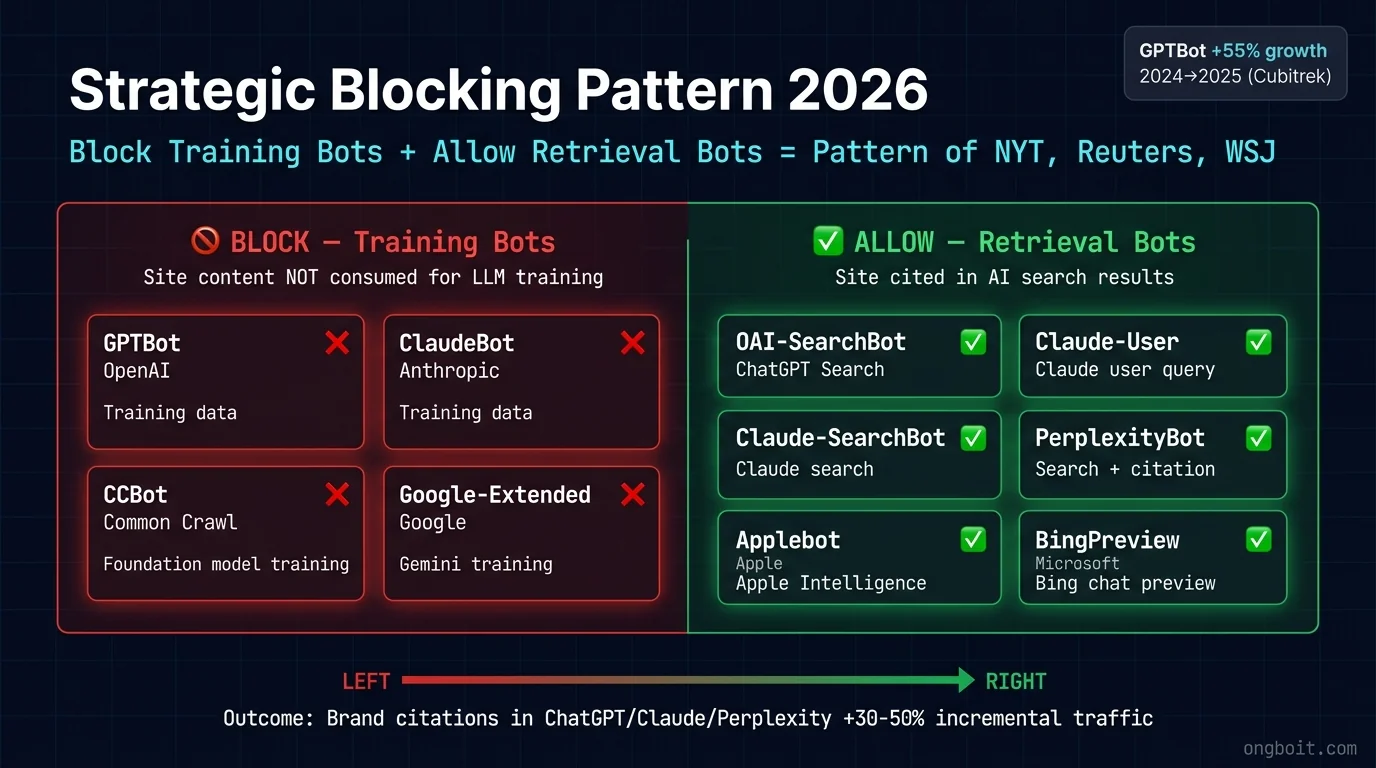
Đây là sub-section mới quan trọng 2026 (chưa có trong checklist 2024). AI crawler audit cho ChatGPT + Claude + Perplexity readiness. Traffic AI crawler grow: GPTBot +55% từ 2024 → 2025, Claudebot gần gấp đôi (Cubitrek 2026).
AI crawler robots.txt (10 bot trong 2 nhóm Training vs Retrieval):
- [55] robots.txt có rule explicit cho cả 10 AI bot 2026 không? 🔴 Critical
- 💡 Tại sao: Default
User-agent: *áp dụng cho mọi bot, không control được training vs retrieval. Pattern publisher lớn (NYT, Reuters, WSJ): block training (GPTBot, ClaudeBot, CCBot, Google-Extended) + allow retrieval (OAI-SearchBot, Claude-User, Claude-SearchBot, PerplexityBot, Applebot, BingPreview). - ✅ Cách check: Mở
yoursite.com/robots.txt, Ctrl+F tìm tên từng bot trong 10 bot trên → mỗi bot có rule riêng (Allow hoặc Disallow), không rơi vào default.
- 💡 Tại sao: Default
| Bot | Vendor | Mục đích | Recommend |
|---|---|---|---|
| GPTBot | OpenAI | Training | Block training |
| OAI-SearchBot | OpenAI | ChatGPT Search retrieval | Allow |
| ClaudeBot | Anthropic | Training | Block |
| Claude-User | Anthropic | User query retrieval | Allow |
| Claude-SearchBot | Anthropic | Claude search | Allow |
| PerplexityBot | Perplexity | Search + citation | Allow |
| CCBot | Common Crawl | Foundation training | Block strict |
| Google-Extended | Gemini training | Block training | |
| Applebot | Apple | Apple Intelligence | Allow |
| BingPreview | Microsoft | Bing chat preview | Allow |
llms.txt + WebMCP (emerging standard 2026):
- [56] Site có file llms.txt ở root không? 🟡 Important
- 💡 Tại sao:
llms.txtlà file Markdown đề xuất 2024 (llmstxt.org), tương tự robots.txt nhưng dành riêng cho AI bot. File liệt kê top 20-30 page quan trọng nhất. AI crawler đọc file này để crawl hiệu quả, không phải brute-force toàn site. - ✅ Cách check: Mở
yoursite.com/llms.txttrên browser → phải hiển thị content Markdown (không 404).
- 💡 Tại sao:
- [57] Có llms-full.txt companion file không? 🟢 Recommended
- 💡 Tại sao: llms-full.txt là version chi tiết của llms.txt, full content map cho AI crawler crawl deeper.
- ✅ Cách check: Mở
yoursite.com/llms-full.txttrên browser → HTTP 200, không 404.
- [58] Có WebMCP action manifest không? 🟢 Recommended 👤 Manual
- 💡 Tại sao: Google Feb 2026 preview cho phép site declare permitted actions cho AI agent (vd: add to cart, subscribe). Chưa stable, defer 6-12 tháng nếu chưa sẵn sàng.
- ✅ Cách check: Mở
yoursite.com/mcp.jsontrên browser → nếu site đã implement, file hiển thị JSON manifest; nếu chưa thì skip (chưa mandatory).
Server health + bot rendering:
- [59] Server log có 5xx errors dưới 0.1% không? 🔴 Critical
- 💡 Tại sao: 5xx = server error, bot bỏ crawl URL đó. Tăng dần báo hiệu server unstable.
- ✅ Cách check: Hosting provider dashboard hoặc Cloudflare Analytics → tab “Errors” → 5xx rate 7-day < 0.1% total request.
- [60] Site infinite scroll có paginated alternative cho bot không? 🟡 Important
- 💡 Tại sao: Bot không scroll như user. Infinite scroll = bot chỉ thấy 10-20 item đầu, miss content còn lại.
- ✅ Cách check: Nếu site dùng infinite scroll, mở
yoursite.com/?page=2→ phải work + show content page 2 (URL parameter alternative).
- [61] Page render bằng JavaScript có SSR/prerender cho bot không? 🔴 Critical
- 💡 Tại sao: Google partial render JS nhưng AI bot (GPTBot, ClaudeBot) thường không execute. SPA không SSR = bot thấy empty page.
- ✅ Cách check: View Source page (Ctrl+U) → thấy actual content trong HTML, không phải
<div id="root"></div>rỗng.
- [62] CSS/JS files có bị block trong robots.txt không? 🔴 Critical
- 💡 Tại sao: Google cần render page với CSS+JS. Block = Google thấy page broken layout → giảm rank (duplicate check #4 nhưng critical re-emphasis).
- ✅ Cách check: Mở robots.txt → không có
Disallow: .css,Disallow: .js,Disallow: /wp-content/themes/.
- [63] Page có mixed content warnings không? 🟡 Important
- 💡 Tại sao: Page HTTPS load resource HTTP (image, script) = browser block + bot warning. UX bad + SEO penalty.
- ✅ Cách check: Mở page → F12 DevTools → tab Console → không có “Mixed Content” warnings màu vàng.
- [64] Có render-blocking resource above the fold không? 🟡 Important
- 💡 Tại sao: CSS/JS block render = LCP chậm = fail Core Web Vitals.
- ✅ Cách check: Paste URL vào PageSpeed Insights → mục “Diagnostics” → audit “Eliminate render-blocking resources” phải pass (không warning).
- [65] Site có favicon.ico không? 🟢 Recommended
- 💡 Tại sao: Favicon = trust signal nhỏ, brand recognition trong tab browser + SERP. Missing = unprofessional impression.
- ✅ Cách check: Mở
yoursite.com/favicon.icotrên browser → file image hiển thị (không 404).
Tại sao AI Crawlers sub-section là critical 2026: Mặc định nhiều theme WordPress + framework Next.js block AI bot vì sợ scraping. Result: site bạn invisible với ChatGPT + Claude. Mình audit ongboit lần đầu tháng 12/2025 → 4 AI bot bị block. Sau khi fix robots.txt + add llms.txt → AI citation tăng từ 0 lên 12 query/tháng trong 6 tuần.
Để hiểu sâu cơ chế Google AI Overviews (xuất hiện ngày càng nhiều trong SERP 2026; khi có AI Overview, click vào link giảm còn 8% so với 15% khi không có, theo Pew Research 2025) + cách content được pick lên cite, đọc AI Overview SEO Guide trên NextGrowth.ai (English).
Advanced crawlability: 4 check senior-level (log, crawl depth, render)
4 check phân biệt audit senior vs junior, vượt ngoài robots/sitemap cơ bản.
- [66] robots.txt vs noindex dùng đúng cơ chế chưa? 🔴 Critical 👤 Manual
- 💡 Tại sao: Disallow trong robots.txt KHÔNG phải cơ chế chặn index (Google nói rõ). Muốn chặn index phải dùng noindex; và page noindex KHÔNG được đồng thời bị Disallow, nếu không bot không đọc được thẻ noindex.
- ✅ Cách check: Page muốn ẩn khỏi index: dùng
noindexmeta, KHÔNG Disallow. Đảm bảo page noindex không bị robots.txt chặn để bot đọc được thẻ.
- [67] Pagination + related links dùng
<a href>crawlable, không button-only? 🔴 Critical- 💡 Tại sao: Pagination/category/related-content phải dùng anchor
<a href>chuẩn. Google không click<button>khi crawl pagination/load-more, dùng button-only thì bot không theo được link. - ✅ Cách check: View source pagination + related module: phải là
<a href>không phải<button>. SSR cho route quan trọng, structured data trong HTML render đầu.
- 💡 Tại sao: Pagination/category/related-content phải dùng anchor
- [68] Đã phân tích server log xem Googlebot thực sự crawl URL nào? 🟡 Important 👤 Manual
- 💡 Tại sao: Log-file analysis cho thấy URL nào Googlebot THỰC SỰ crawl, không chỉ cái sitemap khai. Đây là ranh giới audit senior vs junior.
- ✅ Cách check: Export server/Cloudflare log, filter user-agent Googlebot, đối chiếu URL crawl thật vs URL quan trọng trong sitemap, phát hiện page quan trọng không được crawl.
- [69] Crawl depth của page quan trọng dưới 3 click từ homepage? 🟡 Important
- 💡 Tại sao: Bài cách homepage hơn 3 click thì authority loãng, bot crawl thưa, orphan ngầm. Cần check crawl depth riêng ngoài orphan detection.
- ✅ Cách check: Screaming Frog cột Crawl Depth: page quan trọng tối đa 3. Page sâu hơn thì thêm internal link từ page nông hơn.
3 cách thực hiện audit 69 check theo budget
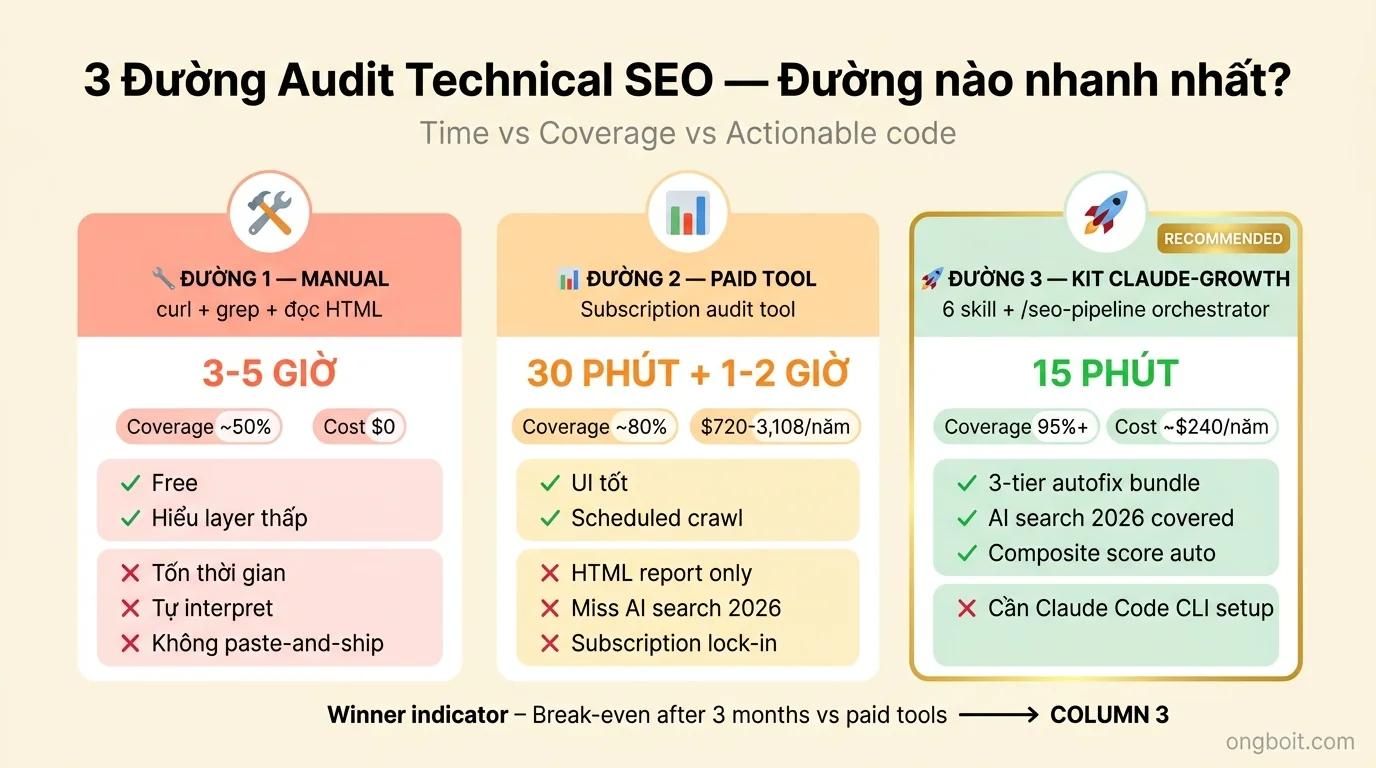
Bạn đã hiểu cần check gì. Câu hỏi tiếp: làm thế nào actually run audit cho site mình? 3 cách, mỗi cách có trade-off khác nhau. Xem danh sách công cụ audit website theo từng yếu tố nếu muốn tự chọn tool, hoặc thuê dịch vụ SEO audit nếu muốn nhận report đã prioritize sẵn.
Cách 1: Manual với curl + grep + đọc HTML
Theoretically possible. Bạn chạy curl commands check từng item, đọc raw HTML, tự interpret output. Ví dụ:
# Check robots.txt + AI bots
curl yoursite.com/robots.txt | grep -E "GPTBot|ClaudeBot|PerplexityBot"

# Check security headers
curl -I yoursite.com | grep -iE "strict-transport-security|content-security-policy"

# Check schema markup
curl yoursite.com/post-slug | grep -A 30 'application/ld+json'
Muốn chạy 69 check bằng 1 lệnh thay vì audit tay?
Kit claude-growth gom toàn bộ skill vào pipeline 1 lệnh trên Claude Code, từ URL tới report + autofix bundle paste-and-ship. Đã test trên 6 site, 190+ bài.
So sánh 3 cách: time vs coverage vs actionable
| Method | Thời gian (50 page) | Coverage | Paste-and-ship code |
|---|---|---|---|
| Manual curl + grep | 3-5 giờ | ~50% | Không |
| Paid audit tool (subscription) | 30 phút setup + 1-2 giờ review | ~80-85% | Không (HTML report) |
Kit claude-growth (6 skill + /seo-pipeline orchestrator) |
15-30 phút 1 lệnh (hoặc dùng từng skill riêng khi debug) | 95%+ | Có (3-tier bundle 23 file) |
⚡ Không đủ thời gian audit full 69 check? Tập trung Critical 10.
Pass 10 cái này = site bạn đã không có critical risk. 30-45 phút work, không cần dụng cụ paid.
- 1robots.txt exist + validatesPass: curl ongboit.com/robots.txt → HTTP 200 + parse không lỗi
- 210 AI bot rules explicitPass: GPTBot, ClaudeBot, PerplexityBot, Google-Extended, Applebot-Extended, CCBot… allow/disallow rõ ràng
- 3sitemap.xml reachable + có lastmodPass: curl ongboit.com/sitemap.xml → HTTP 200 + mỗi URL có <lastmod> ISO 8601
- 4canonical tag self-referencing mọi pagePass: view-source → <link rel=”canonical” href=”URL-page-này”> (không trỏ về homepage)
- 5GSC verified + no soft 404Pass: GSC Coverage report: Submitted: N, Indexed: N (chênh lệch < 5%), Soft 404: 0
- 6HTTPS + SSL Labs grade APass: ssllabs.com/ssltest/analyze.html?d=domain → grade A hoặc A+
- 7HSTS header setPass: curl -I → Strict-Transport-Security: max-age=31536000; includeSubDomains
- 8Organization schema homepagePass: view-source homepage → JSON-LD <script type=”application/ld+json”> với @type: Organization
- 9llms.txt at rootPass: curl ongboit.com/llms.txt → HTTP 200 + Markdown structured (H1 title + H2 sections)
- 10INP < 200ms mobilePass: CrUX field data hoặc Lighthouse mobile profile → INP p75 dưới 200ms
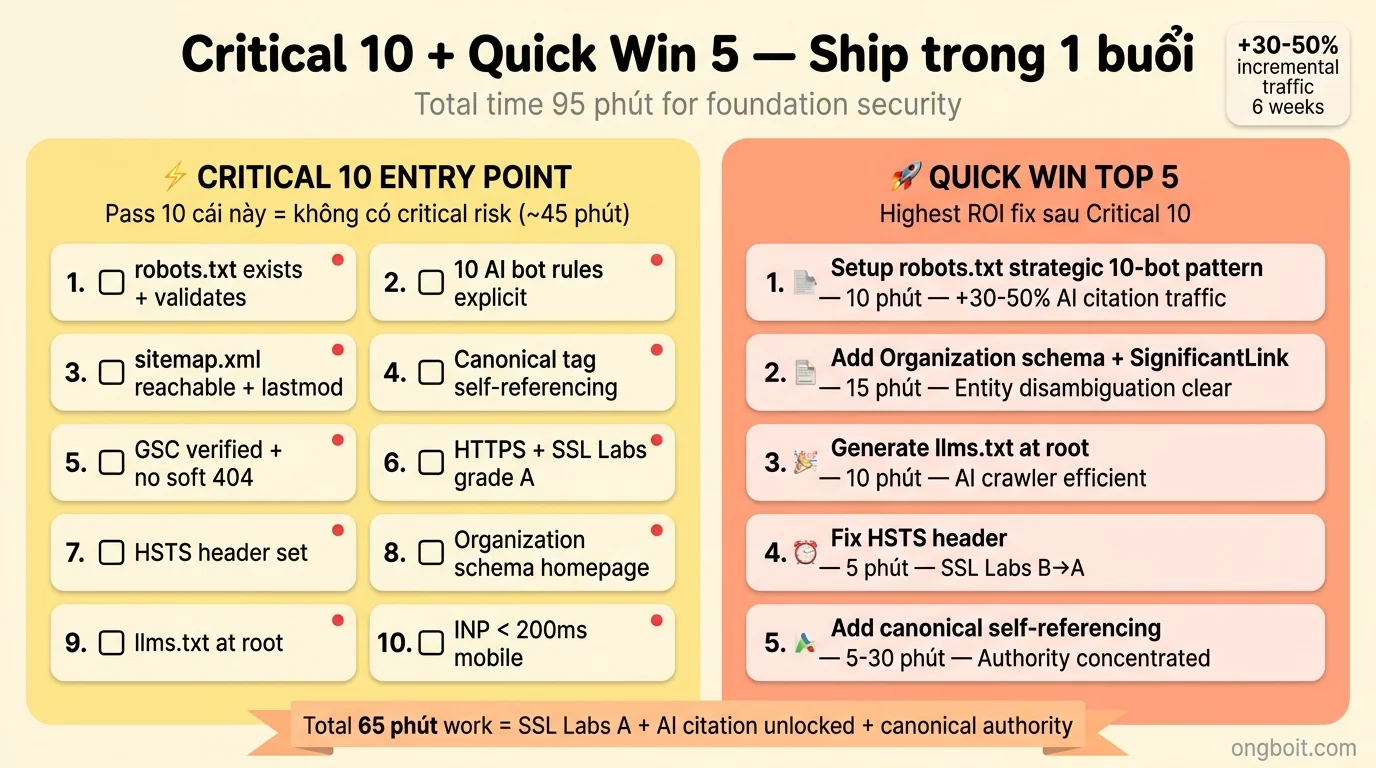
Nếu bạn đã pass Critical 10 và có thêm 1 buổi, đây là 5 fix highest-ROI tiếp theo:
- Setup robots.txt strategic 10-bot pattern (10 phút). Decide: allow training bots (GPTBot, ClaudeBot, CCBot) hay block? Allow retrieval bots (OAI-SearchBot, Claude-User, Claude-SearchBot, PerplexityBot) để được cite trong AI search. Site cited bởi 3 AI engine lớn = +30-50% incremental traffic 6 tuần.
- Add Organization schema homepage + SignificantLink (15 phút). JSON-LD trong
<head>với name, logo, sameAs (LinkedIn, X, Wikipedia). Kèm theo add SignificantLink property cho 3-5 URL quan trọng nhất (pricing, about, top product). Site có entity graph rõ → AI engine disambiguation tốt hơn + agent navigate efficiently.
- Generate llms.txt at root (10 phút). File 2-5KB Markdown listing top 20-30 page quan trọng nhất. AI crawler tốn ít budget hơn = crawl deeper.
- Fix HSTS header (5 phút). Add
Strict-Transport-Security: max-age=63072000; includeSubDomains; preloadtrong .htaccess hoặc Nginx config. SSL Labs grade B → A. HSTS = documented Google ranking signal.
- Add
<link rel="canonical">self-referencing trên mọi page (30 phút nếu manual, 5 phút nếu plugin). Prevent Google split authority giữa duplicate URLs.
Total time: ~65 phút. Impact: SSL Labs grade A + AI citation eligibility đủ điều kiện + entity graph clear + canonical authority concentrated.
🔧 Setup nhanh: API key + CLI tool cần chuẩn bị (nếu chạy tay từng skill)
Bảng dưới list rõ skill nào cần API key / browser / CLI tool. Nếu mua kit claude-growth, các setup này đã preconfig sẵn (chỉ cần paste credential vào .env). Nếu tự chạy tay, làm theo từng row.
| Skill / tool | Yêu cầu API / cài đặt | Chi phí | Chi tiết |
|---|---|---|---|
| seo-technical | Không cần key | 0 đ | Pure crawler, parse HTML/robots.txt/sitemap |
| seo-sitemap | Không cần key | 0 đ | XML parser, no API |
| seo-schema | Không cần key | 0 đ | JSON-LD parser + schema.org validator |
| seo-google | GSC OAuth + CrUX API key (Google Cloud) | 0 đ (free tier) | ~/.config/gsc/credentials.json + CRUX_API_KEY trong .env |
| seo-dataforseo | DataForSEO MCP | ~$0.05/check | DATAFORSEO_LOGIN + DATAFORSEO_PASSWORD trong .env (pay-per-call) |
| geo-crawlers | Không cần key | 0 đ | Parse robots.txt + User-Agent headers |
Gợi ý: setup 1 lần đầu mất 30-90 phút. Sau đó re-run rất nhanh. Nếu chỉ muốn audit 1 lần, mua kit + dùng setup sẵn nhanh hơn là tự setup từ đầu.
Skill coverage: bao nhiêu % 69 check tự động được?
Nếu chạy hết các skill mentions trong Cách 3 (kit claude-growth), coverage ~81% của 69 check Technical SEO, cụ thể 56/69 check auto qua skill, 13/69 cần human judgment. Honest breakdown: