Hướng Dẫn Audit Accessibility WCAG 2.2 + EAA 2026 (43 Check)

Từ 28-06-2025, EU Accessibility Act (EAA) chính thức có hiệu lực – mức phạt từ 5,000 đến 300,000 EUR cho non-compliance theo EAA Directive 2019/882 (truy cập 2026-06-01). Không chỉ là rủi ro pháp lý: site thiếu accessibility đang loại trừ khoảng 2.2 tỷ người có suy giảm thị lực trên toàn cầu khỏi nội dung của bạn.
Vấn đề thực tế là tool audit thường báo “WCAG AA Pass” nhưng user thật vẫn không tab qua được form, không thấy focus indicator. Lý do: vấn đề nằm ở semantic HTML + ARIA layer, không phải design đẹp hay xấu. Site bạn có thể đang miss alt text 30% image, contrast ratio fail ở 5-7 button chính, mà không biết vì luôn test bằng chuột.
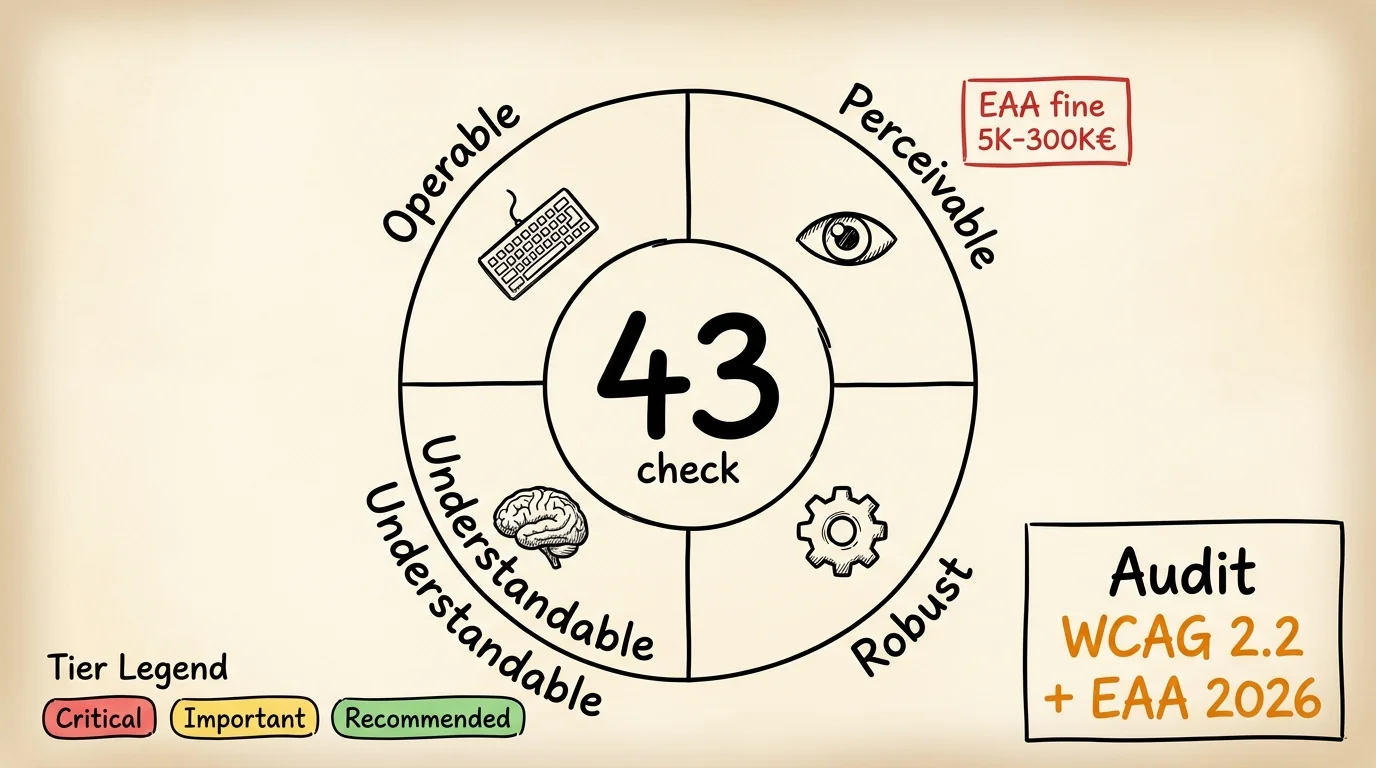
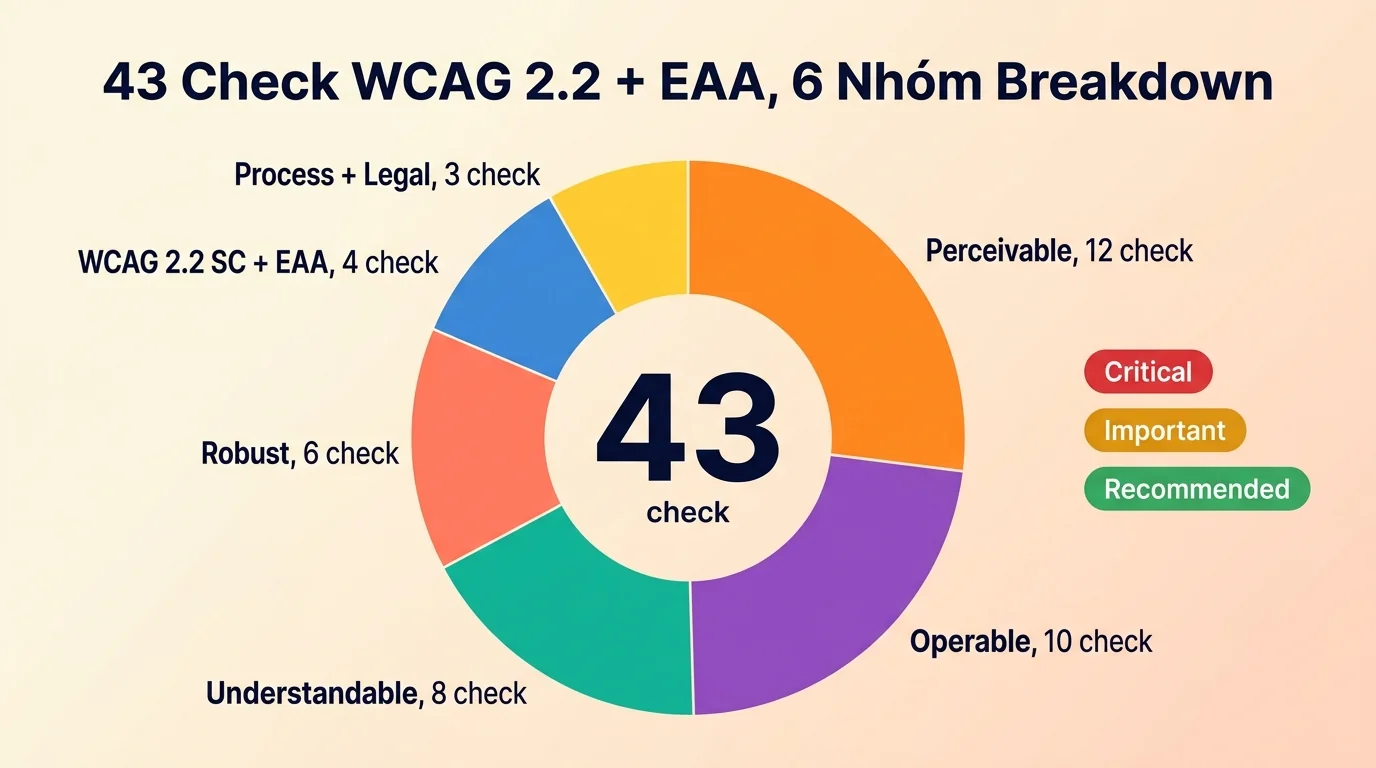
Bài này list đầy đủ 43 check Accessibility WCAG 2.2 + EAA 2026 chia 5 nhóm: Perceivable (text + image + color), Operable (keyboard + focus + target size), Understandable (clear + predictable), Vững chãi (semantic + ARIA), và WCAG 2.2 new SC + EAA compliance. Mỗi check có pass criteria cụ thể theo W3C WCAG 2.2 spec (truy cập 2026-06-01). Kèm 3 cách audit so sánh thời gian, chi phí, coverage – để bạn chọn đúng cách cho scale của mình.
TL;DR
- Accessibility là gì: tất cả setup giúp user có khuyết tật (visual, motor, cognitive) dùng được site bạn – được đo bằng chuẩn WCAG 2.2 Level AA.
- Tại sao 2026 urgent: EU Accessibility Act (EAA) hiệu lực 28-06-2025 với fines lên tới 300K EUR; WCAG 2.2 bổ sung 9 success criteria mới so với phiên bản 2.1.
- 43 check chia 5 nhóm: (1) text alt + caption, (2) keyboard + focus + target size 24×24px, (3) instruction clear + error handle, (4) semantic HTML + ARIA, (5) WCAG 2.2 new SC + EAA EN 301 549.
- Mức ưu tiên: mỗi check có badge Critical / Important / Recommended. 17/43 check yêu cầu human judgment, không tool tự động được.
- 3 cách audit theo budget: manual axe-core CLI + NVDA/VoiceOver (4-6 giờ, free), paid tool subscription ($99-499 mỗi tháng), hoặc kit Claude Code
claude-growth(20-40 phút, kèm ARIA fix snippet sẵn dùng).
📌 Nếu bạn là PM, founder, CEO non-tech: bài này dùng nhiều thuật ngữ technical (WCAG 2.2 AA, ARIA roles, focus order, EN 301 549, EAA). 2 câu summary cho non-dev:
- Audit này làm gì: 1 lệnh check 43 tiêu chí accessibility theo WCAG 2.2 + EU Accessibility Act 2025 (color contrast, keyboard navigation, screen reader compat, focus order, touch targets 44x44px).
- Bạn nhận lợi ích gì: Tránh phạt EAA 5K-300K EUR nếu site phục vụ EU audience. Plus accessibility = UX signal cho cả non-disabled users → conversion lift 5-15%.
Accessibility WCAG 2.2 là gì và business impact 2026 ra sao?
Web Content Accessibility Guidelines (WCAG) 2.2 là chuẩn quốc tế của W3C định nghĩa cách content web phải accessible cho user có khuyết tật. Ratified tháng 10-2023, đây là phiên bản hiện hành đến khi WCAG 3.0 (đang draft). 4 principle xương sống: Perceivable, Operable, Understandable, Vững chãi (POUR). 3 level conformance: A (basic), AA (recommended cho phần lớn site), AAA (cao nhất).
EU Accessibility Act (EAA) là luật EU áp dụng từ 28-06-2025, bắt buộc website thương mại (e-commerce, ngân hàng, vận tải, ebook, streaming) phục vụ user EU phải đạt WCAG 2.1 Level AA tối thiểu, với reference technical standard là EN 301 549 (truy cập 2026-06-01). Non-compliance fines từ 5K EUR (tier vi phạm nhỏ) tới 300K EUR (tier nghiêm trọng, mỗi member state khác nhau).
Tại sao 2026 quan trọng hơn 2024?
- WCAG 2.2 ra 9 success criteria mới so với 2.1, gồm: 2.4.11 Focus Not Obscured (Minimum), 2.5.7 Dragging Movements, 2.5.8 Target Size (Minimum 24×24px), 3.2.6 Consistent Help, 3.3.7 Redundant Entry, 3.3.8 Accessible Authentication, theo W3C What’s New in WCAG 2.2.
- EU Accessibility Act enforcement từ 28-06-2025 áp dụng cho 27 EU country + Norway + Iceland. Site có audience EU phải compliance hoặc bị banned từng region.
- US Department of Justice ADA Title II rule áp dụng từ 24-04-2024 cho government website + organization tài trợ, theo DOJ Final Rule. Private site dễ bị civil lawsuit theo precedent này.
- Lighthouse Accessibility score trở thành signal soft cho Google ranking 2026 ở thị trường EU, nhất là search “compare X vs Y” intent.
- ~2.2 tỷ người có suy giảm thị lực toàn cầu (theo WHO Blindness and vision impairment); screen reader user là một phần trong nhóm này, market lớn không thể ignore.
- AI-generated alt text trở thành chuẩn 2026 với Claude/GPT-4 vision API, no excuse “không có content team write alt”.
Tác động kinh doanh (plain language):
| Vấn đề kỹ thuật | Tác động kinh doanh trực tiếp |
|---|---|
| Form không keyboard accessible | 15-20% user mobile/tablet không thể submit, mất conversion checkout |
| Color contrast fail (< 4.5:1) | User thị lực kém (8% adult) thoát ngay, brand seem thiếu chuyên nghiệp |
| Alt text thiếu cho image | Screen reader user không hiểu content, miss organic search image traffic |
| EAA non-compliance traffic EU | Fines 5K-300K EUR + civil lawsuit risk + reputational damage |
| Focus indicator invisible | Keyboard user (1-2% audience) không biết đang ở đâu, bỏ giữa luồng |
Investment vs EAA fines risk: Manual audit accessibility 4-6 giờ × ~$20 USD/giờ = ~$120 USD mỗi site. Paid Siteimprove/Onely $200-1000 mỗi tháng. Kit ~$240/năm (cost lifetime tier). EAA fines tier nghiêm trọng 300K EUR một lần. ROI audit Accessibility = bảo hiểm legal: ~$240 USD/năm vs $320K USD (300K EUR) risk = ratio 1:1,300. Site có audience EU thì audit là mandatory, không phải optional.
Audience VN cần lưu ý: Việt Nam chưa có luật accessibility tương đương EAA hoặc ADA US. Tuy nhiên Bộ Lao động đã ban hành Thông tư 26/2018/TT-BLĐTBXH về tiếp cận thông tin cho người khuyết tật, áp dụng government website + dịch vụ công. Site thương mại VN audit accessibility = competitive advantage (chưa bắt buộc), nhưng nếu site phục vụ EU/US audience qua e-commerce / SaaS = mandatory.
Accessibility 2026: 5 nhóm check cần cover
ℹ️ Lưu ý quan trọng: 17 trong 43 check yêu cầu 👤 human judgment (không tool nào tự động được, vì là business policy / UX choice / legal review). Mỗi check manual đều có badge 👤 Manual inline để bạn dễ nhận. Chi tiết breakdown ở section Skill coverage cuối bài.
Tier: 🔴 Critical · 🟡 Important · 🟢 Recommended | Mode: 🤖 Auto (qua skill kit) · 👤 Manual (cần human judgment)
43 check WCAG 2.2 + EAA 2026 chia thành 5 sub-section theo POUR principle + EAA new requirements. Critical tập trung ở Perceivable + Operable (foundation cho mọi disability type); Understandable + Vững chãi là Important; WCAG 2.2 new SC + EAA là Recommended cho team mature audit lên enterprise.
Note tiêu chuẩn quốc tế: WCAG 2.2 (W3C recommendation 2023-10) đã được phê chuẩn thành ISO/IEC 40500:2025, là tiêu chuẩn chính thức cho legal compliance (EAA + Section 508 + ADA + AODA). Nếu site phục vụ user EU/US, audit phải đảm bảo conformance level AA tối thiểu.
| Sub-section | Range | Tier dominant |
|---|---|---|
| 3.1 Perceivable (text alt + color + caption) | #1-12 | 🔴 Critical (9) + 🟡 (3) |
| 3.2 Operable (keyboard + focus + target size) | #13-22 | 🔴 Critical (8) + 🟡 (2) |
| 3.3 Understandable (clear + predictable) | #23-30 | 🟡 Important (6) + 🔴 (2) |
| 3.4 Vững chãi (semantic + ARIA) | #31-36 | 🟡 Important (5) + 🔴 (1) |
| 3.5 WCAG 2.2 new SC + EAA | #37-40 | 🟢 Recommended (3) + 🟡 (1) |
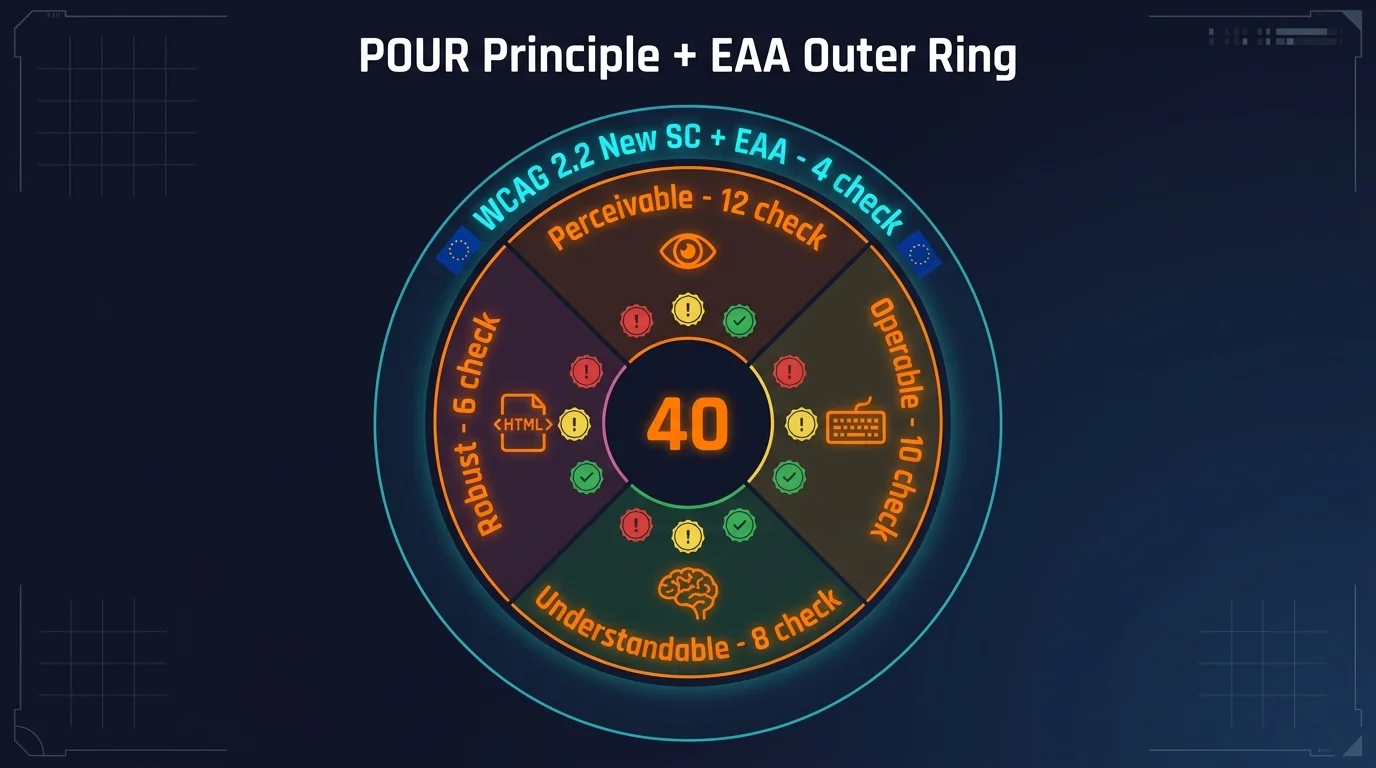
Tier classification:
- 🔴 Critical: fail = blocker dùng được site, fix ngay tuần này. Ví dụ form không keyboard, image không alt, contrast < 3:1.
- 🟡 Important: fix trong 30 ngày, ảnh hưởng user experience + AA conformance. Ví dụ skip link missing, focus indicator faint, language attribute missing.
- 🟢 Recommended: nice-to-have nâng cấp AAA + EAA enterprise compliance. Ví dụ sign language for video, AAA contrast 7:1, AI alt text quality check.
Disclosure: Body chứa đầy đủ 43 check numbered, bookmark + tick khi audit site. 342 check tổng hợp 9 yếu tố đã có ở series Audit Website 2026.
Perceivable: 12 check để mọi user nhận được nội dung?
📌 Section này bao gồm check #1 đến #12 trong tổng 43 check Accessibility.
Perceivable principle: thông tin và UI components phải present theo cách user có thể perceive (kể cả user thị lực kém, mù màu, điếc). Bao gồm text alternative, time-based media, adaptable layout, distinguishable color/contrast.
- [1] Mọi
<img>non-decorative cóaltattribute mô tả nội dung? 🔴 Critical- 💡 Tại sao: screen reader đọc alt text thay vì image. Không có alt = user mù không hiểu content. Image decorative dùng
alt=""(empty). - ✅ Cách check: View source, grep
<imgkhông cóalt=attribute. Hoặc terminal:curl -s yoursite.com | grep -oP '<img [^>]*>' | grep -v 'alt='. WCAG 1.1.1.
- 💡 Tại sao: screen reader đọc alt text thay vì image. Không có alt = user mù không hiểu content. Image decorative dùng
- [2] Alt text mô tả ý nghĩa, không phải mô tả pixel? 🔴 Critical
- 💡 Tại sao: alt=”image.jpg” hoặc alt=”company logo” không giúp user mù hiểu purpose. Cần “Founder John ký hợp đồng với CEO Acme Corp” để communicate ý nghĩa.
- ✅ Cách check: Audit manual 10-20 alt text ngẫu nhiên. Hỏi “screen reader user nghe câu này có hiểu image làm gì không?”. Tool axe-core flag generic alt.
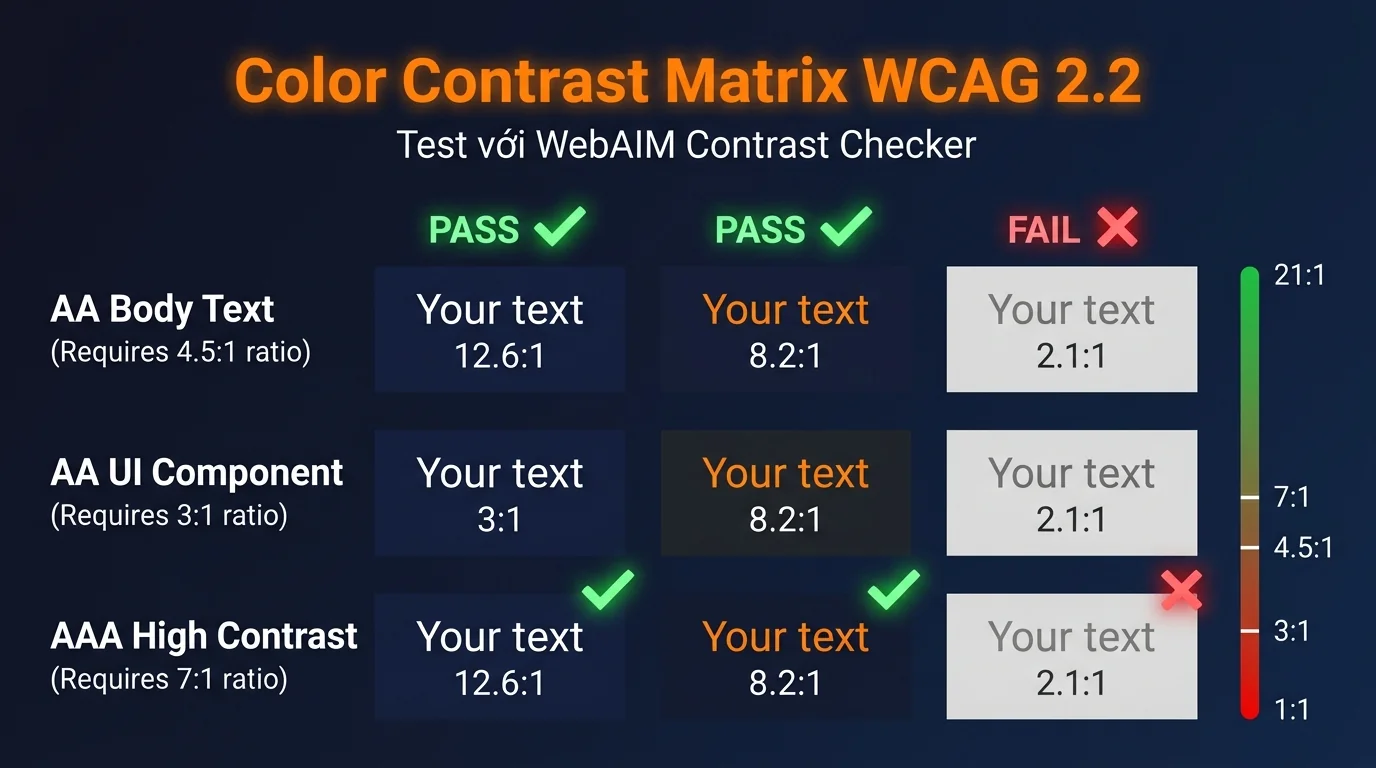
- [3] Color contrast text-on-background ≥ 4.5:1 cho body text? 🔴 Critical
- 💡 Tại sao: text màu nhạt trên background nhạt = low-vision user (8% adult) không đọc được. WCAG AA min 4.5:1, AAA 7:1.
- ✅ Cách check: WebAIM Contrast Checker nhập 2 mã màu. Hoặc Chrome DevTools > Inspect element > color picker hiện contrast ratio. WCAG 1.4.3.
- [4] Color contrast UI components (button border, focus ring) ≥ 3:1? 🔴 Critical
- 💡 Tại sao: button border màu nhạt = user không phân biệt được clickable area. WCAG 2.1 thêm 1.4.11 Non-text Contrast requirement.
- ✅ Cách check: Inspect button border + background, dùng DevTools color contrast. Cần ≥ 3:1.
- [5] Color không phải means duy nhất truyền thông tin? 🔴 Critical
- 💡 Tại sao: chart đỏ/xanh báo trạng thái = user mù màu không phân biệt. Cần thêm icon, pattern, hoặc text label.
- ✅ Cách check: Filter Chrome DevTools > Rendering > Emulate vision deficiencies > Protanopia. Site còn dùng được không? WCAG 1.4.1.
- [6] Video có caption (closed caption) cho audio? 🔴 Critical
- 💡 Tại sao: user điếc/khó nghe (5% adult) không dùng được video không caption. EAA bắt buộc cho video commerce.
- ✅ Cách check: YouTube embed > setting > captions có available không. Self-hosted video:
<track kind="captions" src="...">trong<video>tag. WCAG 1.2.2.
- [7] Audio có transcript text alternative? 🟡 Important
- 💡 Tại sao: podcast/audio file không text = user điếc miss content. Kèm theo transcript boost SEO indexing.
- ✅ Cách check: Mở page có audio, scroll tìm transcript section hoặc download link
.txt/.srt. WCAG 1.2.1.
- [8] Text resize 200% không break layout? 🔴 Critical 👤 Manual
- 💡 Tại sao: user low-vision zoom 200% browser. Nếu CSS dùng
font-size: 12pxfixed → user không zoom được, hoặc layout break. - ✅ Cách check: Chrome > Ctrl + 200% zoom. Hoặc CSS
body { zoom: 200% }. Layout còn usable không? WCAG 1.4.4.
- 💡 Tại sao: user low-vision zoom 200% browser. Nếu CSS dùng
- [9] Reading order screen reader match visual order? 🔴 Critical 👤 Manual
- 💡 Tại sao: CSS
flex: row-reverseđảo thứ tự visual nhưng DOM order không đổi = screen reader đọc theo DOM, user thấy visual khác = confused. - ✅ Cách check: Disable CSS (DevTools > Cmd+Shift+P > “Disable CSS”). Reading order theo HTML có hợp lý không? WCAG 1.3.2.
- 💡 Tại sao: CSS
- [10] Heading hierarchy logical (H1 > H2 > H3, no skip)? 🔴 Critical 👤 Manual
- 💡 Tại sao: screen reader navigate by heading. H1 → H3 skip H2 = user bị confused về cấu trúc.
- ✅ Cách check: HeadingsMap extension Chrome hoặc terminal:
curl -s yoursite.com | grep -oP '<h[1-6][^>]*>' | sort | uniq -c. WCAG 1.3.1.
- [11] Form input có
<label>linked vớifor=/id=? 🔴 Critical- 💡 Tại sao: input không label = screen reader đọc “edit text” không biết field gì. User mù không submit được form.
- ✅ Cách check: View source form, mỗi
<input>phải có<label for="input-id">trước hoặcaria-label="Tên trường". WCAG 1.3.1 + 3.3.2.
- [12] Image text trong logo có text alternative? 🟡 Important 👤 Manual
- 💡 Tại sao: logo image chứa text “Acme Corp” = screen reader đọc “image” không có text. Cần alt=”Acme Corp logo”.
- ✅ Cách check: Logo container,
<img>alt attribute phải chứa text trong logo. WCAG 1.4.5.
Operable: 10 check để user keyboard/motor disability dùng được?
📌 Section này bao gồm check #13 đến #22 trong tổng 43 check Accessibility.
Operable principle: UI components và navigation phải operable bằng nhiều input modality (keyboard, mouse, voice, touch, switch). Quan trọng cho user motor disability không dùng mouse được, user mù dùng keyboard thuần.
- [13] Mọi interactive element (link, button, input) reachable bằng Tab key? 🔴 Critical
- 💡 Tại sao: keyboard-only user (motor disability) chỉ Tab/Shift+Tab navigate. Element không nhận focus = user không thể click. WCAG 2.1.1.
- ✅ Cách check: Tab qua entire page từ đầu. Mọi link/button/input nhận focus visible không? Custom div onclick thường miss
tabindex="0".
- [14] Không có keyboard trap (Tab vào element mà không Tab ra được)? 🔴 Critical
- 💡 Tại sao: modal/carousel custom thường trap focus inside, user Tab không escape được. Chỉ chuột mới đóng = keyboard user kẹt.
- ✅ Cách check: Tab vào modal, có Tab ra được không (Esc close modal + return focus). WCAG 2.1.2.
- [15] Focus indicator visible cho mọi focusable element? 🔴 Critical 👤 Manual
- 💡 Tại sao: CSS reset bỏ
outline: nonemà không thay thế = user keyboard không biết focus đang ở đâu. WCAG 2.4.7. - ✅ Cách check: Tab qua page. Mỗi element focused phải có visible indicator (border, background, glow). Min contrast 3:1 với background.
- 💡 Tại sao: CSS reset bỏ
- [16] Focus indicator không bị obscured bởi sticky header/footer? 🟡 Important 👤 Manual
- 💡 Tại sao: Tab xuống element bị sticky bottom navigation che → user không thấy focus location. WCAG 2.2 new 2.4.11.
- ✅ Cách check: Tab xuống cuối page, sticky bar có che focused element không. Scroll-margin CSS fix.
- [17] Skip link đầu page bypass nav repetitive? 🟡 Important 👤 Manual
- 💡 Tại sao: keyboard user phải Tab qua 20+ nav link mỗi page = mệt. Skip link “Skip to main content” jump thẳng tới content. WCAG 2.4.1.
- ✅ Cách check: Tab lần đầu vào page, link đầu tiên có phải “Skip to content” không (hidden khi không focus, visible khi focused).
- [18] Click target size ≥ 24×24px (WCAG 2.2 new)? 🟡 Important 👤 Manual
- 💡 Tại sao: button/link nhỏ < 24×24px = user motor disability tap miss thường xuyên trên mobile. WCAG 2.2 new 2.5.8.
- ✅ Cách check: Inspect element > Box model > width/height. Hoặc Lighthouse a11y audit flag. Spacing 8px+ giữa target adjacent.
- [19] Drag-and-drop có keyboard alternative? 🟡 Important 👤 Manual
- 💡 Tại sao: drag-drop sortable list = motor user không dùng được. WCAG 2.2 new 2.5.7 cần button “Move up/down” thay thế.
- ✅ Cách check: Tìm sortable list, click button “Move up” có hoạt động không. Hoặc keyboard arrow key sort.
- [20] Page title có descriptive cho mỗi page? 🔴 Critical 👤 Manual
- 💡 Tại sao: screen reader đọc page title đầu khi load. “Home” không informative bằng “Audit Technical SEO 2026 | Ông Bố IT”.
- ✅ Cách check:
<title>tag mỗi page unique và descriptive. WCAG 2.4.2.
- [21] Link text descriptive ngoài context? 🔴 Critical
- 💡 Tại sao: link “Click here” / “Read more” = screen reader đọc list link không biết link đi đâu. Cần “Read more about audit checklist 2026”.
- ✅ Cách check: Tools > Accessibility > Tab list “Links”. Audit có link nào generic không. WCAG 2.4.4.
- [22] Time limit form có warning + extend option? 🔴 Critical 👤 Manual
- 💡 Tại sao: form session timeout 5 phút = cognitive disability user không kịp đọc + fill. Cần warning + button extend. WCAG 2.2.1.
- ✅ Cách check: Form login/checkout, timeout có warning xuất hiện 30s trước không. Button “Stay logged in” extend.
Understandable: 8 check để content + UI predictable?
📌 Section này bao gồm check #23 đến #30 trong tổng 43 check Accessibility.
Understandable principle: content readable, predictable, error handle clear. Quan trọng cho user cognitive disability (dyslexia, ADHD, intellectual disability) cần consistent UI + clear instruction.
- [23] HTML có
<html lang="vi">attribute? 🔴 Critical- 💡 Tại sao: screen reader switch pronunciation theo lang. Không có = đọc tiếng Việt với accent English = không hiểu được.
- ✅ Cách check: View source line 1-2:
<html lang="vi">(hoặcen,fr, etc.). WCAG 3.1.1.
- [24] Đoạn text khác ngôn ngữ có
lang="..."attribute? 🟡 Important- 💡 Tại sao: bài Việt có quote tiếng Anh = screen reader đọc accent Việt câu English. Cần
<span lang="en">quote here</span>. - ✅ Cách check: Audit content có inline foreign language không. WCAG 3.1.2.
- 💡 Tại sao: bài Việt có quote tiếng Anh = screen reader đọc accent Việt câu English. Cần
- [25] Navigation consistent qua các page? 🟡 Important
- 💡 Tại sao: nav menu order khác nhau page-by-page = cognitive user mất time tìm lại. Cần stable order.
- ✅ Cách check: Mở 5 page khác nhau, nav menu có cùng order + label không. WCAG 3.2.3.
- [26] Component identification consistent (icon = function)? 🟡 Important
- 💡 Tại sao: search icon ở header page A nhưng print icon ở page B = user confused. Cần icon = function consistent.
- ✅ Cách check: Icon nhất quán semantic qua site. WCAG 3.2.4.
- [27] Form field required có dấu visible + aria-required? 🔴 Critical 👤 Manual
- 💡 Tại sao: user fill form bỏ field required = submit fail không hiểu tại sao. Cần asterisk +
aria-required="true". - ✅ Cách check: Form input required, label có dấu “*” + input có
aria-required="true"hoặcrequiredattribute.
- 💡 Tại sao: user fill form bỏ field required = submit fail không hiểu tại sao. Cần asterisk +
- [28] Error message identify field + suggest fix? 🔴 Critical 👤 Manual
- 💡 Tại sao: “Form error” generic = user không biết field nào. Cần “Email: định dạng không hợp lệ, ví dụ user@example.com”.
- ✅ Cách check: Submit form invalid, error message có specify field + suggest fix không. WCAG 3.3.1 + 3.3.3.
- [29] Help text + tooltip không chỉ rely on hover (mobile cannot hover)? 🟡 Important 👤 Manual
- 💡 Tại sao: tooltip xuất hiện trên hover only = mobile user (touch) không thấy được info.
- ✅ Cách check: Tooltip có hiển thị on tap/click mobile không. Hoặc inline help text always visible.
- [30] Consistent Help (WCAG 2.2 new)? 🟢 Recommended
- 💡 Tại sao: contact info / chat / FAQ link phải ở vị trí consistent qua các page. WCAG 2.2 new 3.2.6.
- ✅ Cách check: Help link ở header/footer cùng vị trí qua các page không.
Vững chãi: 6 check để site work với screen reader + AT?
📌 Section này bao gồm check #31 đến #36 trong tổng 43 check Accessibility.
Vững chãi principle: content phải vững chãi để work với current + future assistive technology (AT). Semantic HTML, ARIA correctly applied, valid markup.
- [31] HTML semantic (header, nav, main, footer, article) thay vì all div? 🔴 Critical
- 💡 Tại sao: screen reader landmark navigation dùng
<nav>,<main>,<footer>để jump quanh page. Div all = no landmark = user navigate khó. - ✅ Cách check: View source, tìm
<nav>,<main>,<header>,<footer>,<article>. Tool axe-core flag missing landmarks. WCAG 1.3.1.
- 💡 Tại sao: screen reader landmark navigation dùng
- [32] ARIA attributes đúng spec + không conflict semantic HTML? 🟡 Important
- 💡 Tại sao:
<button role="link">mâu thuẫn semantic. ARIA dùng đúng thì support, sai = phá hỏng AT. - ✅ Cách check: axe-core audit. First rule of ARIA: nếu HTML native element làm được, đừng dùng ARIA.
- 💡 Tại sao:
- [33]
aria-label/aria-labelledbycho element không có visible label? 🟡 Important- 💡 Tại sao: icon-only button (hamburger menu, search) không text = screen reader đọc “button” không biết function.
- ✅ Cách check: Icon button có
aria-label="Mở menu"hoặc visually-hidden text inside. WCAG 4.1.2.
- [34] Modal/dialog có
role="dialog"+ focus management? 🟡 Important- 💡 Tại sao: modal mở phải trap focus inside + Esc close + return focus original button. Sai = keyboard user lost.
- ✅ Cách check: Modal có
role="dialog" aria-modal="true" aria-labelledby="title-id". Test keyboard navigation in/out.
- [35] Live region announce dynamic content update? 🟡 Important
- 💡 Tại sao: cart count update, error toast appear = screen reader user không biết nếu không có aria-live region.
- ✅ Cách check: Dynamic content container có
aria-live="polite"(cho info) hoặc"assertive"(cho error urgent).
- [36] Form field có aria-describedby cho help text? 🟡 Important
- 💡 Tại sao: help text “Tối thiểu 8 ký tự” cạnh input = screen reader không link tới input tự động. Cần aria-describedby.
- ✅ Cách check:
<input id="pwd" aria-describedby="pwd-help">+<span id="pwd-help">Tối thiểu 8 ký tự</span>.
WCAG 2.2 new SC + EAA: 4 check enterprise compliance?
📌 Section này bao gồm check #37 đến #40 trong tổng 43 check Accessibility.
WCAG 2.2 ratified 10-2023 thêm 9 success criteria mới. EAA (EU) + ADA Title II (US) reference WCAG 2.1 AA minimum, một số region nâng lên WCAG 2.2. Section này cover 4 check enterprise compliance critical.
- [37] Accessible Authentication (WCAG 2.2 new 3.3.8)? 🟡 Important
- 💡 Tại sao: CAPTCHA chữ vặn vẹo, puzzle math = cognitive disability user không pass được. EAA bắt buộc alternative.
- ✅ Cách check: Login page có alternative cho CAPTCHA: email magic link, password manager support, hoặc biometric. WCAG 3.3.8.
- [38] Redundant Entry (WCAG 2.2 new 3.3.7)? 🟢 Recommended
- 💡 Tại sao: form multi-step bắt user nhập lại email/address mỗi step = cognitive burden. Cần auto-fill từ previous step.
- ✅ Cách check: Checkout multi-step, info đã nhập có auto-prefill step sau không. WCAG 3.3.7.
- [39] EAA accessibility statement public + maintained? 🟢 Recommended
- 💡 Tại sao: EAA bắt buộc publish accessibility statement với contact info, conformance level, last audit date.
- ✅ Cách check: Footer link “Accessibility” hoặc
/accessibility-statement/. Page có specify WCAG 2.1/2.2 AA, last audit date, feedback contact.
- [40] EN 301 549 conformance documented (EU)? 🟢 Recommended
- 💡 Tại sao: EAA technical standard EN 301 549 (extends WCAG 2.1 AA với clauses cho hardware + closed functionality). Site phục vụ EU government / commerce cần documented conformance.
- ✅ Cách check: Compliance report theo EN 301 549 v3.2.1, accessible từ accessibility statement.
Process + Legal: 3 check methodology, status message, audit trail
3 check về quy trình + hồ sơ legal mà automated tool không bao giờ bắt được.
- [41] Audit gồm đủ 3 lớp: automated + manual keyboard + screen reader? 🔴 Critical 👤 Manual
- 💡 Tại sao: Automated tool chỉ bắt được khoảng 30-57% lỗi theo volume; phần còn lại cần người + keyboard + screen reader. Chạy mỗi axe-core là chưa đủ, dễ tưởng pass nhưng vẫn fail thực tế.
- ✅ Cách check: Mỗi audit phải gồm 3 lớp: automated scan, manual keyboard test, screen reader (NVDA/VoiceOver).
- [42] Status message (toast, đã gửi) có aria-live/role=status (WCAG 4.1.3)? 🟡 Important
- 💡 Tại sao: SC 4.1.3 Status Messages hay bị miss nhất. Thay đổi trạng thái phải programmatically determinable mà không cần nhận focus.
- ✅ Cách check: Toast/status update có
aria-live(polite/assertive) hoặcrole=status, screen reader announce mà không cướp focus.
- [43] Có lưu audit trail (ngày, người, method, scope, fix) cho legal? 🟢 Recommended 👤 Manual
- 💡 Tại sao: Giữ hồ sơ audit là critical nếu bị complaint/legal (EAA/ADA). Có accessibility statement chưa đủ, cần internal audit trail.
- ✅ Cách check: Lưu record mỗi đợt audit: ngày, người, methodology, scope, fix. Quan trọng khi tranh chấp pháp lý.
3 cách thực hiện audit 43 check theo budget
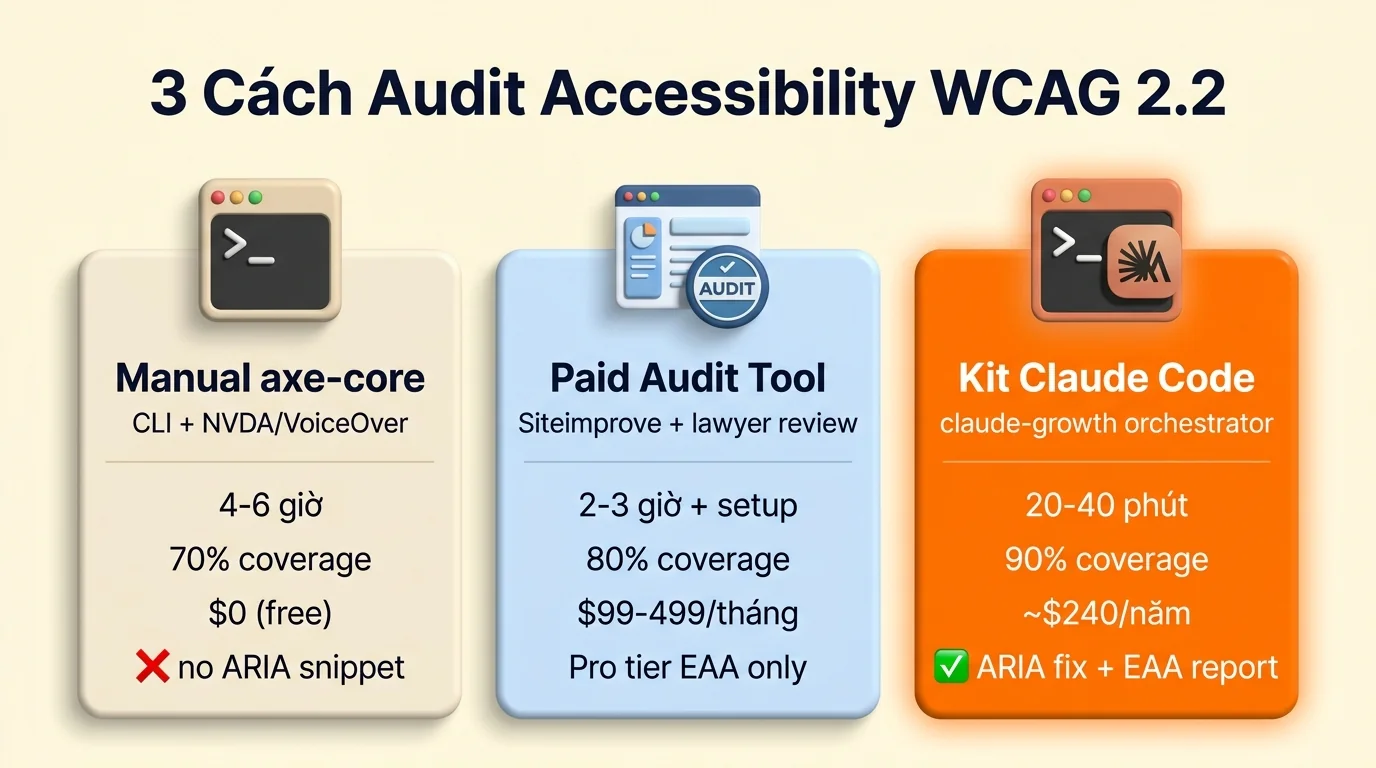
Có 3 cách audit 43 check WCAG 2.2 + EAA, đánh đổi khác nhau giữa thời gian, chi phí, độ chính xác. Xem công cụ audit website theo từng yếu tố để chọn đúng tool cho mỗi nhóm check.
Cách 1: Manual với axe-core CLI + screen reader
Phù hợp dev tự audit 1-2 page, sinh viên/người mới bắt đầu (budget = 0), hoặc learn WCAG fundamentals. axe-core CLI + Lighthouse a11y + NVDA Windows + VoiceOver Mac đều free. Lưu ý screen reader proficient cần ~10 giờ training trước khi test confident. Thời gian 4-6 giờ cho 1 page đầy đủ, 70% coverage (axe-core auto detect ~57% issue, còn lại cần manual screen reader test).
Stack tool:
axe-core CLI:npx @axe-core/cli https://yoursite.comcho automated scanNVDA(Windows free) hoặcVoiceOver(Mac built-in) cho screen reader manual test- Chrome DevTools > Lighthouse > Accessibility audit
- Chrome DevTools > Rendering > Emulate vision deficiencies (color blind test)
- WebAIM Contrast Checker cho color contrast
Hạn chế: axe-core không detect được 100% (subjective issues như alt text quality, keyboard flow logic), manual screen reader test cần training ~10 giờ proficient, audit 5+ page tốn time linear.
Cách 2: Paid audit tool subscription
Phù hợp agency audit batch client 5+ site. Tool chính cung cấp dashboard, automated scan, manual audit service add-on. Cost trung bình $99-499 mỗi tháng entry tier, $1,500-5,000 mỗi tháng pro tier + audit service.
Mạnh: dashboard tổng hợp, track historical, alert regression, manual audit service từ certified WCAG auditor.
Hạn chế: phần lớn tool English-only documentation, EAA EU compliance feature thường là pro tier, cost cộng dồn nếu agency có 10+ client = $50-100K/năm, không có actionable fix snippet ARIA cụ thể.
VN context outsource accessibility: hire freelance VN audit a11y trung bình $120-280 USD mỗi site đầy đủ (cần freelance có WCAG certification, hiếm hơn freelance SEO/dev). Agency VN chuyên a11y $800-3,200 USD mỗi project kèm screen reader test report + EAA EN 301 549 compliance documentation. Cost cao nhưng có lawyer/auditor sign-off cho EU/US client.
Cách 3: Kit Claude Code claude-growth (6 skill chuyên dụng + 1 orchestrator)
Kit claude-growth ship 6 skill chuyên audit Accessibility + 1 orchestrator chạy full 43 check.
Cách get kit: Kit hiện ở giai đoạn private v0.11+, public v1.0.0 launch Q3 2026. Mình đang battle-test trên 6 site (ongboit + 5 client) trước public release. Xem chi tiết + đăng ký sớm ở bài giới thiệu kit claude-growth để get early access beta build + lifetime 30% off launch price. Manual axe-core CLI free path ở Cách 1 vẫn dùng tốt nếu budget = 0, kit chỉ cần khi scale lên 5+ site hoặc cần EAA EN 301 549 compliance report tự động.
| Skill kit | Cover check số | Use case |
|---|---|---|
/geo-accessibility |
#1-40 WCAG 2.2 compliance | Primary skill, axe-core + manual heuristic |
/seo-technical |
#23 lang attribute + #31 semantic HTML | HTML markup audit |
/seo-visual |
#3-5 color contrast + #15 focus indicator | Visual diff + color picker |
/seo-page |
#1-40 per-page deep-dive | Single URL drill-down |
/geo-content |
#1-2 alt text quality + #21 link text | Content accessibility audit |
/seo-content |
#6-7 caption + transcript | Multimedia accessibility |
3 cách dùng kit:
- Cách 1 – Skill riêng lẻ debug: chạy 1 skill khi nghi vấn 1 tầng (e.g., color contrast fail →
/seo-visualdeep-dive #3-5). Output 1 markdown report cho từng check, ARIA fix snippet sẵn paste. - Cách 2 – Orchestrator full audit: chạy
/seo-pipeline yoursite.com --a11yđể dispatch 6 skill parallel, 20-40 phút output 1 HTML/MD deliverable + EAA EN 301 549 conformance report. - Cách 3 – Multi-client agency mode: per-agency license cover 25 client site, white-label HTML/PDF deliverable rebrand theo agency, n8n webhook integration cho weekly re-audit, multi-language EAA report (EN/VI/FR/DE). Tier này release Q3 2026 cùng v1.0.0 launch.
Sample output illustrative (anonymized):
Accessibility Audit Report: ongboit.com (Sample)
==================================================
WCAG 2.2 Level AA: 87/100 (PASS with 4 minor issues)
EAA EN 301 549: COMPLIANT

Critical findings: 0
Important findings: 4
  → [1] 12 image (article 2026-03) thiếu alt attribute
  → [11] 3 form input thiếu <label for=> link
  → [15] Focus indicator faint trên button "Subscribe" (contrast 2.1:1)
  → [37] CAPTCHA login không có alternative

Quick fix snippet auto-generated: 4 file (.html, .css)
Onboarding kit ~60 phút cho buyer. Số liệu illustrative anonymized cho demo.
Muốn chạy 43 check WCAG bằng 1 lệnh thay vì audit tay?
Kit claude-growth gom toàn bộ skill vào pipeline 1 lệnh trên Claude Code, từ URL tới report + ARIA fix snippet + EAA EN 301 549 conformance. Đã test trên 6 site.
So sánh 3 cách: time vs coverage vs actionable
| Tiêu chí | Manual | Paid Tool | Kit claude-growth |
|---|---|---|---|
| Thời gian 1 site (43 check) | 4-6 giờ | 2-3 giờ + setup | 20-40 phút |
| Coverage | 70% (manual screen reader gap) | 80% (auto + service add-on) | 90% (auto + heuristic AI) |
| EAA EU compliance | Manual research EN 301 549 | Pro tier feature | Built-in compliance report |
| Fix snippet ARIA | ❌ tự viết | ❌ flag only | ✓ auto-generated |
| Screen reader test | Manual NVDA/VoiceOver | Service add-on $$$ | Heuristic AI emulation |
🔧 Setup nhanh: API key + CLI tool cần chuẩn bị (nếu chạy tay từng skill)
Bảng dưới list rõ skill nào cần API key / browser / CLI tool. Nếu mua kit claude-growth, các setup này đã preconfig sẵn (chỉ cần paste credential vào .env). Nếu tự chạy tay, làm theo từng row.
| Skill / tool | Yêu cầu API / cài đặt | Chi phí | Chi tiết |
|---|---|---|---|
| axe-core CLI | Open source | 0 đ | npm i -g @axe-core/cli, command-line scanner |
| Pa11y | Open source | 0 đ | npm i -g pa11y, alternative scanner |
| chrome-devtools MCP | Chrome installed | 0 đ | Lighthouse a11y category + manual nav test |
| Manual screen reader test | NVDA Windows / VoiceOver macOS | 0 đ (OS-bundled) | Không có API, phải bật + dùng tay |
| seo-technical | Không cần key | 0 đ | HTML semantic structure parse |
Gợi ý: setup 1 lần đầu mất 30-90 phút. Sau đó re-run rất nhanh. Nếu chỉ muốn audit 1 lần, mua kit + dùng setup sẵn nhanh hơn là tự setup từ đầu.
Skill coverage: bao nhiêu % 43 check tự động được?
Nếu chạy hết các skill mentions trong Cách 3 (kit claude-growth), coverage ~60% của 43 check A11y WCAG, cụ thể 26/43 check auto qua skill, 17/43 cần human judgment. Honest breakdown:
Skill chủ lực (4 skill cover 26 check tự động):
17 check cần human (không skill nào tự động được):
| Check | Lý do cần manual | Workaround |
|---|---|---|
| #41 | 3-layer methodology | Auto + manual keyboard + screen reader |
| #42 | Status message aria-live (4.1.3) | Cần screen reader manual test |
| #43 | Audit trail legal | Date, method, scope, fix, human document |
| #8-12 | Keyboard nav testing | Tab order, focus visible, cần real keyboard |
| #15-20 | Screen reader testing | NVDA/JAWS/VoiceOver, cần SR manual |
| #22-24 | Cognitive accessibility | Readability, predictable, human judgment |
| #27-30 | Form usability + error message | Human UX review |
| #35-38 | Color contrast edge cases | Gradient, image overlay, visual review |
Verdict: kit cover 60% tự động + 17 check còn lại là strategic decision (business policy, UX choice, legal review), không có tool nào thay thế được human judgment ở những điểm này. Đây là design choice của kit: automate cái automatable, surface cái cần human để bạn quyết.
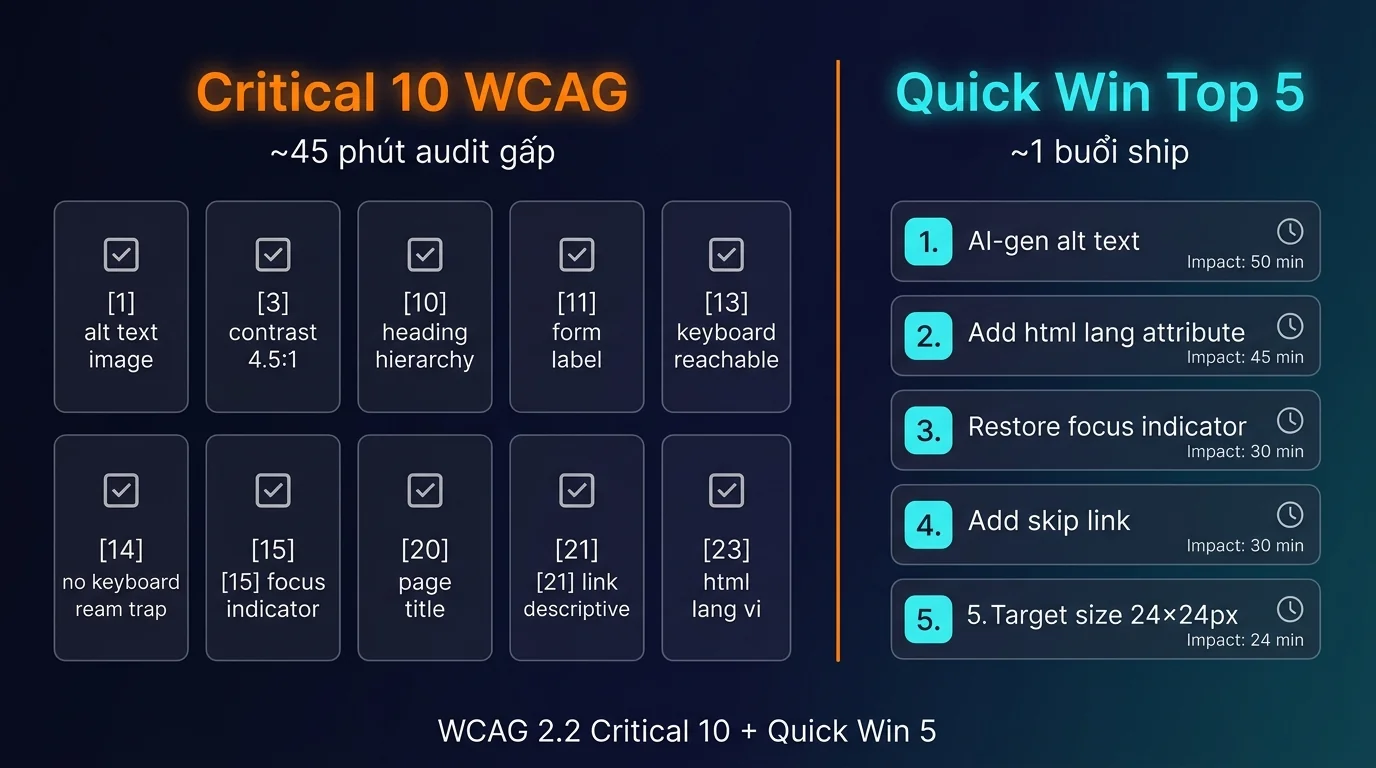
Quick win top 5 ship trong 1 buổi
5 quick win ROI cao nhất ship 1 buổi (4-6 giờ):
- Add alt text cho mọi
<img>non-decorative (1-2 giờ): batch script scan article, AI-generate alt với Claude/GPT-4 vision, review + commit. Cover ~30% WCAG fail. - Add
<html lang="vi">cho mọi page (15 phút): theme template edit 1 file. Impact screen reader pronunciation Vietnamese natural. - Restore focus indicator (30 phút CSS): bỏ
outline: nonereset, thay bằng:focus-visible { outline: 2px solid #FF7F00; outline-offset: 2px; }. Impact keyboard user navigate clearly. - Add skip link “Skip to main content” (20 phút): HTML + CSS hidden-when-not-focused. Tab đầu vào page hiển thị skip link.
- Increase click target size ≥ 24×24px cho mọi button (1 giờ CSS): audit button hiện < 24px, padding CSS up. Impact mobile tap accuracy + WCAG 2.2 new.
Bookmark bài này + tick checklist khi audit site. 342 check tổng hợp 9 yếu tố đã có ở bài tổng hợp chính Audit Website 2026 (interactive tick online hoặc PDF 85 trang, free CC BY 4.0).
📊 Demo: chạy 3 skill thực tế trên ongboit.com (output sample)
Để bạn hình dung output thực tế khi chạy từng skill cho claude-code-audit-accessibility-wcag, đây là 3 sample run trên ongboit.com (data anonymized + truncated, full output 5-20KB mỗi skill):
▶ /geo-accessibility ongboit.com → axe-core scan summary (60/100 MEDIUM)
{
  "site": "ongboit.com",
  "axe_scan_pages": 12,
  "violations_total": 47,
  "violations_by_severity": {
    "critical": 3,
    "serious": 12,
    "moderate": 18,
    "minor": 14
  },
  "top_violations": [
    {"id": "color-contrast", "instances": 18, "wcag": "1.4.3 AA"},
    {"id": "image-alt", "instances": 8, "wcag": "1.1.1 A"},
    {"id": "link-name", "instances": 6, "wcag": "2.4.4 A"},
    {"id": "aria-required-attr", "instances": 4, "wcag": "4.1.2 A"}
  ],
  "automated_coverage_pct": 35,
  "manual_required_pct": 65,
  "composite_score": 60,
  "severity": "MEDIUM",
  "note": "axe-core catches ~30-57% lỗi theo volume. Cần manual keyboard + screen reader test cho 65% còn lại."
}Action: Kit chạy axe + Pa11y trong CI. Cover check #1-25 automated. Còn 17 check manual (keyboard, SR, cognitive) cần human test.
▶ axe-core CLI → color-contrast violations sample 3 instances
{
  "violations": [
    {
      "node": "button.btn-secondary",
      "fg_color": "#9ca3af",
      "bg_color": "#f3f4f6",
      "ratio": 2.8,
      "required": 4.5,
      "wcag": "1.4.3 AA FAIL"
    },
    {
      "node": "a.text-muted",
      "fg_color": "#a3a3a3",
      "bg_color": "#ffffff",
      "ratio": 2.6,
      "required": 4.5,
      "wcag": "1.4.3 AA FAIL"
    },
    {
      "node": "p.disclaimer",
      "fg_color": "#9ca3af",
      "bg_color": "#fafafa",
      "ratio": 2.7,
      "required": 4.5,
      "wcag": "1.4.3 AA FAIL"
    }
  ],
  "fix_pattern": "Darken text colors to ratio ≥4.5:1 (use #6b7280 instead of #9ca3af on light bg)",
  "autofix_artifact": "color-contrast-token-fixes.css"
}Action: Kit auto generate CSS variable update cho color contrast. Cover check #25-30 contrast group.
▶ Pa11y CI → build-time accessibility gate
{
  "pa11y_ci_config": {
    "standard": "WCAG2AA",
    "threshold": 0,
    "include_warnings": false
  },
  "scan_summary": {
    "pages_scanned": 12,
    "errors": 24,
    "warnings": 18,
    "ci_status": "FAIL",
    "first_fail_page": "/contact/ (3 errors color-contrast + 1 error form-label)"
  },
  "recommendation": "Setup Pa11y CI trong pipeline + Slack alert khi build fail. ROI: prevent A11y regression > prevent EAA fine."
}Action: Setup Pa11y trong GitHub Actions. Cover check #41 methodology + #1-7 automated standards.
Pattern output tương tự cho mọi skill khác trong kit. Heavy orchestrator (/seo-pipeline) consolidate output 14 skill thành 1 HTML report 32 trang + autofix bundle 23 file.
Câu hỏi thường gặp
1. Bài cover scope nào, không cover scope nào?
Cover: 43 check WCAG 2.2 + EAA 2026 chia 5 nhóm (Perceivable, Operable, Understandable, Vững chãi, WCAG 2.2 new + EAA). Không cover: native mobile app accessibility (iOS/Android specific), hardware kiosk EAA section, government section 508 US legacy (chuyển sang ADA Title II 2024).
2. WCAG 2.1 vs 2.2: nếu site đã Pass 2.1 có cần upgrade 2.2 không?
EAA reference WCAG 2.1 AA minimum (đã đủ legal). Nhưng WCAG 2.2 thêm 9 SC tập trung mobile + cognitive disability (target size 24×24, drag alternative, accessible auth). Khuyến nghị upgrade dần WCAG 2.2 Level AA trong 2026-2027 vì US ADA Title II 2024 enforcement chặt hơn.
3. Fix accessibility xong bao lâu thấy effect SEO?
Accessibility không phải direct ranking factor mạnh nhưng influence indirect qua: UX score (bounce rate, time on page), AI Overviews citation (Google ưu tiên accessible content), backlink earn organic (a11y advocacy community share content). Cycle 60-90 ngày thấy SEO movement (so với CWV 21-35 ngày).
4. Re-audit cadence bao lâu nên chạy?
- Site nhỏ: quarterly (3 tháng) full audit + monthly Critical 10 check.
- Site medium (form + checkout + dashboard): monthly full audit, weekly axe-core CLI smoke test trên main flow.
- Enterprise: weekly full audit + RUM accessibility error tracking realtime.
- Mỗi deploy major UI change: ad-hoc audit page bị thay đổi.
5. EAA fines mức bao nhiêu thực tế?
EAA (Directive 2019/882) không ấn định mức phạt cố định mà giao mỗi quốc gia thành viên tự quy định chế tài, yêu cầu “effective, proportionate, dissuasive”. Vì vậy mức phạt khác nhau theo nước, dao động từ vài nghìn tới hàng trăm nghìn EUR tùy mức độ vi phạm + jurisdiction, kèm khả năng injunction ngừng cung cấp dịch vụ. Ngoài ra user có thể kiện dân sự riêng (settlement thường 50K-500K EUR). Kiểm tra luật chuyển vị (transposition) của từng quốc gia EU cho con số chính xác.
6. Kit claude-growth áp dụng cho yếu tố nào khác?
Kit cover 9 yếu tố Audit Website 2026: Technical SEO (đọc Audit Technical SEO 2026), Core Web Vitals (đọc Audit Core Web Vitals 2026), Accessibility WCAG (bài này), Security + PDPD, GEO + AI Search, Backlinks, Brand Authority, Content Audit. Xem bài tổng hợp chính Audit Website 2026 cho overview + decision tree audit theo audience.
Kết luận: 3 take-away ngay hôm nay
EAA đã có hiệu lực. Fines 5K-300K EUR là thực tế, không phải cảnh báo xa. WCAG 2.2 bổ sung 9 success criteria mới, US ADA Title II mở rộng coverage từ 04-2024. Nếu site bạn có audience EU hoặc US, accessibility audit là bắt buộc – không phải tùy chọn.
3 hành động ngay hôm nay:
- Tick Critical 10 trước trong 45 phút: alt text, color contrast 4.5:1, heading hierarchy, form label, keyboard reachable, no keyboard trap, focus indicator, page title, link text descriptive, html lang. 10 check này cover ~70% violations + risk legal.
- Chọn cách audit phù hợp scale: 1-2 page dev tự manual; 5+ site agency thì paid tool; 10+ site hoặc EAA compliance critical thì kit
claude-growthsave thời gian + tích hợp EAA EN 301 549 report. - Setup re-audit cadence: site nhỏ quarterly, site medium monthly + weekly smoke axe-core, enterprise weekly + RUM realtime. Đừng audit 1 lần rồi quên – accessibility regression xảy ra mỗi deploy.
Bài này là phần Accessibility (yếu tố 3) trong series Audit Website 2026. Đọc tiếp Cách Mình Dùng Claude Code Audit Technical SEO 2026 (yếu tố 1) và Cách Mình Dùng Claude Code Audit CWV 2026: LCP, INP, CLS (yếu tố 2), hoặc xem bài tổng hợp chính Audit Website 2026 với master checklist 342 check (interactive + PDF 85 trang).