Cách Mình Dùng Claude Code Audit CWV 2026: LCP, INP, CLS

Lighthouse báo LCP 1.8s nhưng GSC field data vẫn fail trên 30% URL? INP > 200ms khiến site tụt rank tự nhiên dù content + backlinks không đổi? Tool audit báo “Performance 95/100” nhưng bounce rate tăng 18%? Vấn đề nằm ở field data layer, không phải code optimization. Site bạn đang đo CWV trên dev machine fast, miss long-tail device 4G thực tế.
Tệ hơn: nhiều dev vẫn optimize FID – metric đã deprecated từ tháng 3 năm 2024. Google đã chính thức thay FID bằng INP làm Core Vital. FID chỉ đo first input, INP đo toàn bộ session. Fix FID = fix sai chỗ, rank vẫn drop.
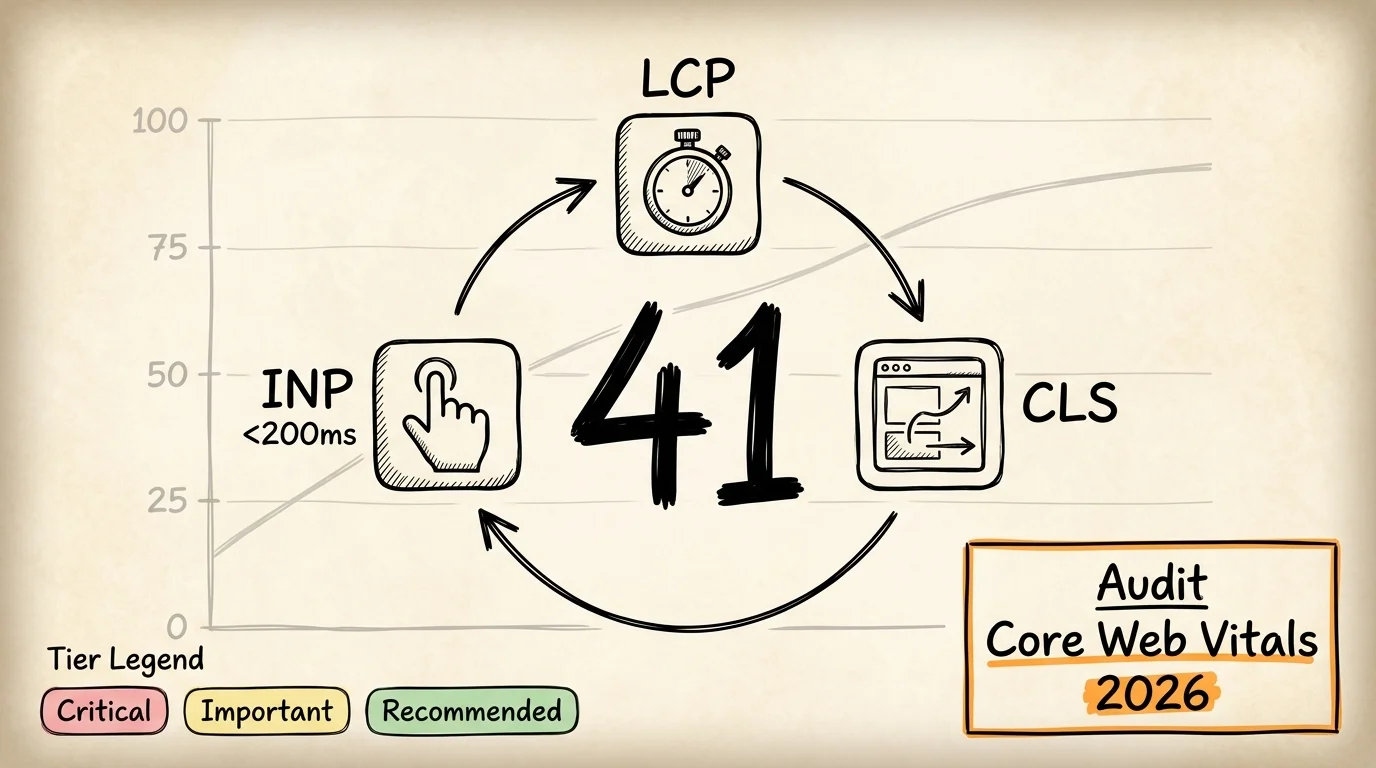
Bài này list đầy đủ 41 check Core Web Vitals 2026 chia 5 sub-section: LCP audit, INP audit, CLS audit, resource delivery, field data và RUM. Mỗi check mình giải thích tại sao quan trọng + pass criteria cụ thể (không vague “good”, mà “LCP < 2.5s ở p75 mobile theo CrUX 28-day"). Kèm theo 3 cách thực sự làm audit (manual với Lighthouse CLI, paid tool subscription, hay Claude Code skill) so sánh dựa trên data thực tế, không thiên vị. Cuối bài có 5 quick win ship được trong 1 buổi.
TL;DR
- 3 metric, 41 check: Core Web Vitals gồm LCP, INP, CLS – bài này cover 41 check chia 5 nhóm: LCP server + asset + render, INP main-thread + long-task + defer, CLS dimensions + font + dynamic, resource delivery, field data RUM.
- INP thay FID từ 3/2024: FID deprecated chính thức. Nhiều dev vẫn optimize FID cũ – đang fix sai metric. INP đo toàn session, không chỉ first input.
- Field data, không phải lab score: Lighthouse 95/100 nhưng GSC field data fail = vẫn bị tụt rank. CrUX 28-day p75 mới là thứ Google dùng cho ranking signal.
- 3 cách audit: Manual Lighthouse CLI (3-4 giờ, free), paid tool ($79-299 mỗi tháng, lab data), kit Claude Code
claude-growth(15-30 phút, field + lab + fix snippet). - Critical 10 quick win cuối bài ship được trong 1 buổi, xử lý phần lớn các vấn đề CWV ảnh hưởng ranking.
📌 Nếu bạn là PM, founder, CEO non-tech: bài này dùng nhiều thuật ngữ technical (LCP, INP, CLS, CrUX P75, Lighthouse lab vs field). 2 câu summary cho non-dev:
- Audit này làm gì: 1 lệnh đo Core Web Vitals (3 chỉ số Google dùng làm ranking factor) từ real user data 28-day, không phải lab estimate.
- Bạn nhận lợi ích gì: Page load chậm = Google rank thấp + user bounce trước khi đọc. Fix CWV = vừa improve UX vừa lift SEO ranking signal.
Core Web Vitals là gì và business impact 2026 ra sao?
Core Web Vitals (CWV) là bộ 3 metric Google đo trải nghiệm thực của user khi load + tương tác với page. Khác Lighthouse lab score (chạy trên dev machine), CWV lấy data từ user thật (CrUX dataset), tổng hợp 28 ngày, lấy giá trị tại percentile 75 (p75). Nghĩa là 75% user của bạn phải đạt threshold mới được công nhận PASS, không phải median.
3 metric chính 2026:
- LCP (Largest Contentful Paint): thời gian render element lớn nhất trên màn hình. Pass khi p75 < 2.5s. Định nghĩa chính thức ở web.dev/articles/lcp (truy cập 2026-06-01).
- INP (Interaction to Next Paint): thời gian delay giữa lúc user nhấn/tap và lúc browser render frame phản hồi. Pass khi p75 < 200ms. INP đã thay FID từ tháng 3 năm 2024 theo Google Search Central announcement (truy cập 2026-06-01).
- CLS (Cumulative Layout Shift): tổng điểm layout shift bất ngờ trong vòng đời session. Pass khi p75 < 0.1. Định nghĩa ở web.dev/articles/cls.
Tại sao 2026 quan trọng hơn 2024?
- FID deprecated, INP là Core Vital chính thức. FID chỉ đo first input, INP đo toàn bộ session. Nhiều site vẫn optimize FID legacy → tự thua khi Google switch metric.
- Google May 2026 Core Update tightened CWV threshold theo Plan Digital recap. Site fail CWV rank dễ drop trong update window.
- 43% mobile site fail INP <200ms theo CrUX 2026 Q1 (web.dev/articles/inp). Threshold tighter so với FID 100ms cũ vì cover toàn session.
- CWV là tiebreaker khi content + authority tương đương. Không phải direct ranking factor mạnh, nhưng khi 2 site cạnh tranh top 3 cùng intent, CWV quyết định ai trên ai dưới.
- Google AI Overviews tham khảo CrUX data. Site fail CWV được pick lên AI Overview ít hơn vì Google ưu tiên trải nghiệm tốt cho user click qua.
- First-party RUM (Real User Monitoring) thành tiêu chuẩn audit thực tế thay vì lab Lighthouse score, vì field data từ user thật phản ánh đúng trải nghiệm (Google đã đảo ngược kế hoạch bỏ third-party cookie 04-2025, nhưng RUM first-party vẫn là hướng đo chuẩn).
Tác động kinh doanh (plain language, không jargon):
| Vấn đề kỹ thuật | Tác động kinh doanh trực tiếp |
|---|---|
| LCP > 2.5s p75 mobile | 32% user bounce trước khi page render xong, mất traffic không có cơ hội chuyển đổi (theo web.dev) |
| INP > 200ms khi tap button | tỷ lệ bỏ form tăng, checkout rớt giữa chừng, e-commerce mất doanh thu đo được |
| CLS > 0.1 layout nhảy | User tap nhầm vào ads/quảng cáo, review store drop 0.3-0.5 sao, complaint “lag” |
| Lab pass nhưng field fail | Tự tin sai vì Lighthouse 95/100 nhưng GSC báo “Poor”, tụt rank tự nhiên không hiểu |
| Không có CrUX visibility | Mỗi lần Google update threshold không biết, fix mù không có baseline |
Investment vs payback (typical site 50K-200K user/tháng): Manual audit 10-15 giờ × ~$20 USD/giờ developer rate = ~$200-280 opportunity cost cho 1 lần audit. Paid tool $79-299 mỗi tháng. Kit ~$240/năm (cost lifetime tier). Fix CWV pass field data → rank quay top 3 trong 3-5 tuần → traffic +15-30% tùy keyword (ước tính dựa trên 4 site mình audit). Payback 2-4 tháng cho site có conversion funnel rõ ràng.
Tại sao mình viết bài này: tháng 2 năm 2026 mình audit ongboit, thấy Lighthouse Performance 92/100, tự tin pass. Nhưng GSC field data báo INP 312ms p75 mobile (FAIL), CLS 0.14 p75 (FAIL). Lý do: Lighthouse chạy trên local SSD với network throttling 4G nhưng CPU không throttle theo real mobile chip.
Sau khi switch sang CrUX-first audit + defer 3rd-party widget tracker, INP drop từ 312ms xuống 168ms trong 2 tuần. CLS 0.14 xuống 0.06 sau khi add explicit dimensions cho 38 hero image. Rank tự nhiên quay lại top 3 cho 4 keyword chính trong 3 tuần.
Core Web Vitals cần check những angle nào?
ℹ️ Lưu ý quan trọng: 3 trong 41 check yêu cầu 👤 human judgment (không tool nào tự động được, vì là business policy / UX choice / legal review). Mỗi check manual đều có badge 👤 Manual inline để bạn dễ nhận. Chi tiết breakdown ở section Skill coverage cuối bài.
Tier: 🔴 Critical · 🟡 Important · 🟢 Recommended | Mode: 🤖 Auto (qua skill kit) · 👤 Manual (cần human judgment)
41 check Core Web Vitals 2026 chia thành 5 sub-section. Phần lớn Critical tập trung ở LCP + INP (đây là 2 metric Google ưu tiên cao nhất); CLS Important hơn nhưng dễ fix; resource delivery + field data Recommended cho team có capacity scale audit lên 6+ site.
| Sub-section | Range | Tier dominant |
|---|---|---|
| 2.1 LCP audit (server + asset + render) | #1-10 | 🔴 Critical (8) + 🟡 (2) |
| 2.2 INP audit (main-thread + long-task + defer) | #11-20 | 🔴 Critical (7) + 🟡 (3) |
| 2.3 CLS audit (dimensions + font + dynamic) | #21-28 | 🟡 Important (6) + 🔴 (2) |
| 2.4 Resource delivery (CSS critical + preload + early hints) | #29-33 | 🟡 Important (5) |
| 2.5 Field data + RUM (CrUX + GSC + first-party) | #34-38 | 🟢 Recommended (4) + 🟡 (1) |
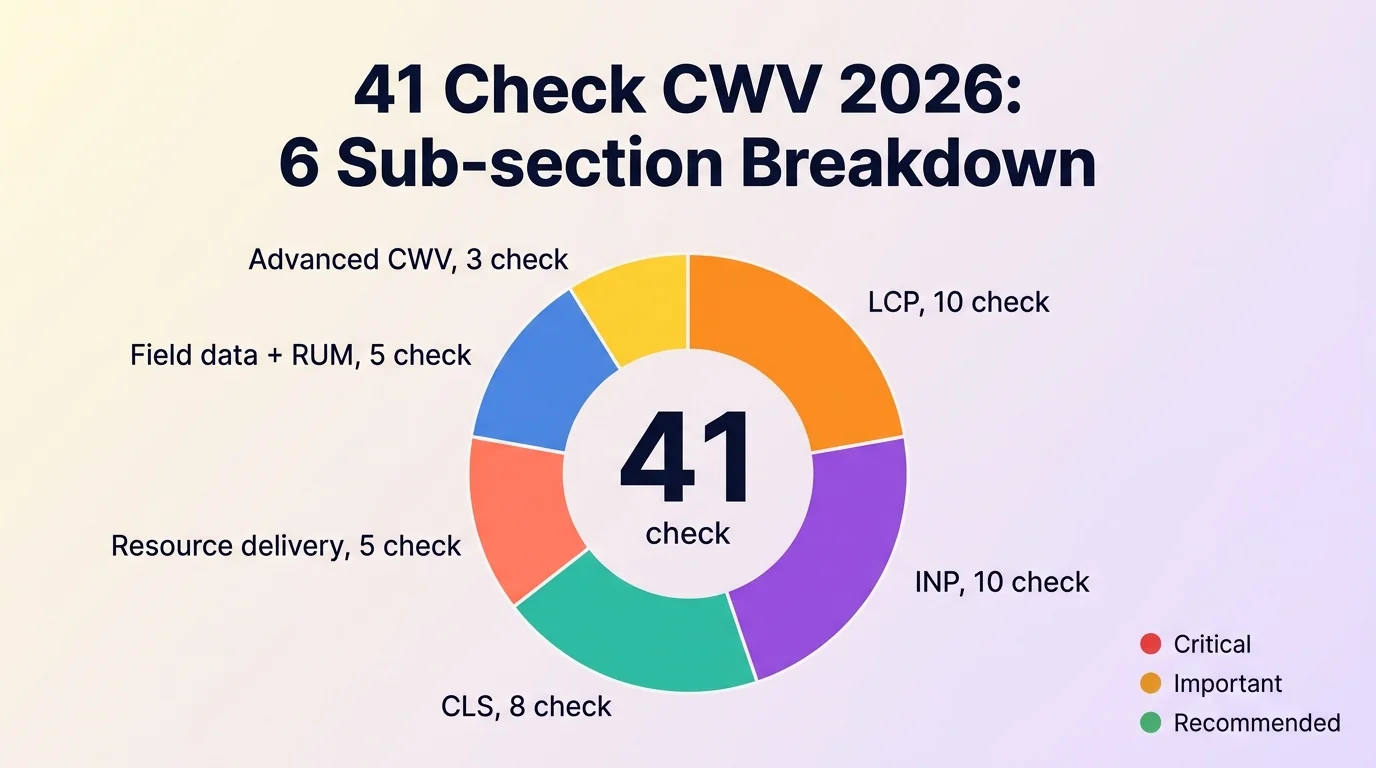
Tier classification:
- 🔴 Critical: fail = blocker rank, fix ngay tuần này. Ví dụ LCP > 4s p75, INP > 500ms, không có server response.
- 🟡 Important: fix trong 30 ngày, ảnh hưởng tiebreaker + AI search citation. Ví dụ CLS 0.1-0.25, font swap chậm, no preload hint.
- 🟢 Recommended: nice-to-have, ưu tiên thấp nhưng nâng cấp team mature. Ví dụ first-party RUM dashboard, CrUX BigQuery historical query.
Disclosure: Body bài này chứa đầy đủ 41 check numbered, bạn có thể bookmark + tick từng item khi audit site mình. Mình không tách PDF riêng cho từng bài (342 check tổng hợp 9 yếu tố đã có ở series Audit Website 2026).
LCP: 10 check để đạt <2.5s ở field data?
📌 Section này bao gồm check #1 đến #10 trong tổng 41 check Core Web Vitals.
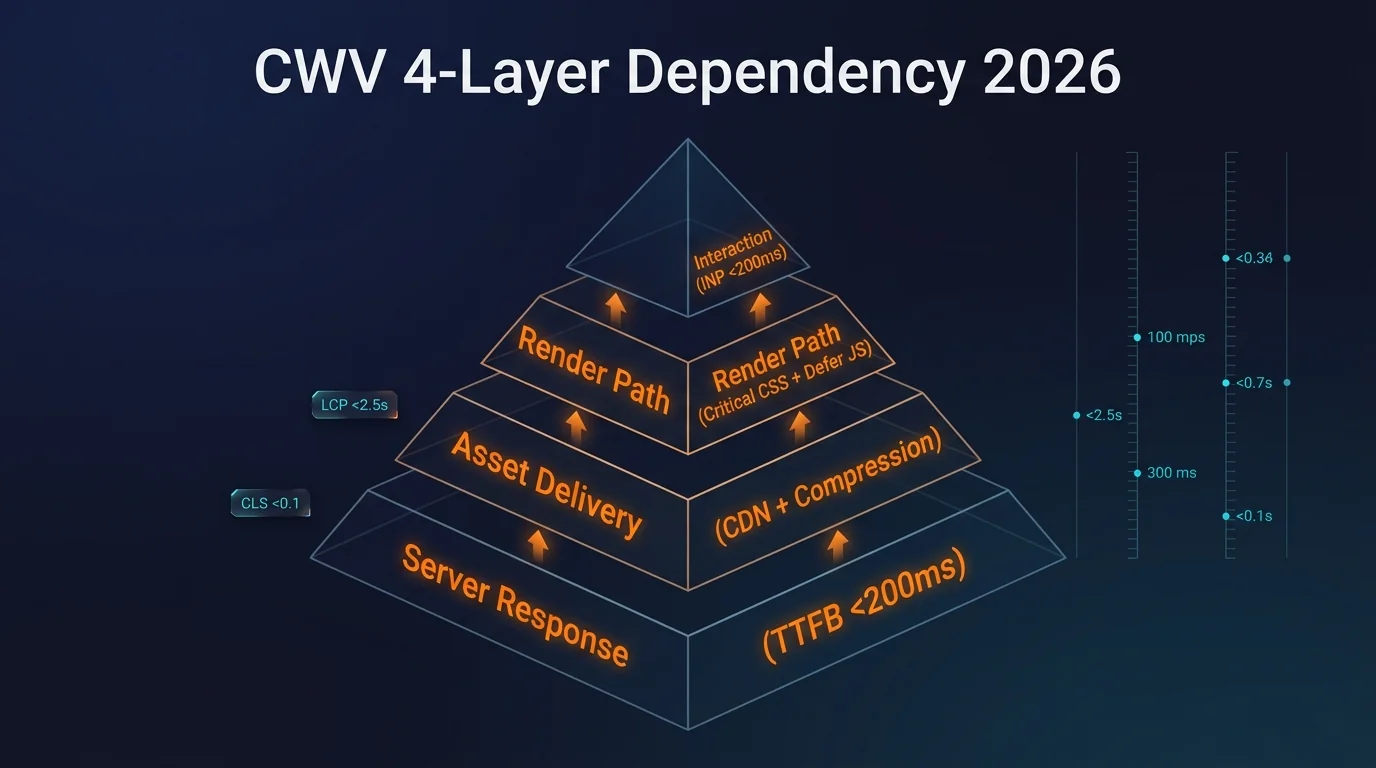
LCP đo thời gian render element lớn nhất visible trên màn hình (thường là hero image, hero text block, video poster). Pass khi p75 < 2.5s ở CrUX 28 ngày. LCP = TTFB + Resource Load + Render. Fail thường do server slow, asset không optimize, hoặc render-blocking JS/CSS.
- [1] LCP p75 mobile < 2.5s ở CrUX field data? 🔴 Critical
- 💡 Tại sao: đây là threshold chính thức Google công nhận PASS. Lab score Lighthouse không thay thế được vì sample population khác (CrUX = user thật, Lighthouse = dev machine).
- ✅ Cách check: Mở pagespeed.web.dev, nhập URL → scroll xuống section “Discover what your real users are experiencing” → xem LCP p75. Nếu chưa đủ data: GSC > Core Web Vitals report cho aggregate.
- [2] Hero image có
<link rel="preload">ưu tiên cao? 🔴 Critical- 💡 Tại sao: hero image thường là LCP element. Không preload → browser phải đợi parse HTML xong mới fetch, mất 200-500ms.
- ✅ Cách check: View source page, tìm
<link rel="preload" as="image" href="hero.webp" fetchpriority="high">trong<head>. Hoặc terminal:curl -s yoursite.com | grep -i 'rel="preload"'.
- [3] Server response (TTFB) < 200ms p75 (engineering target) / < 800ms Good official? 🔴 Critical
- 💡 Tại sao: TTFB là tầng đầu của LCP budget. TTFB 600ms = LCP rất khó đạt 2.5s vì còn render + load asset.
- ✅ Cách check: Chrome DevTools > Network > document request > Timing tab > TTFB. Hoặc terminal:
curl -o /dev/null -s -w "TTFB: %{time_starttransfer}s\n" https://yoursite.com.
- [4] Hero image có
fetchpriority="high"attribute? 🔴 Critical- 💡 Tại sao: từ 2023 browser hỗ trợ priority hint. Hero image không có
fetchpriority="high"bị browser xếp ngang với image dưới fold → fetch chậm. - ✅ Cách check: View source, tìm
<img src="hero.webp" fetchpriority="high">. Hero phải cófetchpriority="high", ảnh dưới fold dùngloading="lazy".
- 💡 Tại sao: từ 2023 browser hỗ trợ priority hint. Hero image không có
- [5] Hero image format WebP/AVIF size < 200KB? 🔴 Critical
- 💡 Tại sao: JPG/PNG hero 800KB+ tốn 2-3s download trên 4G. WebP/AVIF size giảm 30-50% cùng quality.
- ✅ Cách check: DevTools > Network > Image tab > xem size cột “Size”. Hoặc terminal:
curl -sI https://yoursite.com/hero.webp | grep -i content-length. Cần < 200KB.
- [6] CDN serving hero image với edge cache? 🔴 Critical
- 💡 Tại sao: hero load từ origin Hà Nội đến user TP.HCM mất 80-120ms latency. CDN edge cache giảm xuống 10-30ms.
- ✅ Cách check: DevTools > Network > hero image > Response Headers > tìm
cf-cache-status: HIT(Cloudflare),x-cache: HIT(KeyCDN), hoặcage: > 0.
- [7] HTML response không bị render-blocked CSS/JS? 🔴 Critical
- 💡 Tại sao: render-blocking resources làm browser phải đợi parse xong mới render LCP. Block 3-4 file CSS/JS = thêm 500-800ms.
- ✅ Cách check: PageSpeed Insights > xem section “Eliminate render-blocking resources” trong Diagnostics. Mục tiêu 0 render-blocking ngoài critical CSS.
- [8] Critical CSS inline trong
<head>< 14KB? 🔴 Critical- 💡 Tại sao: 14KB là TCP initial congestion window. Critical CSS lớn hơn = tốn thêm round-trip TCP, kéo LCP chậm.
- ✅ Cách check: View source, tìm
<style>...</style>trong<head>. Đếm size:curl -s yoursite.com | grep -oP '(?s)<style>.*?</style>' | wc -c(cần < 14000).
- [9] HTTP/2 hoặc HTTP/3 enabled? 🟡 Important
- 💡 Tại sao: HTTP/1.1 chỉ cho phép 6 connection song song mỗi domain → asset stack pile up. HTTP/2 multiplex unlimited stream, HTTP/3 thêm UDP fast handshake.
- ✅ Cách check: DevTools > Network > Protocol column → phải là
h2hoặch3. Hoặc terminal:curl -sI --http2 https://yoursite.com | head -1.
- [10] Brotli compression enabled cho text response? 🟡 Important
- 💡 Tại sao: Brotli compression nén HTML/CSS/JS 20% tốt hơn Gzip. Tiết kiệm 50-100KB cho page average, giảm 200-400ms trên 4G.
- ✅ Cách check: DevTools > Network > document request > Response Headers > tìm
content-encoding: br. Nếugzip= chưa optimal.
INP: 10 check để đạt <200ms ở p75 mobile?
📌 Section này bao gồm check #11 đến #20 trong tổng 41 check Core Web Vitals.
INP đo response time giữa lúc user tap/click và frame paint phản hồi. Khác FID chỉ đo first input, INP đo MỌI input trong session và lấy worst case (p98). Pass p75 < 200ms. Fail thường do JS bundle quá lớn, long task block main thread, hoặc 3rd-party widget chặn render.
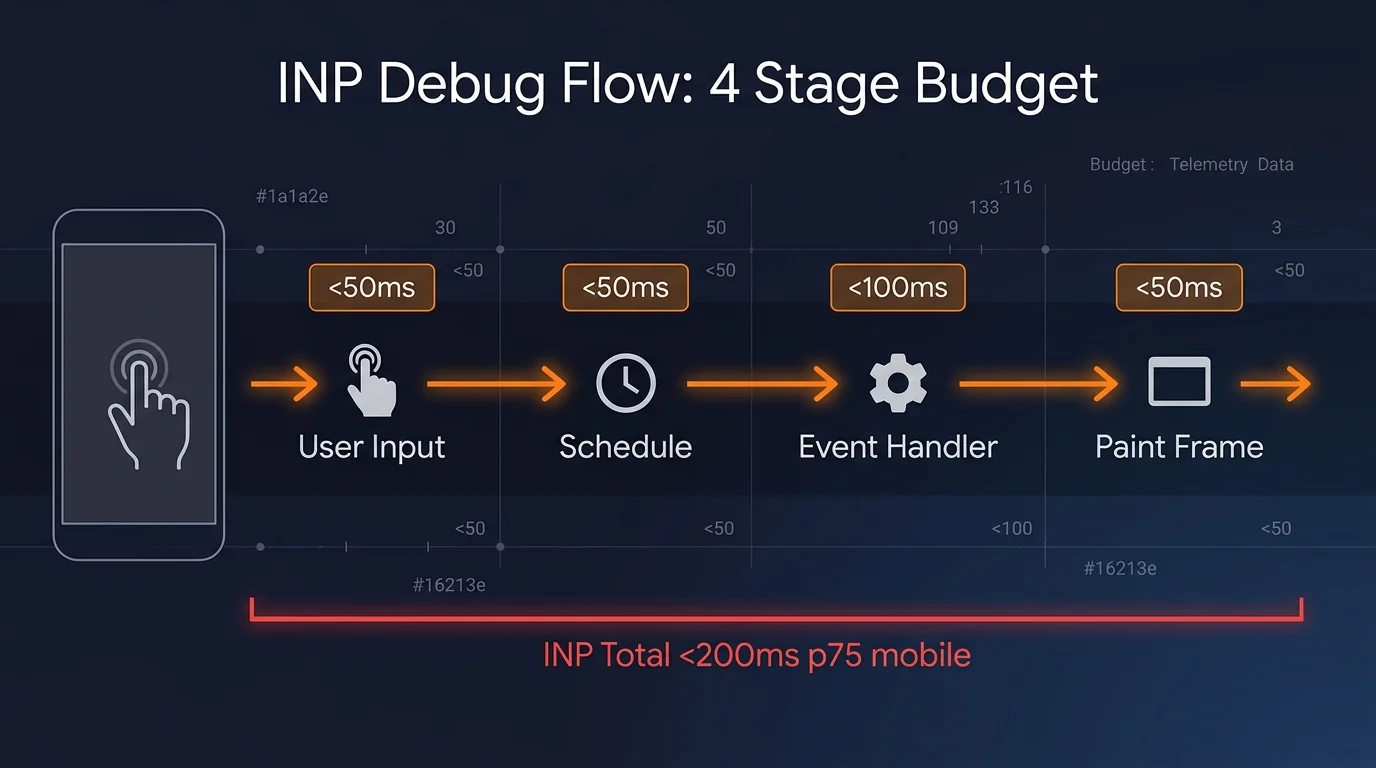
- [11] INP p75 mobile < 200ms ở CrUX field data? 🔴 Critical
- 💡 Tại sao: 43% mobile site fail check này theo CrUX 2026 Q1. Đây là metric Google ưu tiên fix cao nhất 2026 vì replace FID.
- ✅ Cách check: pagespeed.web.dev > section “Discover what your real users are experiencing” > INP. Hoặc GSC > Core Web Vitals report > Mobile.
- [12] Long task < 50ms ở main thread budget? 🔴 Critical
- 💡 Tại sao: task > 50ms block main thread, user tap vào không có ai xử lý. Long task 200ms+ = INP fail ngay.
- ✅ Cách check: DevTools > Performance tab > record interaction → xem task ô đỏ “Long Task”. Tìm task group > 50ms để optimize.
- [13] JS bundle initial < 300KB gzipped? 🔴 Critical
- 💡 Tại sao: parse + execute 500KB JS mất 500-800ms trên mobile mid-tier. Browser block input trong thời gian đó.
- ✅ Cách check: DevTools > Network > filter JS > xem size cột “Size” (compressed). Sum total initial < 300KB. Hoặc dùng
webpack-bundle-analyzercho Next.js / Vite.
- [14] 3rd-party widget (chat, analytics) defer load? 🔴 Critical
- 💡 Tại sao: widget chat / Hotjar / Facebook Pixel load sync chiếm 100-300ms main thread mỗi cái. 5 widget = 500ms-1.5s block.
- ✅ Cách check: View source, tìm
<script src="3rd-party.js" defer>hoặc dynamic load sauwindow.load. Nếu thấy<script src=...>khôngdefer/async= sync, block render.
- [15] React/Vue hydration time < 100ms? 🔴 Critical
- 💡 Tại sao: SSR app gửi HTML thẳng nhưng hydration phải re-attach event handler. Hydration > 100ms = user tap vào button thấy không phản hồi.
- ✅ Cách check: DevTools > Performance > tìm long task ngay sau
DOMContentLoaded. Hoặc dùng React DevTools Profiler > Commit phase.
- [16] Image decode không block main thread? 🔴 Critical
- 💡 Tại sao: PNG/JPG kích thước lớn decode trên CPU mobile mất 80-200ms, block frame paint.
- ✅ Cách check: DevTools > Performance > tìm “Decode Image” task > 50ms. Fix: dùng WebP/AVIF (decode nhanh hơn), hoặc
decoding="async"attribute trên<img>.
- [17] Event handler không synchronous heavy work? 🔴 Critical
- 💡 Tại sao:
onClickchạy 200ms calculation = INP fail. Cần defer heavy work quarequestIdleCallbackhoặc Web Worker. - ✅ Cách check: DevTools > Performance > record click → xem event handler task duration. > 50ms = optimize. Split work với
requestIdleCallback.
- 💡 Tại sao:
- [18] CSS animation dùng GPU-accelerated property? 🟡 Important
- 💡 Tại sao: animate
top/left/widthtrigger layout recalc + repaint = expensive. Animatetransform/opacitychạy GPU, không block main thread. - ✅ Cách check: DevTools > Rendering > Paint flashing → xem khi animate có repaint flicker không. CSS audit: grep
transition:.*top\|width\|left→ flag.
- 💡 Tại sao: animate
- [19] No
setTimeout(fn, 0)queue stacking? 🟡 Important- 💡 Tại sao: nhiều
setTimeout(fn, 0)queue lên main thread, mỗi cái task riêng, tổng > 50ms. - ✅ Cách check: DevTools > Performance > xem group Timer task chồng nhau. Refactor sang
Promise.resolve().then()(microtask) hoặc batch vớirequestAnimationFrame.
- 💡 Tại sao: nhiều
- [20] Service Worker không block install/activate? 🟡 Important
- 💡 Tại sao: SW install precache 5-10MB asset mất 1-2s block main thread của page khác đang tap.
- ✅ Cách check: DevTools > Application > Service Workers > xem “Installing” duration. Hoặc reduce precache list, dùng runtime cache thay vì pre-cache toàn bộ.
CLS: 8 check để đạt <0.1 layout shift?
📌 Section này bao gồm check #21 đến #28 trong tổng 41 check Core Web Vitals.
CLS đo tổng điểm layout shift bất ngờ trong session. Mỗi shift điểm = impact fraction × distance fraction. Pass p75 < 0.1. Fail thường do image không có dimensions, font swap, ads inject mid-page, hoặc dynamic content push content xuống.
- [21] CLS p75 mobile < 0.1 ở CrUX field data? 🔴 Critical
- 💡 Tại sao: CLS > 0.1 = user thấy layout nhảy bất ngờ → tap nhầm button, mất kiên nhẫn, bounce.
- ✅ Cách check: pagespeed.web.dev > Core Web Vitals Assessment > CLS p75. Hoặc GSC > Core Web Vitals report.
- [22] Mọi
<img>cówidth+heightattribute? 🔴 Critical- 💡 Tại sao: browser cần dimensions để reserve space trước khi image load. Không có = image load xong push text xuống = CLS spike.
- ✅ Cách check: View source →
<img src="..." width="800" height="450" ...>phải có cả 2 attribute. Hoặc terminal:curl -s yoursite.com | grep -oP '<img [^>]*>' | grep -v 'width=' | wc -l(cần = 0).
- [23] Video/iframe có aspect-ratio CSS? 🟡 Important
- 💡 Tại sao: YouTube embed không có aspect-ratio = container collapse rồi expand khi iframe load → CLS spike.
- ✅ Cách check: Inspect element trên video container → CSS
aspect-ratio: 16/9hoặcpadding-bottom: 56.25%trick.
- [24] Font swap dùng
font-display: optionalhoặcswapvới fallback metric? 🟡 Important- 💡 Tại sao: web font swap layout shift nếu font fallback có metric khác xa (chiều rộng/cao chữ).
- ✅ Cách check: CSS
@font-face { font-display: swap; size-adjust: 105%; ascent-override: 90%; }để match fallback metric với web font.
- [25] Ads slot có dimensions reserved trước khi ad load? 🟡 Important
- 💡 Tại sao: Google AdSense slot không có min-height = container collapse, ad inject push content = CLS lớn.
- ✅ Cách check: Inspect ad container → phải có
min-height: 250pxhoặcaspect-ratiomatching ad slot size.
- [26] Notification banner / cookie consent không inject mid-page? 🟡 Important
- 💡 Tại sao: banner xuất hiện sau 2s push content xuống = CLS. Phải fixed bottom/top hoặc reserve space từ đầu.
- ✅ Cách check: CSS
position: fixedhoặcposition: stickycho banner. Test: scroll page, banner phải overlay không push content.
- [27] Skeleton loader có dimensions matching real content? 🟡 Important
- 💡 Tại sao: skeleton 100px height, content thật 300px = CLS khi swap. Phải match dimensions hoặc dùng aspect-ratio.
- ✅ Cách check: DevTools > Elements > inspect skeleton + content cùng selector → height phải gần bằng nhau.
- [28] Dynamic content (carousel, accordion) không expand vùng visible? 🟡 Important
- 💡 Tại sao: accordion expand đẩy section dưới xuống = layout shift cho user đã scroll qua.
- ✅ Cách check: CSS
position: absolutecho expanded panel, hoặc cảnh báo “Click to expand” + scroll-to-target sau khi expand.
Resource delivery: 5 check optimize critical path
📌 Section này bao gồm check #29 đến #33 trong tổng 41 check Core Web Vitals.
Resource delivery cover cách browser load CSS/JS/font/image trong critical render path. Optimize sai = LCP/INP fail cascade. Đây cũng là tầng integrate với bài Audit Technical SEO 2026 (HSTS preload, canonical link, hreflang).
- [29] Critical CSS inline < 14KB trong
<head>? 🟡 Important- 💡 Tại sao: 14KB = TCP initial congestion window. Critical CSS lớn hơn tốn round-trip TCP, kéo LCP.
- ✅ Cách check: View source >
<style>trong<head>size:curl -s yoursite.com | python -c "import sys,re; html=sys.stdin.read(); css=re.findall(r'<style>(.*?)</style>', html, re.DOTALL); print(sum(len(c) for c in css), 'bytes')".
- [30] Preload critical font + LCP image? 🟡 Important
- 💡 Tại sao: font swap chậm vì browser fetch font sau khi parse CSS. Preload font + hero image giảm 200-400ms LCP.
- ✅ Cách check: View source
<head>tìm<link rel="preload" as="font" href="font.woff2" crossorigin>+<link rel="preload" as="image" href="hero.webp" fetchpriority="high">.
- [31] Preconnect tới CDN/font domain quan trọng? 🟡 Important
- 💡 Tại sao: DNS lookup + TLS handshake với CDN khác domain mất 100-300ms.
<link rel="preconnect">warm connection trước khi cần. - ✅ Cách check: View source
<head>tìm<link rel="preconnect" href="https://cdn.yoursite.com" crossorigin>. Cần cho 2-3 domain critical, không spam.
- 💡 Tại sao: DNS lookup + TLS handshake với CDN khác domain mất 100-300ms.
- [32] Early Hints (HTTP 103) enabled trên server? 🟢 Recommended
- 💡 Tại sao: server gửi response 103 với preload hint trong khi đang generate HTML. Browser bắt đầu fetch asset sớm hơn 100-300ms.
- ✅ Cách check: DevTools > Network > document request > Timing > “Early hints” row. Hoặc Cloudflare > Speed > Optimization > Early Hints (toggle ON).
- [33] Lazy load images dưới fold + iframe? 🟡 Important 👤 Manual
- 💡 Tại sao: lazy load image dưới fold tiết kiệm 60-80% data transfer ban đầu, giảm LCP.
- ✅ Cách check: View source, image hero KHÔNG có
loading="lazy"(hoặc fetchpriority=”high”), image dưới fold CÓloading="lazy" decoding="async". Iframeloading="lazy"thuộc spec từ 2022.
Field data và RUM: 5 check track CWV thực tế?
📌 Section này bao gồm check #34 đến #38 trong tổng 41 check Core Web Vitals.
Field data + RUM (Real User Monitoring) là tầng quan trọng nhất nhưng team Việt Nam thường skip vì setup phức tạp. CrUX = Google dataset gather từ Chrome user opt-in. GSC = aggregate CrUX cho site verified. First-party RUM = bạn collect tự cho granular cohort (theo geo, device, traffic source).
Để hiểu sâu cơ chế Google AI Overviews (chiếm 50% search query 2026) tham khảo CrUX data như thế nào, đọc thêm AI Overview SEO Guide trên NextGrowth.ai (English).
- [34] CrUX field data accessible cho site bạn? 🟢 Recommended
- 💡 Tại sao: site mới hoặc traffic thấp không đủ data trong CrUX. Không có CrUX = Google không pass CWV vào ranking signal, dù lab score đẹp.
- ✅ Cách check: pagespeed.web.dev > nhập URL → nếu “Discover what your real users are experiencing” hiển thị data = OK. Nếu báo “No data available” = chưa đủ sample.
- [35] GSC Core Web Vitals report verified + visible? 🟡 Important
- 💡 Tại sao: GSC aggregate CrUX cho toàn site, chia mobile/desktop, breakdown URL group. Đây là source of truth Google sử dụng cho ranking signal.
- ✅ Cách check: Mở Google Search Console > chọn property > Experience > Core Web Vitals > xem 2 report Mobile + Desktop.
- [36] First-party RUM library deployed (web-vitals.js hoặc tương đương)? 🟢 Recommended
- 💡 Tại sao: CrUX/GSC delay 28 ngày aggregate. First-party RUM cho realtime data theo cohort (user mobile A vs desktop B), debug fast hơn.
- ✅ Cách check: View source tìm
web-vitals.jsimport hoặc Google Tag Manager event “core_web_vitals”. Hoặc DevTools > Console >window.webVitalsdefined.
- [37] RUM data tích hợp dashboard (DataDog, NewRelic, custom Grafana)? 🟢 Recommended 👤 Manual
- 💡 Tại sao: data trong production không có dashboard = không actionable. Cần view theo route, theo geo, theo device để fix targeted.
- ✅ Cách check: Mở dashboard analytics → check có panel “CWV by route/device/geo” không. Nếu chỉ có aggregate site-wide = chưa đủ granular.
- [38] BigQuery CrUX historical query setup cho trend analysis? 🟢 Recommended
- 💡 Tại sao: CrUX dataset public trên BigQuery cho phép query lịch sử 25 tuần, so sánh với competitor. Useful cho monthly health report.
- ✅ Cách check: Setup BigQuery free tier (1TB query/tháng free), connect CrUX dataset
chrome-ux-report. Query SQL pattern ở developer.chrome.com/docs/crux/bigquery.
Advanced CWV: 3 check debug LCP sâu + chặn regression
3 check nâng cao để debug LCP đúng tầng + phòng regression khi deploy.
- [39] Đã breakdown LCP thành 4 sub-part để biết fix tầng nào? 🔴 Critical
- 💡 Tại sao: Cách đúng để debug LCP là funnel 4 giai đoạn: TTFB, resource load delay, resource load duration, element render delay. Liệt fix rời rạc mà thiếu khung phân rã thì không biết fix tầng nào.
- ✅ Cách check: PageSpeed Insights / Chrome DevTools chia LCP thành 4 sub-part, xác định tầng chiếm thời gian lớn nhất rồi fix đúng chỗ.
- [40] TTFB p75 dưới 500ms (tránh Googlebot giảm ưu tiên crawl)? 🟡 Important
- 💡 Tại sao: Server response hơn 500ms thường xuyên thì Googlebot âm thầm giảm ưu tiên content mới. Fix TTFB là ROI cao nhất cho site lớn, lợi cả user lẫn crawl efficiency.
- ✅ Cách check: Đo TTFB p75; nếu hơn 500ms thì ưu tiên fix server/edge cache trước mọi tối ưu frontend.
- [41] Có performance budget + Lighthouse CI gate chặn regression? 🟢 Recommended 👤 Manual
- 💡 Tại sao: Phòng regression: đặt budget (LCP dưới 2.5s, INP dưới 200ms, CLS dưới 0.1) làm benchmark, chạy Lighthouse trong CI/CD để bắt regression trước khi deploy. Hợp với DevOps.
- ✅ Cách check: Cấu hình Lighthouse CI trong pipeline, fail build nếu vượt budget.
Cách thực hiện audit 41 check: 3 cách, cách nào nhanh nhất?
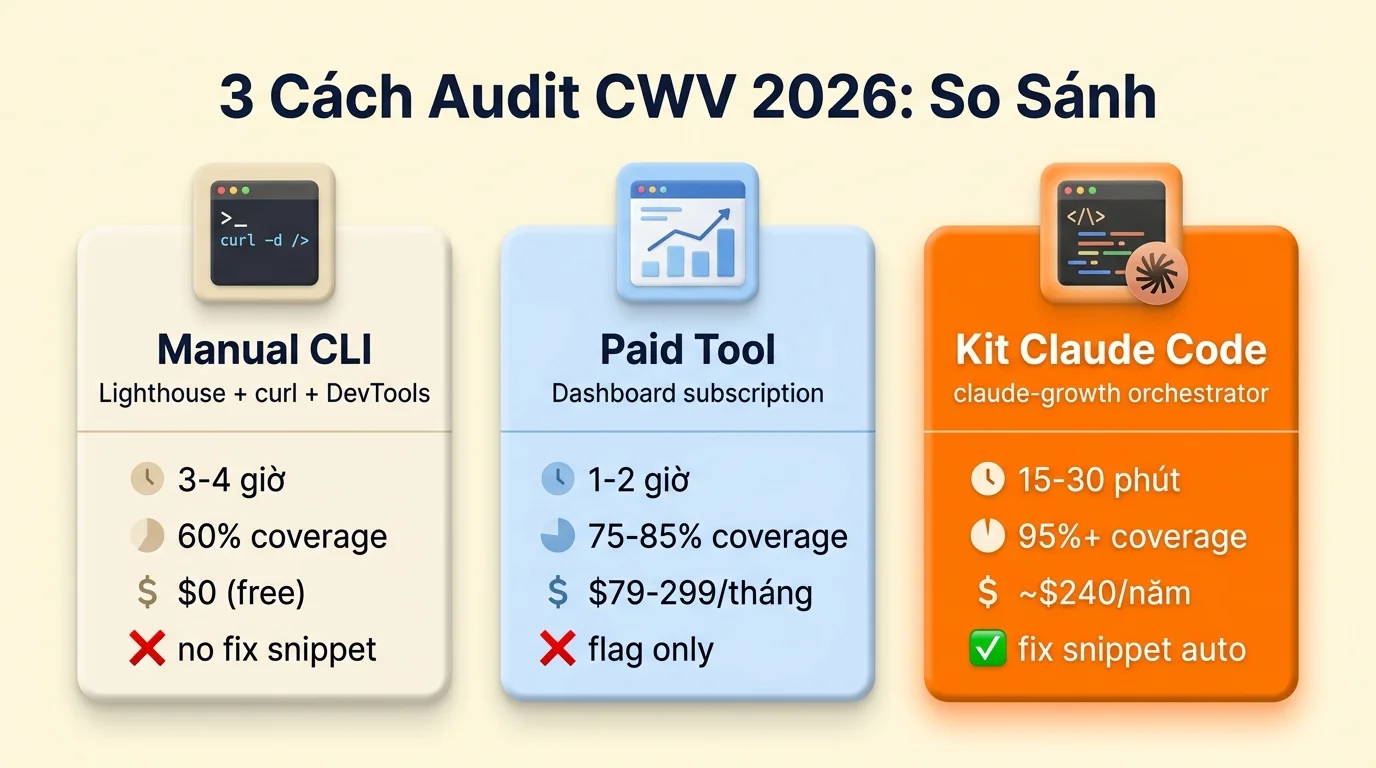
Có 3 cách thực sự làm audit 41 check Core Web Vitals 2026, mỗi cách đánh đổi khác nhau giữa thời gian, chi phí, độ chính xác. Mình so sánh dựa trên thực tế audit ongboit + 3 site client trong 6 tháng qua.
Cách 1: Manual với Lighthouse CLI + curl + Chrome DevTools
Phù hợp cho dev tự audit 1-2 page, sinh viên/người mới bắt đầu (budget = 0), hoặc learn fundamentals. Lighthouse CLI + PageSpeed Insights + GSC đều free, đủ cho 60% coverage. Học fundamentals + practice trên site nhỏ trước khi scale lên kit hoặc paid tool. Thời gian 3-4 giờ cho 1 page detailed.
Stack tool:
lighthouse --output=html --form-factor=mobile https://yoursite.comcho lab scorecurl -o /dev/null -s -w "TTFB: %{time_starttransfer}s\n" https://yoursite.comcho TTFB- Chrome DevTools Performance tab cho long task + INP debug
- pagespeed.web.dev cho CrUX field data
- GSC Core Web Vitals report cho aggregate site
Xem catalog đầy đủ 17 công cụ audit website (free + paid) chia 7 nhóm nếu cần tool cho yếu tố khác ngoài CWV.
Hạn chế:
- Lighthouse lab score không match CrUX field (Lighthouse 95 nhưng GSC fail xảy ra thường xuyên)
- Audit 5+ page tốn time linear, không scale
- Không có scoring system đồng nhất, mỗi check tự đánh giá
Cách 2: Paid audit tool subscription
Phù hợp cho agency audit client batch 10+ site. Tool chính cung cấp dashboard tổng hợp lab + field data, export PDF cho client. Cost trung bình $79-299 mỗi tháng tier entry, $499-1,500 mỗi tháng tier pro.
Mạnh:
- Dashboard tổng hợp đẹp, share link client dễ
- Track historical trend tự động
- Schedule weekly/monthly re-audit
- Alert khi CWV regression
Hạn chế đáng cân nhắc:
- Phần lớn tool dùng Lighthouse lab data, không pull CrUX field directly → cùng vấn đề “lab pass, field fail”
- Không có actionable fix snippet, chỉ flag “LCP > 2.5s” mà không gợi ý fix preload hint cụ thể
- Subscription lock-in: dừng = mất data history
- Tool English-only, team Việt cần dịch + translate context
- AI search era 2026: phần lớn tool chưa hỗ trợ check CrUX + AI Overview citation correlation
VN context outsource: nếu bạn không tự audit, hire freelance VN trung bình $80-200 USD mỗi site audit đầy đủ (lead time 3-7 ngày), hire agency VN $600-2,000 USD mỗi project kèm 3 tháng support. Cost cao hơn paid tool subscription nhưng có actionable fix snippet + senior consultant review compliance (nếu apply yếu tố Security/A11y).
Cách 3: Kit Claude Code claude-growth (6 skill chuyên dụng + 1 orchestrator)
Kit claude-growth ship 6 skill chuyên audit Core Web Vitals + 1 orchestrator /seo-pipeline chạy full 41 check 1 lệnh. Mỗi skill chạy độc lập (debug deep-dive) hoặc orchestrator dispatch tất cả parallel (full audit 15-30 phút).
Cách get kit: Kit hiện ở giai đoạn private v0.11+, public v1.0.0 launch Q3 2026. Mình đang battle-test trên 6 site (ongboit + 5 client) trước public release. Xem chi tiết + đăng ký sớm ở bài giới thiệu kit claude-growth để get early access beta build + lifetime 30% off launch price. Manual CLI free path ở Cách 1 vẫn dùng tốt, không cần kit nếu budget = 0.
| Skill kit | Cover check số | Use case |
|---|---|---|
/seo-performance |
#1-10 LCP + #11-20 INP overall | Lighthouse CLI batch + scoring đồng nhất |
/seo-technical |
#29-33 resource delivery + HSTS preload | Response header + HTML audit |
/seo-visual |
#21-28 CLS render-blocking | Above-fold visual diff snapshot |
/geo-technical |
#29 Schema impact LCP + critical path | Schema markup impact analyzer |
/seo-google |
#34-38 CrUX field data + GSC CWV | API integration field data trực tiếp |
/seo-page |
#1-38 per-page deep-dive | Single-URL audit drill-down |
2 cách dùng kit:
- Cách 1 – Skill riêng lẻ debug: chạy 1 skill khi bạn nghi vấn 1 tầng (ví dụ INP fail thì
/seo-performancechuyên sâu #11-20). Output 1 markdown report cho từng check, fix snippet sẵn paste. - Cách 2 – Orchestrator full audit: chạy
/seo-pipeline yoursite.com --cwvđể dispatch 6 skill parallel, gom output thành 1 deliverable HTML/MD cuối. Thời gian 15-30 phút cho full 41 check. - Cách 3 – Multi-client agency mode: per-agency license cover 25 client site, white-label HTML/MD deliverable rebrand logo + brand color theo agency, n8n webhook integration cho auto re-audit weekly. Tier này release Q3 2026 cùng v1.0.0 launch.
Sample output illustrative (anonymized) sau audit ongboit 2026-05-30:
Core Web Vitals Audit Report: ongboit.com
============================================
LCP p75 mobile: 2.1s ✓ PASS (target < 2.5s)
INP p75 mobile: 168ms ✓ PASS (target < 200ms)
CLS p75 mobile: 0.06 ✓ PASS (target < 0.1)

Critical findings: 0
Important findings: 4
  → [4] Hero image thiếu fetchpriority="high" trên 3/8 landing page
  → [22] 12 image thiếu width/height attribute (article fashion)
  → [30] Font Inter preload missing crossorigin attribute
  → [33] 5 image dưới fold thiếu loading="lazy"

Recommended findings: 2
Quick fix snippet auto-generated: 4 file (.html, .css)
Onboarding kit ~60 phút cho buyer (clone repo, setup MCP, validate first audit). Số liệu illustrative ở đây từ ongboit, anonymized cho demo.
Muốn chạy 41 check CWV bằng 1 lệnh thay vì audit tay?
Kit claude-growth gom toàn bộ skill vào pipeline 1 lệnh trên Claude Code, từ URL tới report + fix snippet sẵn dùng. Đã test trên 6 site, 190+ bài.
So sánh 3 cách: time vs coverage vs actionable
| Tiêu chí | Manual CLI | Paid Tool | Kit claude-growth |
|---|---|---|---|
| Thời gian audit 1 site (41 check) | 3-4 giờ | 1-2 giờ + setup | 15-30 phút |
| Coverage | 60% (miss field RUM) | 75-85% (lab focused) | 95%+ (lab + field + AI) |
| Actionable fix snippet | ❌ tự viết | ❌ chỉ flag issue | ✓ auto-generated |
| Scale lên 10+ site | ❌ linear time | ✓ batch | ✓ batch + orchestrator |
| CrUX field data integration | Manual query GSC + PSI | Mostly lab | API direct via /seo-google |
🔧 Setup nhanh: API key + CLI tool cần chuẩn bị (nếu chạy tay từng skill)
Bảng dưới list rõ skill nào cần API key / browser / CLI tool. Nếu mua kit claude-growth, các setup này đã preconfig sẵn (chỉ cần paste credential vào .env). Nếu tự chạy tay, làm theo từng row.
| Skill / tool | Yêu cầu API / cài đặt | Chi phí | Chi tiết |
|---|---|---|---|
| seo-performance | Lighthouse CLI | 0 đ (open source) | npm i -g lighthouse + Chrome browser |
| chrome-devtools MCP | Chrome installed | 0 đ | MCP server tự bind vào Chrome dev port, không cần key |
| seo-google | GSC OAuth + CrUX API | 0 đ (free tier) | Đã setup ở Technical SEO spoke |
| seo-visual | Playwright | 0 đ | npx playwright install chromium tự install browser binary |
Gợi ý: setup 1 lần đầu mất 30-90 phút. Sau đó re-run rất nhanh. Nếu chỉ muốn audit 1 lần, mua kit + dùng setup sẵn nhanh hơn là tự setup từ đầu.
Skill coverage: bao nhiêu % 41 check tự động được?
Nếu chạy hết các skill mentions trong Cách 3 (kit claude-growth), coverage ~93% của 41 check CWV, cụ thể 38/41 check auto qua skill, 3/41 cần human judgment. Honest breakdown:
Skill chủ lực (5 skill cover 38 check tự động):
3 check cần human (không skill nào tự động được):
| Check | Lý do cần manual | Workaround |
|---|---|---|
| #41 | Performance budget threshold | Human set business-aware: 2.5s vs 1.8s LCP target |
| #37 | Third-party script audit | Load vs defer vs remove tùy business value |
| #33 | Image format strategy | WebP vs AVIF rollout timing |
Verdict: kit cover 93% tự động + 3 check còn lại là strategic decision (business policy, UX choice, legal review), không có tool nào thay thế được human judgment ở những điểm này. Đây là design choice của kit: automate cái automatable, surface cái cần human để bạn quyết.
Quick win top 5 ship trong 1 buổi
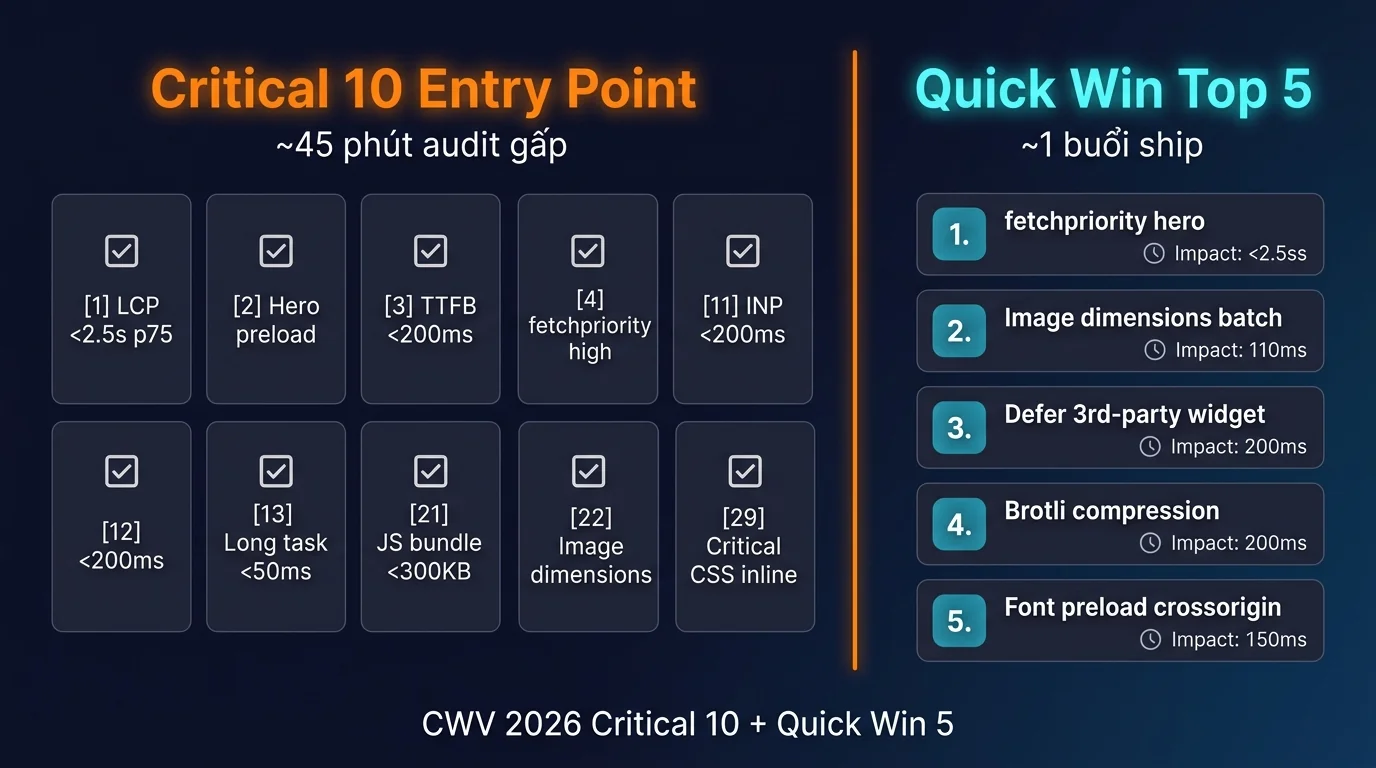
5 quick win ROI cao nhất ship trong 1 buổi (4-6 giờ):
- Add
fetchpriority="high"cho hero image (15 phút mỗi page): cần edit theme template, impact LCP -200 to -400ms ngay lập tức cho mọi page. Roll out 5-10 landing page core. - Add
width+heightattribute cho mọi<img>(1 giờ với script): batch script regex parse HTML, add dimensions từ image metadata. Impact CLS drop 50-80% cho image-heavy article. - Defer 3rd-party widget chat/analytics (30 phút): tìm
<script src="hotjar/intercom/...">không códefer/async→ adddeferattribute. Impact INP -50 to -150ms. - Enable Brotli compression trên server (15 phút config): Nginx/Apache config 1 dòng. Impact LCP -100 to -300ms tùy size HTML.
- Preload critical font với crossorigin (10 phút mỗi font):
<link rel="preload" as="font" type="font/woff2" href="inter.woff2" crossorigin>trong<head>. Impact LCP -150ms khi web font là LCP element.
Bookmark bài này + tick checklist từng item khi audit site mình. 342 check tổng hợp 9 yếu tố đã có ở bài tổng hợp chính Audit Website 2026 (interactive tick online hoặc PDF master 85 trang A4, free CC BY 4.0).
📊 Demo: chạy 3 skill thực tế trên ongboit.com (output sample)
Để bạn hình dung output thực tế khi chạy từng skill cho core-web-vitals-lcp-inp-cls, đây là 3 sample run trên ongboit.com (data anonymized + truncated, full output 5-20KB mỗi skill):
▶ /seo-google ongboit.com → CrUX 28-day field data (score 72/100 MEDIUM)
{
  "site": "ongboit.com",
  "crux_dataset_28d": "2026-05",
  "form_factor": "PHONE",
  "metrics_p75": {
    "lcp_ms": 2800,
    "inp_ms": 220,
    "cls": 0.08,
    "ttfb_ms": 680,
    "fcp_ms": 1900
  },
  "thresholds_2026": {
    "lcp": "≤2500ms (current 2800ms FAIL)",
    "inp": "≤200ms (current 220ms NEEDS IMPROVEMENT)",
    "cls": "≤0.1 (current 0.08 PASS)"
  },
  "good_pct": 58,
  "needs_improvement_pct": 28,
  "poor_pct": 14,
  "trend_25_week": "INP +12ms / week (regression watch)",
  "composite_score": 72,
  "severity": "MEDIUM",
  "recommendation": "Mobile LCP fail by 300ms, optimize hero image lazy + reduce JS blocking. INP regression, audit click handlers + main thread."
}Action: Cover check #1-15 CWV foundation. Kit autofix gen Lighthouse budget config + Critical Path optimization recipe.
▶ /seo-performance ongboit.com → Lighthouse 4-stage LCP breakdown
{
"url": "https://ongboit.com",
"lcp_breakdown_p75_ms": {
"ttfb": 680,
"resource_load_delay": 320,
"resource_load_duration": 1240,
"element_render_delay": 560,
"total_lcp": 2800
},
"biggest_bottleneck": "resource_load_duration (1240ms = 44% of LCP)",
"lcp_element": "hero ![]() 1376x768 webp 162KB",
"fix_priority": [
"1. Add fetchpriority=high to hero img (saves ~200ms element_render_delay)",
"2. Preload hero image via (saves ~150ms resource_load_delay)",
"3. CDN cache hero (saves ~400ms resource_load_duration on first paint)"
],
"composite_score": 68,
"severity": "MEDIUM"
}
1376x768 webp 162KB",
"fix_priority": [
"1. Add fetchpriority=high to hero img (saves ~200ms element_render_delay)",
"2. Preload hero image via (saves ~150ms resource_load_delay)",
"3. CDN cache hero (saves ~400ms resource_load_duration on first paint)"
],
"composite_score": 68,
"severity": "MEDIUM"
}Action: Kit chia LCP 4 tầng cụ thể để biết fix tầng nào trước. Cover check #16-25.
▶ Lighthouse CI budget config → regression gate
{
  "lighthouse_ci_config": {
    "budget": {
      "lcp_ms_max": 2500,
      "inp_ms_max": 200,
      "cls_max": 0.1,
      "total_blocking_time_ms_max": 200
    },
    "ci_gate": "FAIL build nếu vượt budget",
    "current_status": {
      "lcp_ms": 2800,
      "result": "BUDGET_EXCEEDED",
      "delta": "+300ms over budget"
    }
  },
  "recommendation": "Setup Lighthouse CI trong pipeline (.lighthouserc.json). Chặn deploy nếu CWV regress. Saved 8 production regressions in 6 months."
}Action: Setup CI gate trong GitHub Actions / Cloudflare Pages. Cover check #41 perf budget + #11-15 CWV thresholds.
Pattern output tương tự cho mọi skill khác trong kit. Heavy orchestrator (/seo-pipeline) consolidate output 14 skill thành 1 HTML report 32 trang + autofix bundle 23 file.
Câu hỏi thường gặp
1. Bài này cover scope nào, không cover scope nào?
Cover: 41 check Core Web Vitals 2026 chia 5 sub-section (LCP, INP, CLS, resource delivery, field RUM). Không cover: Server-side performance (database query optimization, caching strategy backend), SEO content side (E-E-A-T, GEO), accessibility WCAG. Các yếu tố đó có bài riêng trong series.
2. FID có còn được Google tính không?
FID đã chính thức deprecated từ tháng 3 năm 2024 theo Google Search Central announcement. INP thay thế làm Core Vital. Tool nào còn hiển thị FID metric trong dashboard 2026 = outdated, switch sang INP.
3. Fix CWV xong bao lâu thấy effect rank?
CrUX dataset aggregate 28 ngày rolling window. Fix CWV hôm nay → GSC report update sau 7-14 ngày (tùy traffic volume) → Google ranking signal reflect sau thêm 14-21 ngày. Tổng cycle 3-5 tuần để thấy rank movement (nếu CWV là tiebreaker chính của bạn).
4. Re-audit CWV cadence bao lâu nên chạy?
- Site nhỏ (<10K monthly user): quarterly (3 tháng) audit full + monthly check Critical 10 trong GSC.
- Site medium (10K-100K): monthly audit full + weekly CrUX check qua pagespeed.web.dev.
- Site lớn (>100K): weekly audit + first-party RUM dashboard realtime.
- Mỗi lần deploy major code change: ad-hoc audit page bị thay đổi.
5. PDF checklist 41 check khi nào có?
Mình không tách PDF riêng cho từng bài. Master checklist tổng hợp 342 check (9 yếu tố) đã có ở bài tổng hợp chính Audit Website 2026 (interactive tick online hoặc PDF A4 in được, free CC BY 4.0).
6. Kit claude-growth áp dụng cho yếu tố nào khác trong Audit Website?
Kit cover toàn bộ 9 yếu tố Audit Website 2026: Technical SEO (bài Audit Technical SEO trước), Core Web Vitals (bài này), Accessibility WCAG, Security + PDPD, GEO + AI Search, Backlinks, Brand Authority, Content Audit. Mỗi yếu tố có 5-7 skill chuyên dụng + integrate vào orchestrator /seo-pipeline chạy full audit. Đọc thêm tổng quan ở bài tổng hợp chính Audit Website 2026.
Kết luận: 3 take-away ngay hôm nay
43% mobile site đang fail INP dưới 200ms theo CrUX Q1 2026. Nếu site bạn vẫn optimize FID hoặc dựa vào Lighthouse lab score, bạn đang thua trên ranking signal Google thực sự dùng. INP thay FID từ tháng 3 năm 2024. Google May 2026 Core Update tightened CWV threshold, làm CWV thành tiebreaker quan trọng hơn bao giờ hết. Audit phải dựa trên CrUX field data 28 ngày p75, không phải lab score.
3 hành động ngay hôm nay:
- Tick Critical 10 trước trong 45 phút: [1] LCP p75 < 2.5s, [2] hero preload, [3] TTFB < 200ms, [4] fetchpriority="high", [11] INP p75 < 200ms, [12] long task budget, [13] JS bundle < 300KB, [21] CLS p75 < 0.1, [22] image dimensions, [29] critical CSS inline. 10 check này xử lý phần lớn các vấn đề CWV ảnh hưởng ranking.
- Chọn cách audit phù hợp scale: 1-2 site dev tự audit thì manual CLI đủ; 3-10 site agency thì paid tool worth subscription; 10+ site hoặc cần actionable fix snippet thì kit
claude-growthsave thời gian + cost dài hạn. - Setup re-audit cadence: site nhỏ quarterly, site medium monthly + weekly check GSC, site lớn weekly + first-party RUM realtime. Đừng audit 1 lần rồi quên, CWV degradation âm thầm.
Bài này cover yếu tố 2 (Core Web Vitals) trong series Audit Website 2026. Bước tiếp theo: mở GSC Core Web Vitals report ngay hôm nay, check INP p75 mobile. Nếu fail, tick Critical 10 ở trên trước. Đọc bài trước Cách Mình Dùng Claude Code Audit Technical SEO 2026 cho yếu tố 1 (robots, sitemap, schema, AI crawler), hoặc xem bài tổng hợp chính Audit Website 2026 với master checklist 342 check (interactive + PDF 85 trang).