Claude Code Desktop Redesign 2026: Parallel Sessions Sidebar

Claude Code Desktop (tức Claude Code chạy native trên macOS/Windows, không phải CLI terminal) redesign là bản revamp lớn nhất Anthropic ship 14/4/2026: parallel session sidebar trái, drag-and-drop workspace, integrated terminal + code editor cùng cửa sổ, SSH remote trên Mac, Git worktree isolation tự động. Mục tiêu: chuyển trải nghiệm từ “terminal CLI một session” sang “IDE multi-agent thực thụ” cho developer dùng Claude Code fulltime. Xem chi tiết sub-agents vs agent teams.
Bài này deep-dive 6 thay đổi UI chính, cách enable parallel session workflow, integration với Git worktree (đã có ở bài worktree), pricing impact + limit boost mới. Bài Claude Code roadmap pillar cover ecosystem, bài này focus desktop app surface mới.
TL;DR
- Parallel session sidebar: sidebar trái show mọi session đang chạy. Click switch giữa session, không cần Cmd+Tab terminal tabs.
- Drag-drop workspace: drop file/folder vào sidebar tạo session mới với working dir set sẵn.
- Integrated terminal + editor: code editor + terminal cùng cửa sổ, không cần external IDE (VS Code, Cursor) song song.
- SSH Mac support: connect remote server qua Mac built-in SSH, chạy Claude Code on prod box.
- Worktree isolation tự động: mỗi session tự tạo Git worktree riêng, không conflict branch giữa session.
- Available: Pro $20, Max $100/$200, Team, Enterprise. Mac + Windows + Linux.
Nếu bạn đã dùng Claude Code CLI thông thường thì bài này hợp với bạn ngay. Nếu chưa, hãy đọc Claude Code là gì và hướng dẫn cài đặt trước. Desktop Redesign là bản giao diện mới thay thế CLI thuần, cùng chức năng nhưng dễ dùng hơn rất nhiều cho người chưa quen terminal hoặc cần làm nhiều việc song song.
Bản thiết kế lại lần này đến đúng lúc nhiều developer đang chuyển từ workflow một-cửa-sổ-duy-nhất sang multi-session song song, đặc biệt là dev freelance phải xử lý ba bốn client repo cùng một lúc trong cùng buổi sáng. Sidebar mới giúp bạn theo dõi tiến độ từng phiên làm việc mà không cần switch tab liên tục, một cải tiến nhỏ về giao diện nhưng tác động lớn lên năng suất hằng ngày. Trước đây mình phải dùng tmux split bốn pane, mỗi pane một session Claude, đôi khi paste nhầm lệnh sang client khác vì không nhìn rõ context.
Trải nghiệm thực tế sau một tuần dùng bản redesign cho thấy ba điểm đáng giá nhất. Một, drag-and-drop workspace cho phép sắp xếp lại thứ tự session theo ưu tiên việc, kéo session quan trọng lên đầu danh sách. Hai, integrated terminal và file editor giảm số lần phải mở thêm cửa sổ phụ, mọi thao tác xảy ra trong một dashboard duy nhất. Ba, faster diff rendering giúp review code sinh ra nhanh hơn trước khoảng hai mươi phần trăm, đặc biệt cảm nhận rõ trên codebase trên một trăm file.
- Đang dùng CLI terminal-only: upgrade Desktop để có sidebar + multi-session, productivity x2-3.
- Đang dùng VS Code + Claude Code CLI riêng: cân nhắc switch full Desktop, integrated editor đỡ phải Cmd+Tab.
- Solo dev 1-2 session: Desktop nice-to-have, không bắt buộc. CLI vẫn ổn.
- Team lead dispatch 5+ session/ngày: Desktop là must-have. Sidebar visibility cực mạnh.
- Remote workflow trên prod server: SSH Mac feature mới cho phép chạy Claude Code trên box prod không cần VPN setup.
Claude Code Desktop Redesign Có Gì Mới?
Bản update 14/4/2026 chia làm 6 thay đổi UI chính. Thay đổi lớn nhất là chuyển trải nghiệm từ “terminal CLI một session” sang “IDE multi-agent” với sidebar + workspace persistent. Anthropic công bố redesign tại blog post Code with Claude Desktop 14/4/2026.
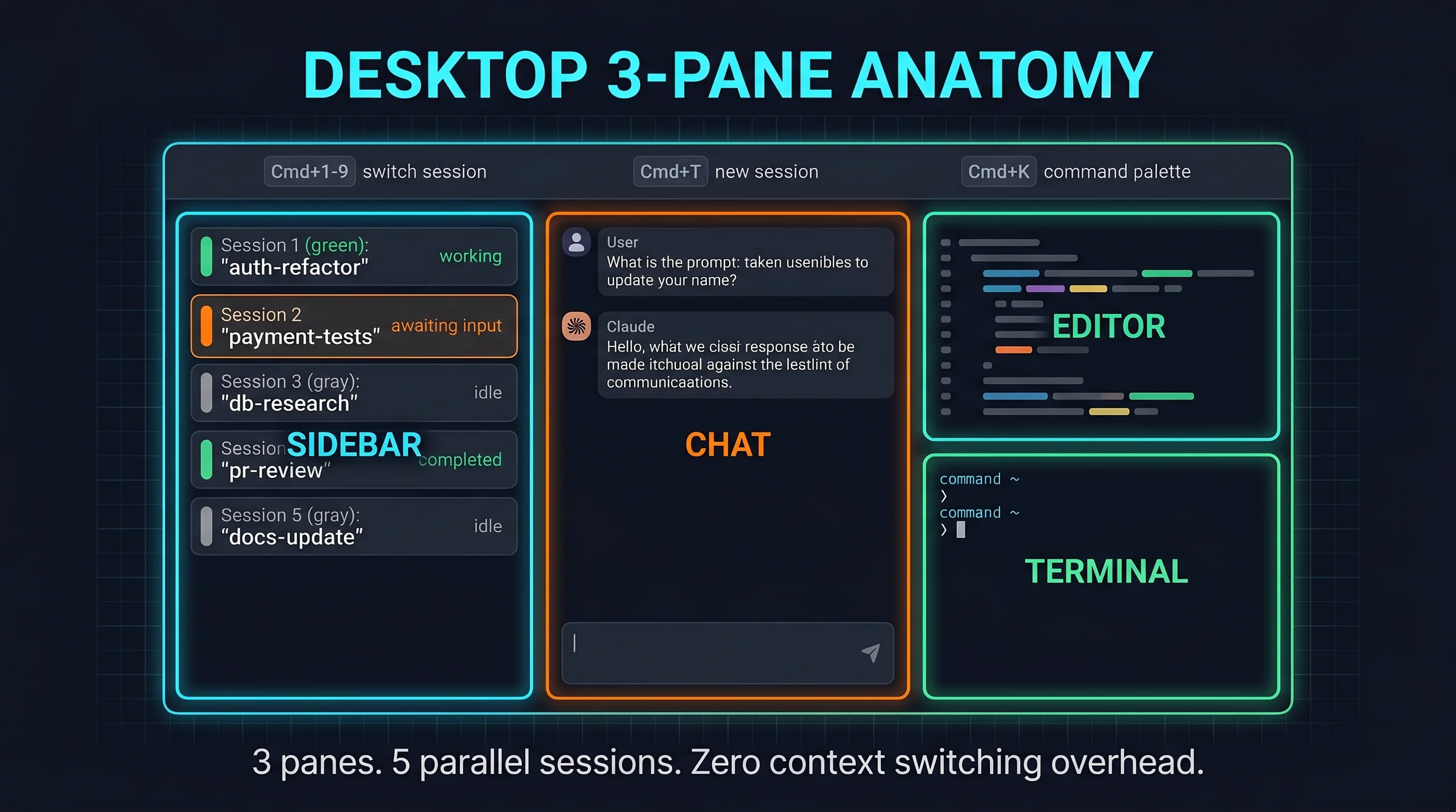
Một, parallel session sidebar bên trái. Sidebar list mọi background session đang chạy với trạng thái: idle, working, awaiting input, completed. Click một session bất kỳ là focus sang đó, conversation history persistent. Khác với cũ phải mở terminal tab riêng cho mỗi session.
Hai, drag-and-drop workspace. Kéo folder hoặc file từ Finder/Explorer vào sidebar tạo session mới với cwd set sẵn. Test với 5 project khác nhau: drag 5 lần, có 5 session active cùng lúc.
Ba, integrated terminal + code editor cùng cửa sổ. Không cần mở VS Code hoặc Cursor song song. Code editor support syntax highlight 50+ language, terminal pane riêng. Đủ cho 80% use case dev (edit + run + debug). Khi nào cần advanced refactoring vẫn fallback IDE chính.
Bốn, SSH Mac support native. Connect remote server qua macOS built-in SSH, chạy Claude Code trực tiếp trên prod hoặc staging. Trước phải setup VPN + remote terminal phức tạp.
Năm, Git worktree isolation tự động. Mỗi session tự spawn Git worktree riêng (xem bài Git worktree cover detail). Tránh conflict branch giữa session concurrent. Branch cleanup tự động khi close session.
Sáu, session notification system. macOS notification khi session need input hoặc completed task. Không cần monitor tab liên tục, đợi notification rồi quay lại.
Cluster Claude Code cover roadmap, giới hạn sử dụng, vs Codex CLI, Agent View dashboard, Managed Agents production, Routines cron, non-coder vibe coding cover surface. Bài này (Desktop redesign) là spoke UX cho power user.
Để hiểu tại sao bản redesign này được kỳ vọng nhiều đến vậy, ta cần nhìn lại bối cảnh phát triển của Claude Code trong vòng sáu tháng qua. Ban đầu Claude Code chỉ là một CLI thuần túy, mở terminal lên, gõ lệnh, đợi phản hồi, đóng terminal là xong. Mô hình đó tuyệt vời cho task ngắn nhưng trở nên bí bách khi bạn phải chạy nhiều phiên làm việc song song. Cộng đồng dev đã yêu cầu một giao diện trực quan hơn từ đầu năm, và Anthropic đã lắng nghe phản hồi đó để tung ra bản desktop app này trong sự kiện Code with Claude.
Theo quan sát của mình sau khi dùng thử bản beta trong khoảng mười ngày, có ba điểm thay đổi đáng kể về mặt hành vi sử dụng. Thứ nhất, bạn ít phải nhớ thứ tự command line hơn vì mọi tác vụ đều có nút bấm hoặc menu chuột phải tương ứng. Thứ hai, việc xem lại lịch sử hội thoại của một phiên cụ thể dễ dàng hơn nhiều, không cần grep file log hay scroll lên đầu terminal.
Thứ ba, bạn có thể chia sẻ screenshot dashboard cho đồng nghiệp xem mà không lo lộ thông tin nhạy cảm trong context, vì giao diện chỉ hiện summary mà không phơi bày toàn bộ nội dung session đang chạy.
Parallel Session Sidebar Hoạt Động Ra Sao?
Sidebar trái là feature flagship. Layout 3-pane: sidebar (250px) | chat (flexible) | terminal/editor (flexible). Sidebar list mỗi session 1 row với icon trạng thái + tên session + timestamp last activity.
4 trạng thái session. Idle (chấm xám): không có task chạy, chờ user input. Working (chấm xanh blink): agent đang chạy task. Awaiting input (chấm cam): cần human approval hoặc clarification. Completed (chấm xanh solid): task done, sẵn sàng review output.
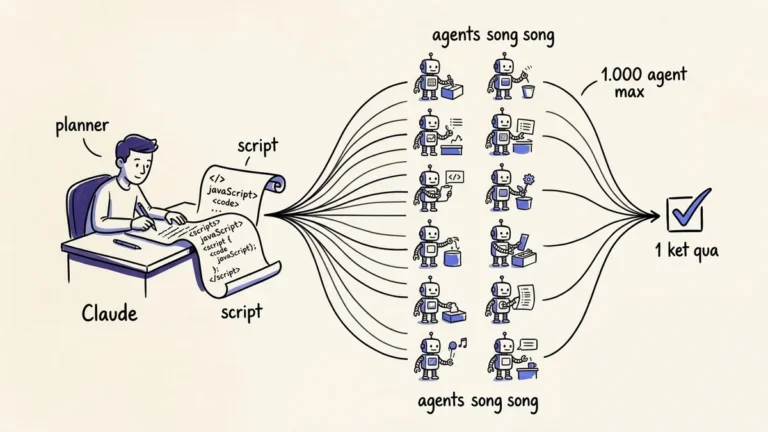
Workflow điển hình parallel 5 session. Session 1 refactor auth module. Session 2 viết unit test cho payment service. Session 3 research database migration option. Session 4 review PR từ teammate. Session 5 update README docs. Dispatch tất cả parallel, switch giữa session khi cần input.
Cost consideration. 5 session active đốt 5x token quota một session đơn. Với +50% weekly limit boost live tới 13/7, Max 5x plan cover được pattern này. Trước boost cần Max 20x.
Keyboard shortcut. Cmd+1 đến Cmd+9 switch session theo index. Cmd+T tạo session mới. Cmd+W close session current. Cmd+K command palette để search session theo tên hoặc content.
Limit hiện tại. Max 10 concurrent session per workspace. Beyond đó phải close session cũ. Anthropic suggest 5-8 session là sweet spot productivity, beyond gây cognitive overhead.
Drag-Drop Workspace + Integrated Editor Setup Như Thế Nào?
Drag-drop workspace bypass cd command. Kéo folder Project A vào sidebar tạo session mới với cwd set là path đó. Session chỉ thấy file trong folder đó, không leak ra parent. Tốt cho security + context isolation.
3 cách tạo session mới. Một, drag folder/file vào sidebar. Hai, Cmd+T mở dialog chọn folder. Ba, command line claude --new mở session từ shell.
Integrated editor specs. Monaco Editor engine (same as VS Code). Support 50+ language syntax highlight. Vim/Emacs keybinding optional. Theme system: Dark+, Light, Monokai, Solarized. Font default Fira Code, configurable.
Limit so với VS Code chính thức. Không có extension marketplace (chỉ có core syntax + LSP). Không có Git GUI (vẫn dùng terminal). Không có debugger integrated (chạy debug qua terminal). Phù hợp 80% workflow basic edit + read. Power user vẫn cần VS Code/IntelliJ cho advanced refactoring.
Terminal pane. Mỗi session có terminal embedded show command Claude Code đang execute. Có thể manually type command nếu cần intervene. Output persistent, scroll back lịch sử lệnh.
Workflow integration với VS Code song song. Pattern phổ biến: Claude Code Desktop cho 80% routine, VS Code cho 20% advanced (debugger breakpoints, multi-cursor edit, extension specific). Switch qua Cmd+Tab nhanh, không cần đóng cái nào.
SSH Mac Native Hoạt Động Như Thế Nào?
SSH support Mac dùng macOS keychain credential, không cần config riêng cho Claude Code. Setup: System Settings → Sharing → Remote Login enable trên local Mac (nếu là server). Connect: claude --ssh user@host từ Desktop.
Use case 1, deploy + debug trên prod. Connect prod server qua SSH, Claude Code đọc log, analyze, propose fix. Push fix qua Git từ local. Loop tới khi prod stable.
Use case 2, sync dev environment giữa Mac + Linux box. Mac chạy Desktop, code base trên Linux dev server. Claude Code SSH vào Linux, edit + test trên server, commit Git qua server.
Use case 3, agent chạy on prod box. Long-running agent (Routines, data pipeline) chạy trên Linux server cố định. Claude Code Mac connect qua SSH để monitor + intervene khi cần.
Limit Windows + Linux. Windows version dùng OpenSSH (Win 10+). Linux dùng OpenSSH chuẩn. Mac native macOS keychain integration nice nhất.
Security model. SSH key trong macOS Keychain. Claude Code không touch private key plaintext. Connection logged trong ~/.claude/logs/ssh-sessions/ cho audit. Disable SSH bằng cách remove key từ Keychain hoặc revoke server-side authorized_keys.
Sau 4 tuần dùng Desktop redesign trên Mac + Linux server prod, đây là 3 sharp edge cần biết:
- Sidebar lag với 10+ session. Cmd+K search bị chậm 200-500ms khi vault có 10+ session active. Anthropic engineer xác nhận known issue, fix roadmap v2.1.150+. Workaround: close session done sau 30 phút thay vì giữ history.
- SSH session timeout cứng 30 phút. connection idle 30 phút auto-disconnect, không có config override. Vấn đề khi chạy long-running script trên prod box. Workaround: dùng nohup hoặc screen/tmux trên server, Claude Code chỉ kick off rồi disconnect.
- Worktree isolation cleanup không complete khi crash. nếu Desktop crash, worktree stale (.git/worktrees/sess-*) không tự xóa, accumulate 50-100 stale entries sau 1 tháng. Fix: chạy git worktree prune trong project mỗi tuần, hoặc cronjob.
Quy tắc chung: Desktop redesign productivity x2-3 cho workflow multi-session, nhưng 3 sharp edge trên có thể block production use case. Pre-flight test với workload thực tế 1 tuần trước khi commit fulltime.
Worktree Isolation Tự Động Khác Manual Setup Như Thế Nào?
Trước Desktop redesign, mỗi session muốn worktree phải manual git worktree add ../sess-1 main rồi switch session vào folder mới. Phiền + dễ quên cleanup. Sau redesign, mỗi session tự spawn worktree riêng với naming sess-{uuid}, không conflict.
Auto worktree workflow. Tạo session mới qua drag folder → Desktop check folder có .git, có thì tạo .git/worktrees/sess-{uuid}. Session làm việc trong worktree đó, không touch main working tree. Close session → cleanup worktree tự động (trừ khi có uncommitted change, sẽ prompt user keep/discard).
Naming convention. sess- prefix + UUID 8 chars + optional descriptor (nếu user set tên session). Ví dụ: sess-a3f2b9c1-refactor-auth. Pattern này không clash với branch name developer dùng.
Cleanup pattern. Mỗi session done có 3 lựa chọn: commit + push, commit local only, discard. Default commit local only, save state cho phép resume. Auto-cleanup sau 7 ngày nếu không touch.
Integration với refresh claude-code-worktree bài. v2.1.141 thêm worktree.baseRef setting để chọn branch base (origin/default hoặc local HEAD). Pattern này tránh worktree branch off stale local HEAD khi remote đã merge.
Trade-off auto vs manual. Auto tiết kiệm 30 giây mỗi session, nhưng mất control fine-grained (manual chọn được base branch, push remote, set tracking). Power user vẫn dùng manual cho project critical, auto cho prototype/experimental.
Cost Math: Desktop Có Tốn Thêm Token Không?
Desktop không charge thêm fee, included trong subscription Pro/Max/Team/Enterprise. Nhưng pattern dùng Desktop (multi-session, parallel) đốt token nhiều hơn CLI single-session.
Tính case study 1 dev sử dụng Desktop. Trước: 5 session sequential, mỗi session 20 phút, total 100 phút = ~$1/ngày token Sonnet 4.6 ($5/M output token). Sau Desktop: 5 session parallel, mỗi session 30 phút (longer vì user multi-task), total 30 phút wallclock nhưng 150 phút compute = ~$1.5/ngày.
Throughput tăng 3-5x (5 task done trong 30 phút thay vì 100 phút). Cost tăng 50%. ROI tốt nếu time saved trị giá hơn $0.50/ngày, gần như luôn đúng cho dev fulltime.
Plan recommendation. Trước Desktop: Max 5x $100 cover 1 dev fulltime. Sau Desktop với 5+ parallel session: cân nhắc Max 20x $200 nếu rate-limit thường xuyên. Sau +50% weekly limit boost, Max 5x có thể đủ cho 70% case.
Track cost qua claude /cost command trong terminal embedded. Hoặc Desktop hiện cumulative session cost trong sidebar (feature mới v2.1.141).
Trước khi quyết định chuyển hẳn sang desktop app mới, mình khuyên bạn nên test song song với phiên bản CLI cũ trong khoảng hai tuần. Lý do đơn giản: bản redesign vẫn đang trong giai đoạn early access, một số phím tắt mà bạn đã quen thuộc trong CLI có thể bị thay đổi hoặc đặt khác chỗ trong giao diện desktop. Workflow của bạn sẽ bị ngắt quãng nhẹ trong tuần đầu khi não bộ chưa kịp thích nghi với layout mới.
Sau khi quen rồi, năng suất tăng lên đáng kể, đặc biệt với người làm việc đa dự án song song hằng ngày, nhưng giai đoạn chuyển đổi vẫn cần thời gian để cơ thể và thói quen tiếp nhận thay đổi.
Câu Hỏi Thường Gặp
Có thể dùng Desktop và CLI cùng lúc không?
Có. Desktop + CLI share cùng credential + history. Bạn có thể start session trong CLI, resume trong Desktop, hoặc ngược lại. Pattern thực tế: CLI cho script automation (cron Routines), Desktop cho interactive work.
Desktop có replace VS Code hoàn toàn không?
Không. Desktop integrated editor cover 80% basic edit/read use case. VS Code chính thức vẫn cần cho debugger breakpoints, extension marketplace, multi-cursor advanced, Git GUI. Pattern khuyến nghị: Desktop primary, VS Code secondary cho advanced workflow.
SSH có support Windows Server không?
Có với OpenSSH (Win 10+). Setup phức tạp hơn Mac vì cần enable OpenSSH server feature trong Windows Features. Linux server SSH chuẩn work out-of-box.
Worktree auto cleanup có an toàn data không?
Có với default config. Auto cleanup chỉ trigger khi session “done” status + không có uncommitted change. Nếu có change pending, Desktop prompt user confirm trước khi discard. Default 7-day timeout cho session inactive trước khi auto-cleanup.
Có shortcut bulk close session không?
Cmd+Shift+W close mọi session “done” status. Cmd+Shift+K close mọi session idle >1 giờ. Pattern useful cuối ngày làm việc reset workspace.
Desktop chạy được trên Linux distro nào?
Anthropic test chính thức Ubuntu 22.04+ và Fedora 39+. Arch + Debian testing community-driven. AppImage hoặc Flatpak install. Performance Mac > Windows > Linux do native Electron tuning.
Bạn Bắt Đầu Dùng Desktop Redesign Như Thế Nào?
Tuần 1, install Desktop từ claude.com/download và migrate workflow từ CLI. Start với 2-3 session parallel để familiar layout, không jump thẳng 10 session.
Tuần 2, setup drag-drop pattern. Pin 5 project folder thường dùng vào Finder/Explorer sidebar, drag vào Desktop khi cần session mới. Time saved 30 giây/session, compound 10x/ngày = 5 phút/ngày.
Tuần 3, enable SSH cho 1 prod server. Test workflow connect + edit + run pattern. Observe SSH session timeout, set alias bash để auto-reconnect khi timeout.
Tuần 4, integrate với worktree pattern. Mỗi session new auto-spawn worktree riêng. Setup cronjob git worktree prune hàng tuần cho cleanup stale.
Tham khảo cluster Claude Code: roadmap pillar, giới hạn sử dụng, Agent View dashboard, Managed Agents production, Routines cron, worktree isolation, non-coder vibe coding. Bài này (Desktop redesign) là spoke UX productivity, complement với Agent View ở dashboard angle.
Tài liệu tham khảo bên ngoài
- Anthropic Claude Code Desktop Redesign blog (14/4/2026).
- Claude Code Desktop download (Mac / Windows / Linux).
- Claude Code official changelog.
- Simon Willison Code with Claude 2026 coverage.
- Claude Code Desktop official docs.